Loading/Removing a Memory Card
8
charged normally, replace it with a battery
of the same type.
• Do not strike, throw or cause any kind of
violent shock to the battery, otherwise liq-
uid leakage, body damage, overheating,
explosion or fire may occur.
• Charge the battery by using the charger
supplied with your phone.
Charging with a Cable Charger
Before charging the battery with a cable charger,
ensure that the battery has been properly loaded into
your phone.
To charge the battery, do as follows:
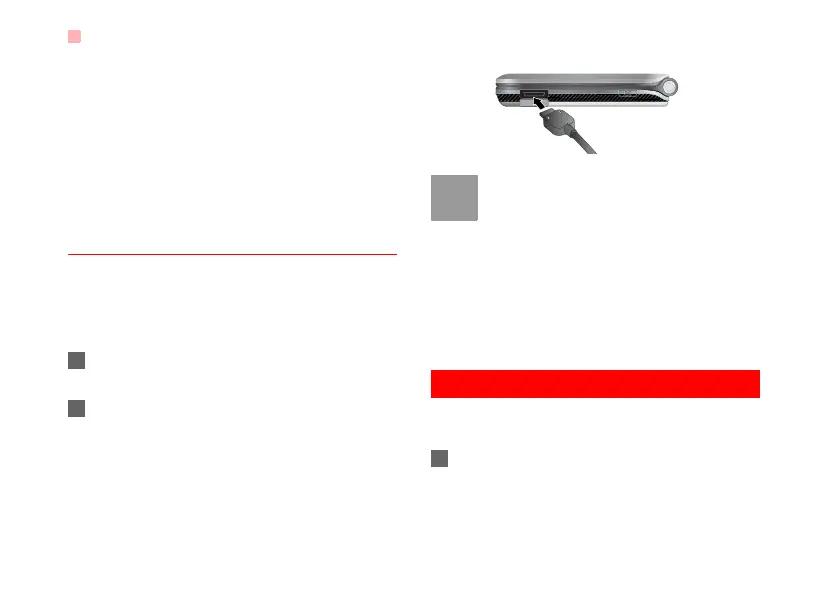
1 Insert the plug of the charger into the connector
of the phone as shown in the following figure.
2 Plug in the connector of the charger to a power
socket.
Note
• When the battery power level is very low,
the phone makes alert sounds and dis-
plays a prompt. When the battery power
level is too low, the phone will power off
automatically.
• When the battery is being charged, the
charging indicator blinks continuously.
When the charging indicator stops blink-
ing, it indicates that the battery is full.
Loading/Removing a Memory Card
The phone supports a memory card (micro-SD) with
a capacity up to 2 GB.
1 Insert the memory card into the slot, as shown in
the following figure.
U5700.book Page 8 Tuesday, September 4, 2007 11:48 AM



 To Next Page