Powering On/Off
9
Getting Started
2
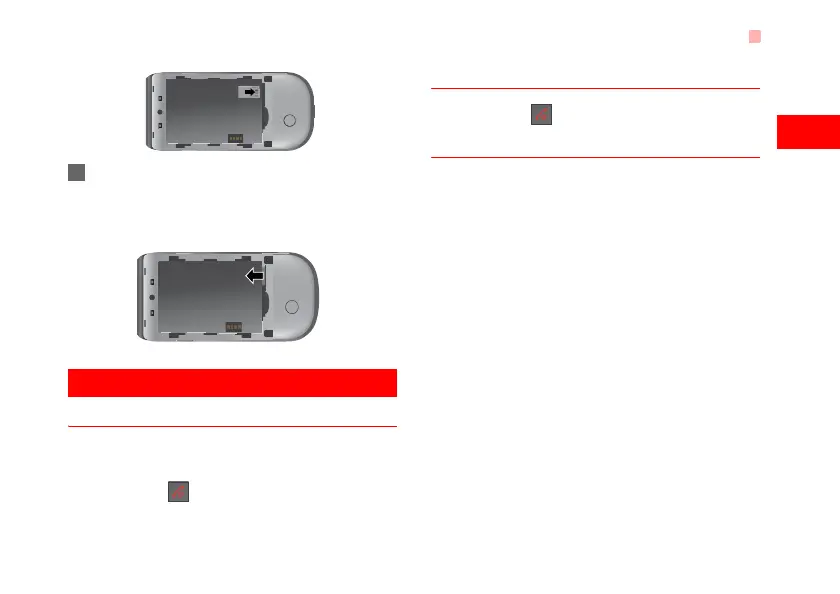
2 To remove a memory card, press the memory
card gently. Now the memory card will pop up
automatically. Then take it out as shown in the
following figure.
Powering On/Off
Powering On
Ensure that the SIM card is in your phone and that
the battery has been charged.
Press and hold to power on your phone.
Powering Off
Press and hold to power off your phone.
Access Codes
If you have set the phone password and the PIN is
ON, you have to enter the corresponding access
codes when you power on your phone. For setting
and changing the access codes, please refer to "Set-
tings/Security Setup" on page 50.
◆ Phone Password
The phone password is used to protect your phone
from unauthorized use. The phone password is
preset as 0000 for your phone.
◆ PIN
The personal identification number (PIN) code is
used to protect your SIM card from unauthorized use.
The PIN code is usually provided when you get the
SIM card from your service provider. If you have not
received a PIN code or if you have forgotten it, con-
tact your service provider.
U5700.book Page 9 Tuesday, September 4, 2007 11:48 AM



 To Next Page