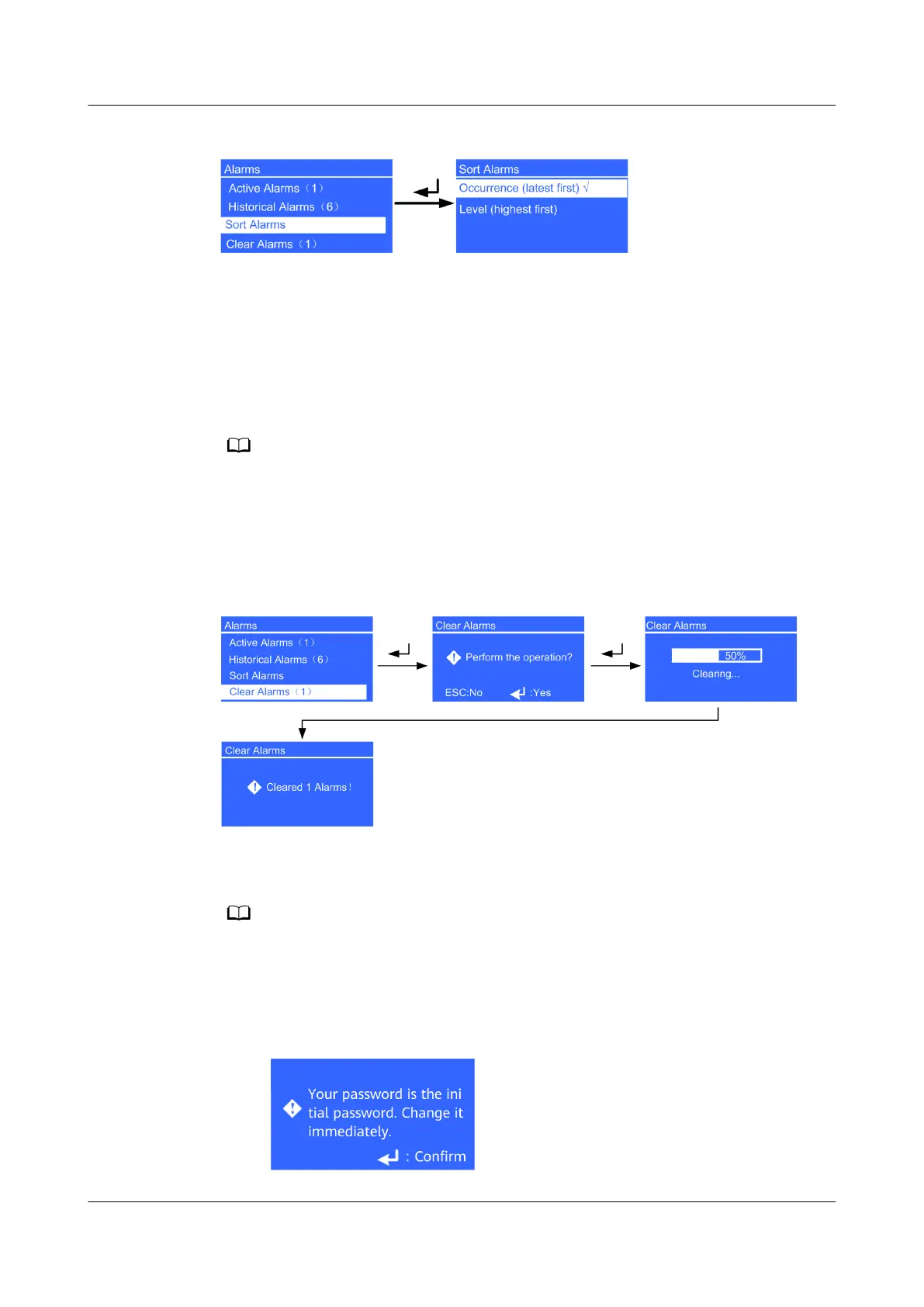
Figure 4-20 Sort Alarms screen
● Occurrence (latest rst) parameter
Alarms are sorted by occurrence time. The latest alarms are listed rst.
● Level (highest rst) parameter
Active alarms are displayed by severity. The most critical alarms are listed
rst.
√ is displayed next to a selected Sort Alarms.
Clear Alarms Screen
Clear the alarms that you can clear manually, as shown in Figure 4-21.
Figure 4-21 Clear Alarms screen
4.6.3 Settings Screen
● To ensure system security, change the LCD and WebUI passwords after the rst login.
● The UPS2000-G-15KRTL-01/UPS2000-G-20KRTL-01 prompts users to change the initial
password. If an incorrect password is entered ve consecutive times, the account will be
logged out for 5 minutes.
Figure 4-22 Password change reminder
UPS2000-G- (6 kVA-20 kVA)
User Manual 4 Control Panel
Issue 18 (2021-07-16) Copyright © Huawei Technologies Co., Ltd. 56


 To Next Page
 Loading...