UPS2000-(6 kVA-20 kVA)
Modbus Protocol Development Guide
Huawei Proprietary and Confidential
Copyright © Huawei Technologies Co., Ltd.
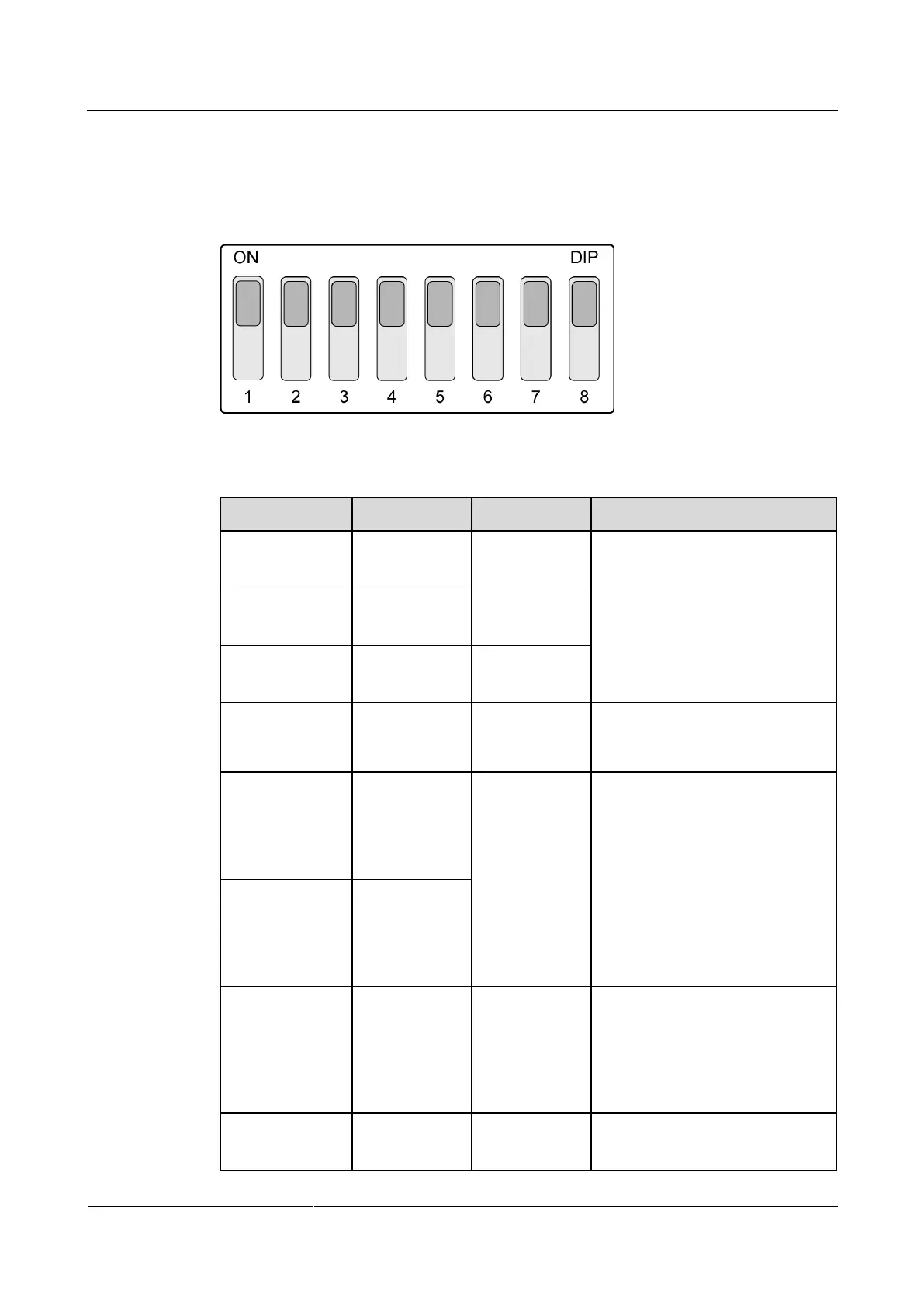
Set toggle 4 to ON, as shown in Figure 1-3. This indicates that the Modbus protocol is
enabled. If both toggles 5 and 6 are set to ON, it indicates a two-wire system. If both of them
are set to OFF, it indicates a four-wire system.
Figure 1-3 Functional DIP switch S1
Table 1-2 Description of the functional DIP switch S1
Toggle switches 1, 2, and 3 are
used together to set a 3-bit baud
rate.
Currently, the software version
supports only a baud rate of 9600
bits/s (in this case, toggle switches
1, 2, and 3 are ON).
RS485
protocol toggle
switch
Toggle switch
for selecting a
two-wire or
four-wire
system
ON: two-wire
system
OFF: four-wire
system
Toggle switches 5 and 6 must be
both ON or both OFF.
Toggle switch
for selecting a
two-wire or
four-wire
system
Control area
network
(CAN)
build-out
resistor toggle
switch







 To Next Page