UPS2000-(6 kVA-20 kVA)
Modbus Protocol Development Guide
Huawei Proprietary and Confidential
Copyright © Huawei Technologies Co., Ltd.
If the RS485 build-out resistor toggle switch is set to ON, it indicates that there is a build-out resistor.
Set the toggle switch as required.
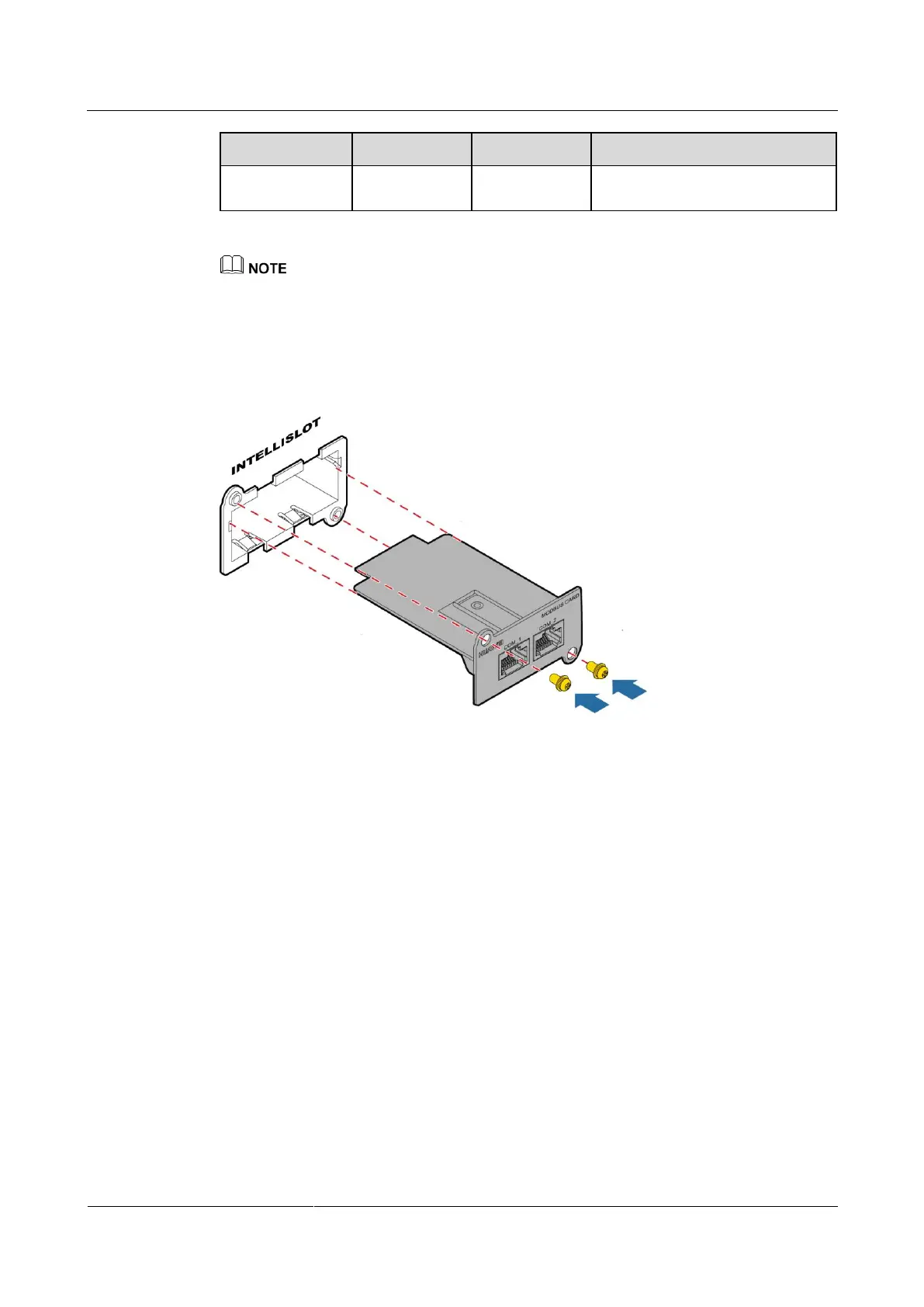
Step 3 Insert the Modbus card into the extended card slot of the UPS, and tighten the screws, as
shown in Figure 1-4.
Figure 1-4 Inserting the Modbus card into the optional card slot
Step 4 Set up a network, as shown in Figure 1-5.
1. Connect the COM_1 port (the COM_2 port is used for cascading) on the Modbus card to
the RS485 port on the RS232-RS485 adapter over a network cable (a shielded twisted
pair is recommended) that meets pin sequence requirements.
2. Connect the RS232 port on the RS232-RS485 adapter to the RS232 port on the PC over
a network cable (a shielded twisted pair is recommended) that meets pin sequence
requirements.
Connecting cables for the Modbus card.







 To Next Page