3
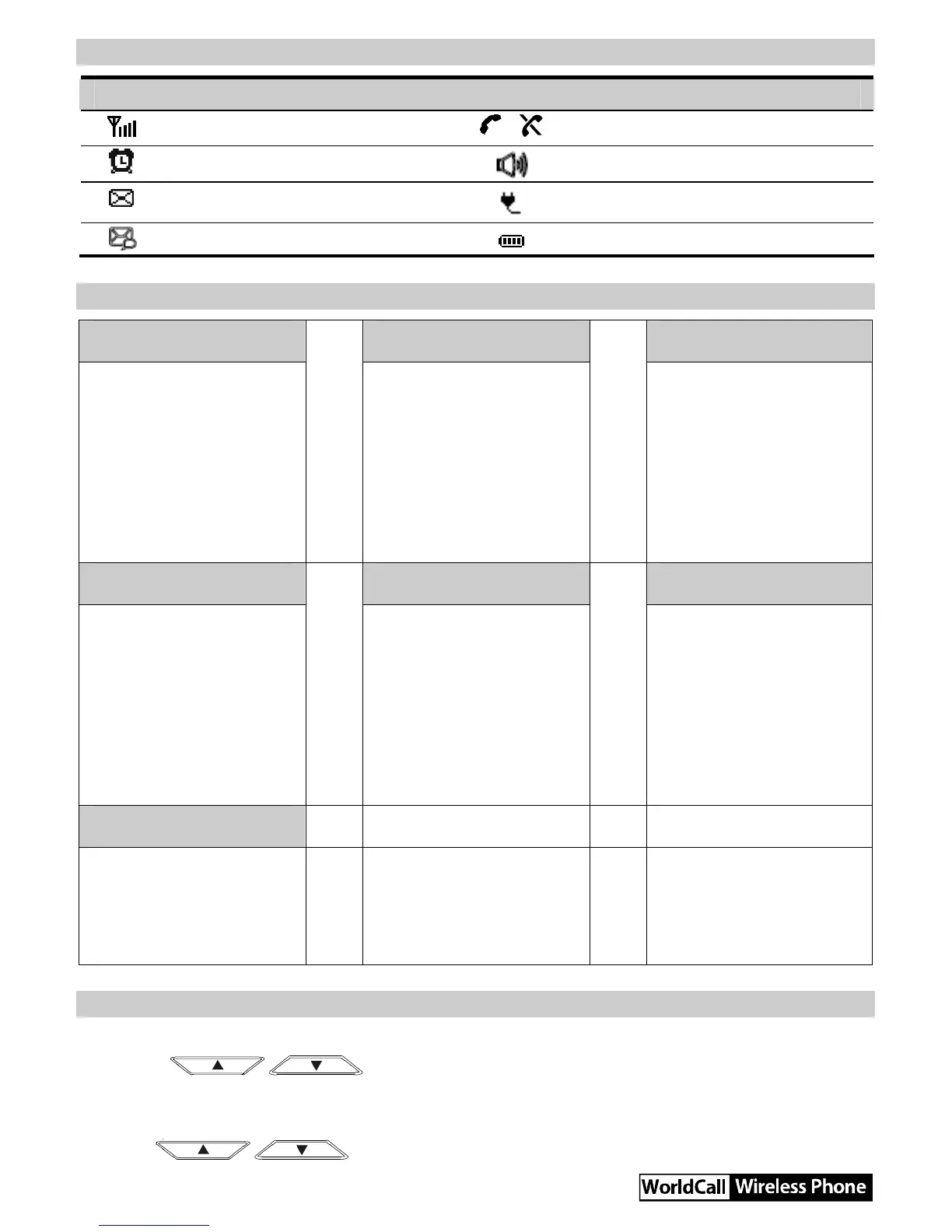
Screen Icons
Icon Description Icon Description
Network signal strength
/
Calling / No service
Alarm clock is on
Hands-free mode
Message received
Powered by the power adapter
Voice message received
Battery power level
Menu Tree
Phone Book Messages CallHistory
1. Search
2. Add New
3. Groups
4. Speed Dial
5. Delete All
6. My Phone Num
7. Memory Status
1. Write Message
2. Inbox
3. Outbox
4. Draft
5. Voice Mail
6. Message Settings
7. Delete All
1. Missed Calls
2. Received Calls
3. Dialed Calls
4. Call Duration
5. Delete All
Recorder Fun&Utility Profiles
1. Guest
Announcements
2. Recorder Settings
1. Alarm
2. Schedule
3. Calculator
4. Stopwatch
5. World Clock
6. Line Game
7. Smash Game
1. General
2. Outdoor
3. Quiet
Settings
1. Display
2. Call Settings
3. Phone Settings
4. Security
Using the Menu
1. In standby mode, press Left soft key to display the main menu.
2. Press / to select a menu item.
3. Press Left soft key to display submenu.
4. Access the submenu in either of the ways:
y Press / to scroll to a submenu item and press Left soft key to access it.



 To Next Page