1.2 Aircraft Battery
1.2.1 Aircraft Battery Charging
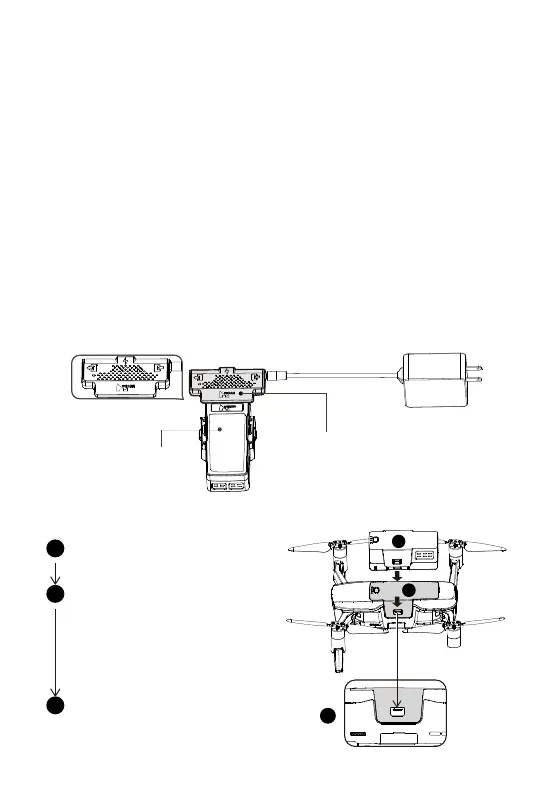
1.2.2 Aircraft Battery Installation
Take a fully charged battery
Insert the battery into battery
compartment, while pressing the
left and right edges of the
battery (As shown in illustration)
push in, until the battery buckles
are fully locked. You should hear
buckle locking sound
Battery and aircraft top
should be flush that confirms
battery is in place.
Aircraft Lithium Battery Capacity: 3800mAh, 11.4V lithium 3S intelligent
battery equipped with a standard charger, charging time is about 2.5 hours.
① Connect the power adapter to AC power (100V-240V, 50-60Hz), insert the
adapter's DC head into the DC female port marked "IN" on the smart
charging module.
② Connect the Intelligent Battery and the intelligent charging module with
Intelligent Battery. Make sure the battery is turned off.
③ Intelligent Battery Level indicator will flash and indicate the current battery
level under charging.
④ Intelligent Battery is fully charged when power indicator lights are all off.
Please remove the Intelligent Battery and power adapter.
⑤Please make sure to charge the battery at an ambient temperature
between 0-40°C.
Note: After using the battery, please recharge it in time (at least to 60%) to
maintain a good battery life.
3
Intelligent Battery
IN
OUT
Intelligent Charger Head
1
2
3
1
2
3


 To Next Page