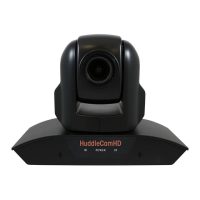
This document describes the HuddleCamHD 10XA with Audio, a USB 2.0 PTZ (Pan-Tilt-Zoom) camera featuring a built-in microphone array. This camera is designed for various applications, including video conferencing, live streaming, and recording, offering both video and audio capture capabilities.
Function Description
The HuddleCamHD 10XA is primarily a video conferencing camera that connects to a PC via a USB 2.0 interface. It provides high-definition video output and integrates a dual microphone array for audio input. The camera's PTZ functionality allows users to remotely control its pan, tilt, and zoom movements, enabling dynamic framing and coverage of a meeting space or presentation area.
The camera's optical zoom capability allows for clear magnification of subjects, making it suitable for larger rooms or situations where detailed views are required. The integrated microphone array captures audio from the environment, eliminating the need for separate microphones in many setups. This combination of video and audio in a single device simplifies installation and reduces cable clutter.
The camera supports various communication protocols for serial control, including VISCA and PELCO-D, which can be configured via dip-switches on the bottom of the unit. This allows for integration with different control systems and software. The virtual COM port functionality enables software-based control of the camera's PTZ and other settings.
Usage Features
The HuddleCamHD 10XA is designed for ease of use and flexibility.
- Connectivity: It connects to a PC using a standard USB 2.0 A-A cable, functioning as a UVC (USB Video Class) device for video and a UAC (USB Audio Class) device for audio. While designed for USB 2.0, it can also function in USB 3.0 ports as a USB 2.0 device. The camera also includes an IR receiver for remote control.
- Remote Control: The included IR remote controller provides comprehensive control over the camera's functions. Users can pan, tilt, and zoom the camera, set and recall up to 64 preset positions, and adjust various image settings. The remote also allows for selecting which camera to control if multiple HuddleCamHD units are present.
- PTZ Control: The pan and tilt movements are smooth and precise, allowing users to adjust the camera's view to focus on different participants or areas. The optical zoom ensures that subjects remain clear even when magnified. The camera features a "Home" position for quick resetting of the camera's view.
- Preset Positions: The ability to save and recall multiple preset positions is a significant feature, allowing users to quickly switch between different views without manual adjustment. This is particularly useful in dynamic meeting environments or for presentations.
- Audio Input: The built-in dual microphone array captures audio, making it a complete solution for video conferencing. The microphone array is designed to pick up sound from a wide range, ensuring that participants' voices are clearly heard.
- Image Settings: Users can adjust various image parameters through the OSD (On-Screen Display) menu, including backlight compensation, saturation, sharpness, noise reduction, white balance, red gain, blue gain, auto exposure, shutter speed, iris, and brightness. These settings allow for optimization of the video quality based on lighting conditions and user preferences.
- Mounting Options: The camera can be placed on a desktop or mounted using a tripod. The bottom of the camera includes a 1/4-20 bolt thread for compatibility with standard tripods and mounting solutions.
- Dip-Switch Configuration: The dip-switches on the bottom of the camera allow for advanced configuration of serial communication settings, such as baud rate and communication protocol (VISCA or PELCO-D), as well as the IR remote address. This enables customization for specific control setups.
- OSD Menu: The OSD menu provides access to detailed settings for the camera's dome movement (pan speed, tilt speed, scan speed, tour path, tour dwell, proportion, auto rev, frame, preset freeze, POS comeback) and lens adjustments (backlight, saturation, sharpness, noise reduction, white balance, red gain, blue gain, auto exposure, shutter, iris, bright).
Maintenance Features
Maintaining the HuddleCamHD 10XA is straightforward, focusing on ensuring optimal performance and longevity.
- Cleaning: The manual advises against using active chemicals or corrosive detergents for cleaning the camera. For the lens, it recommends using a blower to remove dust or dirt, which helps prevent scratches and maintains image clarity.
- Handling and Installation: Users are cautioned to handle the camera with care during transportation, storage, and installation to prevent damage to the case, ports, lens, or tilt mechanism. Avoiding stress, violent vibration, or liquid intrusion is crucial.
- Environmental Considerations: The camera should be kept away from strong electromagnetic sources and not aimed at bright light sources for extended periods, as this can cause damage.
- Troubleshooting: The manual includes a troubleshooting section to help users diagnose and resolve common issues, such as power problems, USB connectivity issues, PTZ malfunctions, and remote control non-responsiveness. This empowers users to address minor problems independently.
- Professional Repair: For more complex issues or after long-term operation where moving components may wear down, users are advised to contact an authorized HuddleCamHD dealer for repair, rather than attempting to disassemble the camera themselves. This ensures that repairs are performed correctly and maintains the warranty.
- USB Connectivity Best Practices: The manual provides important notes regarding USB connectivity, recommending direct connection to a PC's USB port, avoiding external USB hubs for reliable HD video, and ensuring USB extension systems are fully compatible and externally powered if needed. It also advises turning off USB power saving settings in the operating system for stable camera connectivity.
- Firmware Updates: While not explicitly detailed as a user-maintenance feature, the nature of USB devices often allows for firmware updates to improve performance or add features, which would typically be provided by the manufacturer.
- Warranty: The device comes with a 2-year parts and labor warranty, providing assurance and support for potential manufacturing defects or failures within that period.


 To Next Page
 Camera & Lens