
 Need help?
Do you have a question about the Hudl FOCUS FLEX and is the answer not in the manual?
Download the Hudl Focus app from the App Store or Google Play Store.
Press the power button on the back of the device to turn it on.
Use your Hudl account email and password to log in to the Focus App.
Follow the steps to set up the camera after logging into the Hudl Focus App.
Connect the camera to a router via Ethernet or Wi-Fi to update its firmware.
Turn off the camera and charge it using the provided power cable.
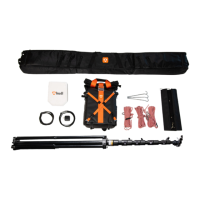
Position the tripod approximately 10-20ft from the sideline, away from the sun.
Stabilize the tripod using ropes/stakes for grass or a sandbag for artificial turf.
Connect to the 'HUDL-Focus' Wi-Fi network to calibrate the camera.
Tap 'Start Recording' and select game/practice type and title for automatic recording.
Tap 'Connect Flex to Wi-Fi' in the Recordings tab to upload recorded footage.
Handle the camera with care, place on a stable surface, and avoid dropping or damage.
Set up tripod per manual instructions, ensure camera is mounted securely.
Use only the included power cable, avoid wet conditions, and prevent overheating.
Device complies with FCC rules, limits for Class A digital device, and radiation exposure limits.
Handle and dispose of the lithium-ion battery according to local regulations.
 General
| Brand | Hudl |
|---|---|
| Model | FOCUS FLEX |
| Category | Digital Camera |
| Language | English |

 To Next Page