4
Attach Work Surface
1
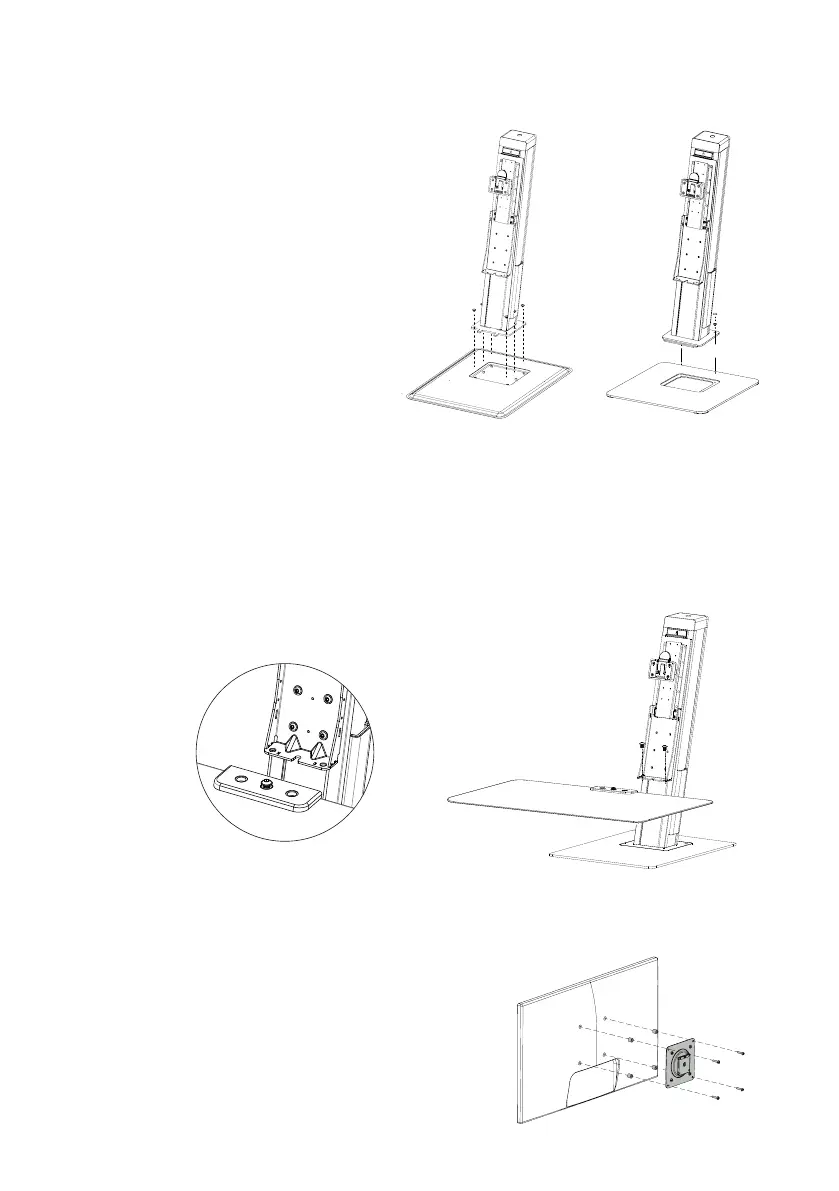
Slide the work surface, with preinstalled screw, into the slot in the support bracket.
This will allow you to support the work surface with one hand and use
your other hand to insert and secure the other two screws.
2
Tighten the M8x21mm screws (2x) securely with the 6mm hex key.
Attach VESA Bracket to Monitor
1
Attach the VESA plate onto the monitor(s)
with the M4x18mm screws provided.
Attach Main column to Base
1
If the base comes with plastic covers
installed (version 1.0), remove them and
set them aside.
Install the main post onto the base by
inserting the tab in the front rst, and
then secure with the M6x6mm (version
1.0) or the M5x3mm (version 1.5) screws
provided.
2
i. version 1.0
Snap on plastic covers removed in step1.
Rear cover rst then front cover.
ii. version 1.5
Remove the protective lm from the
plastic caps and snap them in over the
screws.
① ②
i. version 1.0 ii. version 1.5
Assembly Instructions


 To Next Page