90˚
90˚
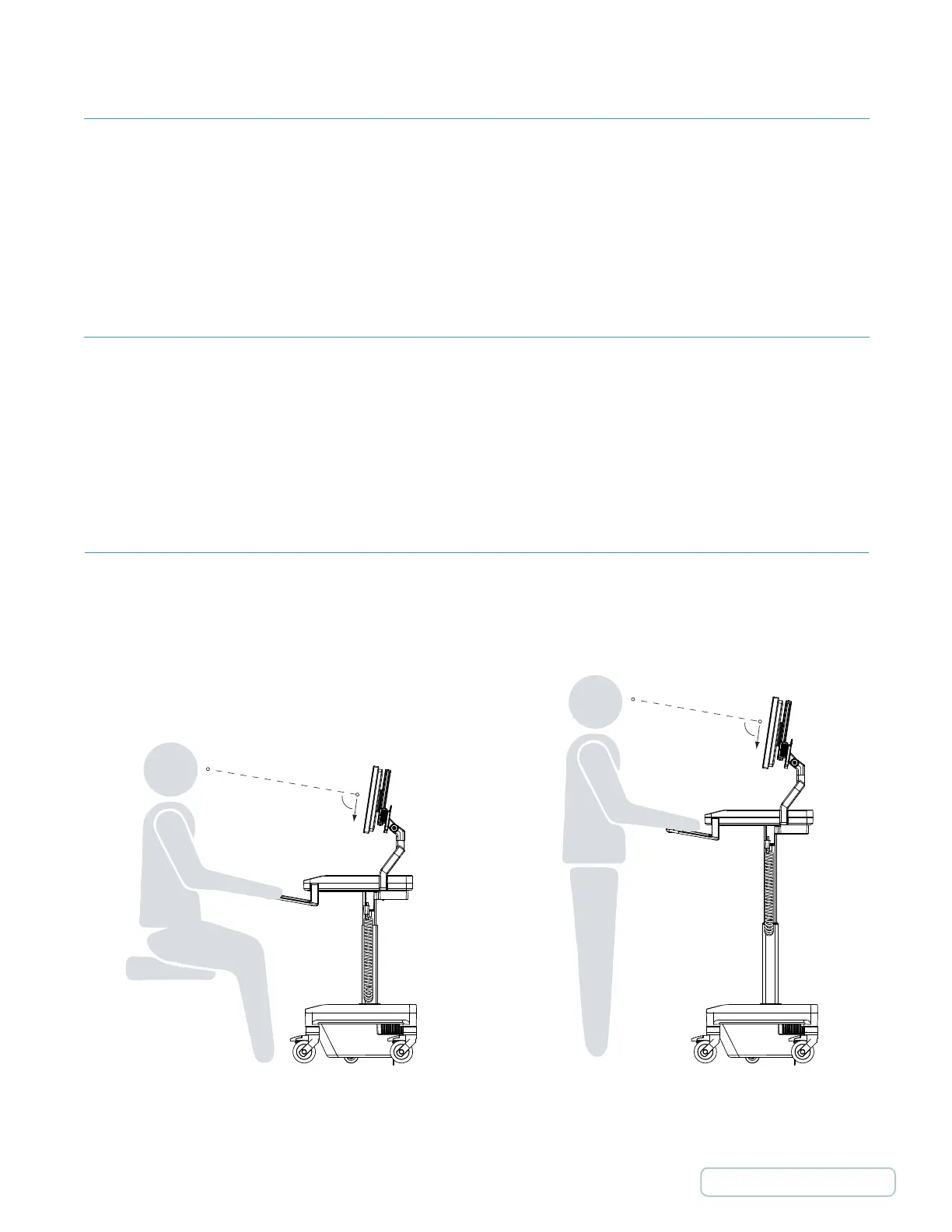
7.2 ERGONOMIC MONITOR POSITIONING
Position the monitor so that the top of the screen is slightly below eye level.
7.0 ADJUSTING THE T7
Proper ergonomics can help reduce and prevent workplace injuries by lessening the physical demands on the worker.
Ergonomically designed products, such as the T7 point-of-care technology cart, take into account the wide range of people
who will use the product, so that everyone, regardless of their stature, can use the product easily and comfortably—
essentially, allowing the job to fit the worker instead of the other way around.
The T7’s 20” (50.8 cm) height range ensures comfortable accommodation for both seated and standing workers.
7.1 TIPS ON USING THE T7
• Push the cart with arms placed close to body. Do not pull the cart. Pushing utilizes your own body weight, while pulling
causes undue stress and can result in ankle and knee injury.
• Keep the
cart well maintained and the cart equipment organized. A well-maintained cart will be easier to move and an
organized cart will be less susceptible to accidents.
41
Return to Table of Contents



 To Next Page