5
S D H
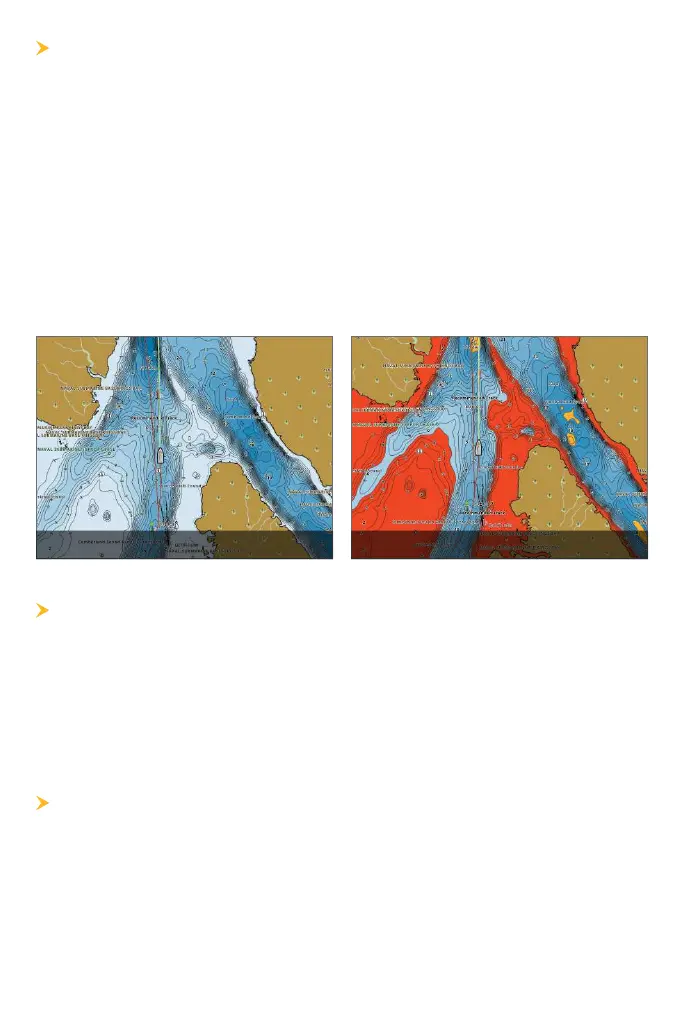
Highlight deep and shallow waters in Chart View and Chart Combo Views
using the following CoastMaster features. Highlight colors are customizable.
• Depth Highlights allow you to select up to four depth ranges to be
highlighted on the chart.
• Shallow Water Highlight identifies shallow waters when the depth is
equal to or less than the level you set.
APEX/SOLIX: Chart X-Press Menu > Chart Options > Depth Highlights
HELIX: Main Menu
>
HB Chart tab > Depth Highlights
() ()
S S D L
Use the Safe Depth feature to set the minimum depth level for your
vessel and to turn on highlights for hazards shallower than that level.
APEX/SOLIX: Home > Settings > Chart > Safe Depth
HELIX: Main Menu
> HB Chart tab > Safe Depth
S/H S S
Spot Soundings are depth measurements shown on the chart.
APEX/SOLIX: Chart X-Press Menu > Chart Options > Chart Objects >
Navigation > Spot Soundings
HELIX: Main Menu
> HB Chart tab > Chart Objects > Spot Soundings











 To Next Page