4
S W L O
Your CoastMaster card includes chart data for select inland lakes and
rivers.
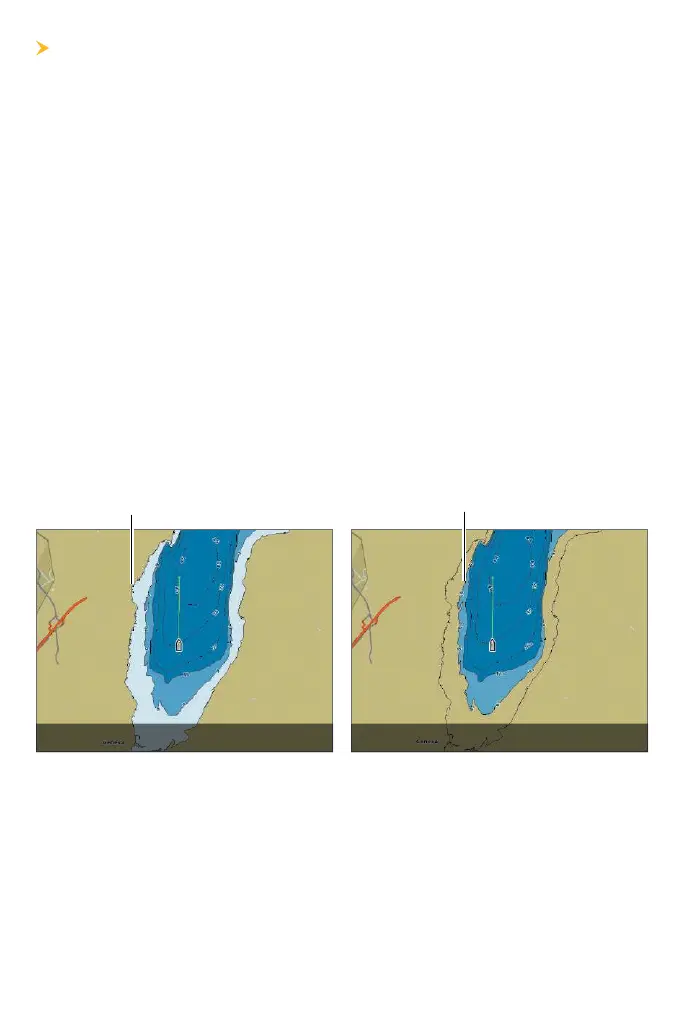
It is important to note if the water level is higher or lower than normal.
For example, if you know that the tide is 3 feet lower than normal (or that
a lake's water level is down 3 feet), set the Water Level Offset to -3. Depth
labels on the Contour Lines will adjust based on the Water Level Offset
setting.
• If the water level is higher than normal, set a positive amount.
• If the water level is lower than normal, set a negative amount.
• If the water level has not changed (normal): For APEX and SOLIX,
turn Water Level Offset off. For HELIX, set the Water Level Offset
to 0.
APEX/SOLIX: Home > Settings > Chart > Water Level Offset
HELIX: Main Menu
>
HB Chart tab > Water Level Offset
() ()
shoreline
new shoreline with Water Level Offset set to -3











 To Next Page