
 Need help?
Do you have a question about the Humminbird Smartcast RF20 and is the answer not in the manual?
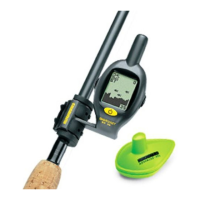
Explains how to use the wireless fishfinder by attaching components and casting into water.
Describes two distinct ways the RSS can be used: Sonar Graph and Stationary Float.
Guides users on how to activate the battery in the Rod Mounted Display before first use.
Details how to select and attach the correct sleeve to fit the display onto a fishing rod.
Explains how to tie the line to the Remote Sonar Sensor for fishing or float use.
Details the RSS battery life, power activation, and proper storage to conserve power.
Interprets the underwater information shown on the SmartCast display, including depth and fish icons.
Instructions on how to turn the Rod Mounted Display on and off, noting it lacks auto shut-off.
Describes the initial display sequence and how sonar information appears in fishing mode.
Explains how to enter and exit the simulator mode for practice without using the RSS.
How to adjust sensitivity to control sonar return visibility and Fish ID Symbol detection.
Guides on setting the automatic or manual depth range for optimal bottom display.
Instructions on enabling or disabling the fish alarm feature, requiring Fish ID to be on.
How to enable or disable the display of fish symbols, which uses advanced signal processing.
How to select the correct channel (A or B) to match the RSS unit for optimal performance.
General advice for maintaining the Rod Mounted Display and RSS, including cleaning and storage.
Explains causes for signal loss, such as line of sight, depth, speed, and weight.
Steps to resolve issues where the display does not power on, focusing on battery and door closure.
Addresses issues with gaps in bottom readings in water less than 2 feet deep.
Troubleshooting steps for a faded display, checking battery and re-installing.
Explains noise as interference from other devices or multiple RSS units.
Explains display jumps due to automatic depth changes or signal loss/regain.
Outlines the terms and conditions of the 6-month limited warranty for the product.
Details the service policy, repair process, and instructions for returning the unit for service.
Lists the required steps for obtaining in-warranty service, including authorization and documentation.
Details the necessary steps for out-of-warranty service, including payment and documentation.
Provides contact information for the Humminbird Customer Resource Center via telephone and email.
Lists the technical specifications for the Rod Mounted Display and the RSS unit.
 General
| Brand | Humminbird |
|---|---|
| Model | Smartcast RF20 |
| Category | Fish Finder |
| Language | English |





 To Next Page