
 Need help?
Do you have a question about the Hunter Road Force Elite GSP9700 Series and is the answer not in the manual?
Read manual before operating. Owner is responsible for training the technician.
Defines hazard symbols and provides crucial safety instructions for electrical and operational use.
Details important decals and their placement, including safety and compliance information.
Lists and describes the various components and numbered elements of the Road Force Elite main screen.
Instructions for safely getting a wheel onto and removing it from the balancer.
Verifies the wheel's mount to balance, identifying potential centering errors.
Details how to use the inflation station to set preset tire pressure.
Explains the automatic calibration procedure performed at installation time.
Provides guidance on how to clean the monitor screen without causing damage.
Outlines the daily maintenance tasks required for the wheel balancer.
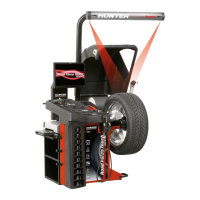
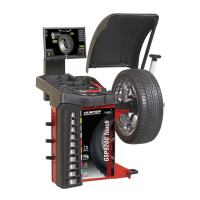
The Hunter Road Force® Elite GSP9700 Series Wheel Balancer is a sophisticated piece of equipment designed to accurately balance vehicle wheels and diagnose ride-related issues. Its primary function is to identify and correct imbalances in a wheel and tire assembly, ensuring a smooth ride and extended tire life. Beyond basic balancing, the Road Force Elite incorporates advanced technology to measure road force variation, a critical factor in identifying potential causes of vibrations that traditional balancers might miss.
At its core, the Road Force Elite GSP9700 operates by spinning a wheel and tire assembly at high speeds to detect imbalances. It then calculates the precise amount and location of weights needed to correct these imbalances. However, its capabilities extend significantly beyond this. A key feature is the integrated load roller, which applies a controlled force to the tire, simulating real-world road conditions. This allows the balancer to measure "road force variation," which is the stiffness and uniformity of the tire as it rotates under load. High road force can cause vibrations even in a perfectly balanced wheel, and the GSP9700 helps technicians identify and address these issues, often by recommending optimal tire-to-wheel matching or even indicating a defective tire.
The balancer also includes an optical scan laser, a Class 1 laser that measures the profile of the wheel assembly. This laser is integral to the machine's ability to gather precise dimensional data, which is crucial for accurate balancing and road force measurements. For applying clip-on weights, the optional HammerHead® TDC (Top Dead Center) Laser Indicator, a Class 2M laser, projects a vivid line at the top dead center of the wheel, simplifying the weight placement process.
Operating the Road Force Elite GSP9700 is designed to be intuitive and efficient, with several features aimed at enhancing user experience and accuracy. The main screen provides a comprehensive overview of the balancing process, displaying information such as imbalance and couple force, road force limits, and wheel dimensions. The "Tire Stack / Vehicle Plan View Tab" and "Wheel Assembly Display" offer visual aids for understanding the wheel's condition.
Mounting a wheel onto the balancer is facilitated by a wheel lift operation. The technician slides the proper collet onto the spindle shaft, positions the wheel lift carriage, and uses a foot pedal to lower the lift. The wheel is then rolled onto the lift, raised into position, centered on the collet, and clamped. The safety hood must be closed before initiating a spin, and the "Hood Autostart" feature can automatically start the balancing process upon hood closure. The "START/STOP/SERVO Button" controls the wheel's rotation, and a red "STOP" button is available for emergency stops.
The "CenteringCheck® Wheel Centering Feature" is a crucial diagnostic tool. It inspects and verifies the wheel's mount to identify potential centering errors, ensuring that the balancing process starts with a properly mounted wheel. This helps prevent misdiagnoses and ensures accurate results.
For convenience, the "Inflation Station" provides preset tire pressure capabilities. Technicians can lift the inflation hose from its cradle, and a setting screen will appear, allowing them to set target air pressure. This integrated feature streamlines the pre-balancing setup.
The balancer also incorporates "SmartWeight®" technology, which aims to minimize the amount of weight needed to balance a wheel, leading to cost savings and improved aesthetics. The "SmartWeight® Savings Odometer" tracks these savings, providing a tangible benefit to the user.
For user support, the "Hunter Help Video Player" is accessible directly from the main screen. This feature allows technicians to launch videos on various balancer topics, offering on-demand training and troubleshooting assistance.
Maintaining the Road Force Elite GSP9700 is straightforward, with daily maintenance procedures designed to ensure optimal performance and longevity. The manual outlines a clear schedule for routine tasks.
Daily maintenance includes cleaning around and under the balancer to remove any loose weights from the floor, as these can interfere with accurate measurements. The spindle requires lubrication; a 3-in-1 oil applied to a rag, along with the "Clean Threads" feature to rotate the spindle, ensures smooth operation. It's important to keep oil away from the skin during this process.
The hub face should be cleaned by hand with a Scotch Brite pad, but it should not be lubricated. The manual specifically warns against using power tools for cleaning the hub to prevent damage.
Regular inspection of the wing-nut and cup is also part of daily maintenance. Gritty bearings, broken knobs, or missing handle spacers can all contribute to balance issues, so addressing these promptly is essential.
The balancer utilizes an "eCal™ automatic calibration procedure," which, once performed during installation, generally requires no further operator input. This simplifies the calibration process for the end-user.
For cleaning the monitor, a soft cloth should be used regularly. Chemicals, solvents, or corrosive cleaners should be avoided as they can damage the screen's anti-glare protection. ArmorAll wipes are recommended for cleaning the touch screen.
The optical scan laser is a Class 1 laser and is not a field-serviceable part, meaning no maintenance is to be performed on it by the operator. Similarly, the HammerHead® TDC Laser Indicator is an optional feature that is not field-serviceable.
The power switch, located on the left side of the LCD support, is a push-button type used for normal shutdown and restarting. It is emphasized that this switch should always be used to power the balancer on/off to prevent data loss. The main power ON/OFF switch is located on the back of the balancer cabinet for complete power control.
 General
| Power Requirements | 115-230V, 1Ph, 50/60 Hz |
|---|---|
| Dimensions | 54 in (1372 mm) D x 48 in (1219 mm) W x 74 in (1880 mm) H |
| Weight | 750 lbs (340 kg) |
| Drive System | Direct Drive |
| Balancing Speed | Variable, Application Specific |
| Lateral Runout Measurement | Yes |
| Laser Guided Weight Placement | Yes |
| Max Tire Width | 20 inches |
| Rim Width Range | 1.5 - 20 in (38 - 508 mm) |
| Road Force Measurement | Yes |
| Automatic Data Entry | Yes |
| Measurement Accuracy | 0.01 oz |


 To Next Page