43
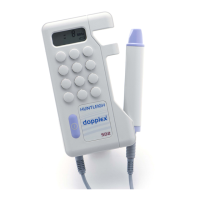
Fetal
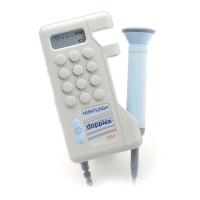
Dopplex
II
(FD2)
Obstetric mode is automatically selected
when an obstetric probe (OP2HS/OP3HS)
is connected. Fetal heart rate (FHR) is
displayed with 3 operating modes, and
an RS232 interface provides for FHR
printing on the Dopplex Printa Package.
Fetal
Dopplex
(FD1+/FD3)
Operates in standard mode to provide
FHR display. The probe/cable are
waterproof and can be fully immersed for
use in waterbirths.
Clinical
Use
Apply a liberal amount of gel to the
abdomen. Place the faceplate of the
probe flat against the abdomen above
the symphysis pubis. Adjust the probe to
obtain an optimum audio signal ideally
by angling the probe around. Avoid
sliding it over the skin.
In early pregnancy a full bladder may
improve sound detection. In later
pregnancy the best signals are generally
located higher on the abdomen. The fetal
heart sounds like a galloping horse at
approximately twice the maternal rate. A
wind-like sound is heard from the
placenta.
Standard
Mode
-
FD1+/FD2/FD
3
In this mode the FHR, averaged over 4-
heart beats, is displayed on the 3-digit
readout. This gives FHR performance
similar to conventional fetal monitors. The
LCD displays an outline heart symbol.
Smoothed
Mode
-
FD2
Only
This mode is used to obtain more stable
heart rate readings. In this mode, FHR is
averaged over 8 beats. The LCD displays
a solid heart symbol.
Manual
Mode
-
FD2
Only
This mode is used when a fetal heart beat
is audible in the loudspeaker or
headphones but, due to noise or a low
signal level, the unit cannot reliably
calculate the heart rate. In this mode, the
heart rate can be manually counted over
a period of 10 audible heart beats (see
below). The unit will automatically
calculate and display the derived FHR on
the LCD. The LCD displays a clock
symbol.
Mode
Selection
Press
Mode
button to select mode.
Use
of
Manual
Mode
-
FD2
Only
1. Press and hold
Start/Stop
button
and immediately count the audible
heart beats, counting the first beat
as the button is pressed. The LCD
displays the flashing clock symbol
and the FHR reading is shown as
three dashes
2. Release the
Start
/Stop
button
immediately on the count of 10 (i.e.
after nine beat intervals). The
FD2
will automatically calculate the
derived FHR averaged over the 10
beat period and display the result.
This rate value is retained until the
measurement is repeated or the
mode is changed. If the button is
held for a period less than about 3
seconds the display will clear the
previous rate value and reset.
Connection
to
Printa™
(FD2
Only)
Hard copy printing is automatically
selected when the plug of the interface
buffer box is inserted into the RS232
socket on the top panel of the
FD2
.
Printing is then initiated by using the
Start/Stop
button.
OOPPEERRAATTIINNGG
IINNSSTTRRUUCCTTIIOONNSS
OOBBSSTTEETTRRIICCSS
IMPORTANT!
The
FD1+//FD3
mmaainn
unnits
aarre
nnot
wwaaterrpprroof
aannd
mmust
nnot
be
immmmerrsed..
Probes for obstetric applications
OP2 HS : 2MHz ±1%
OP3 HS : 3MHz ±1%
EENNGGLLIISSHH
((UUSSAA))


 To Next Page
 Loading...