P/N 3034041_D 23
HUSSMANN CORPORATION • BRIDGETON, MO 63044-2483 U.S.A.
VRM Merchandisers
KDEPLUS BUTTONS
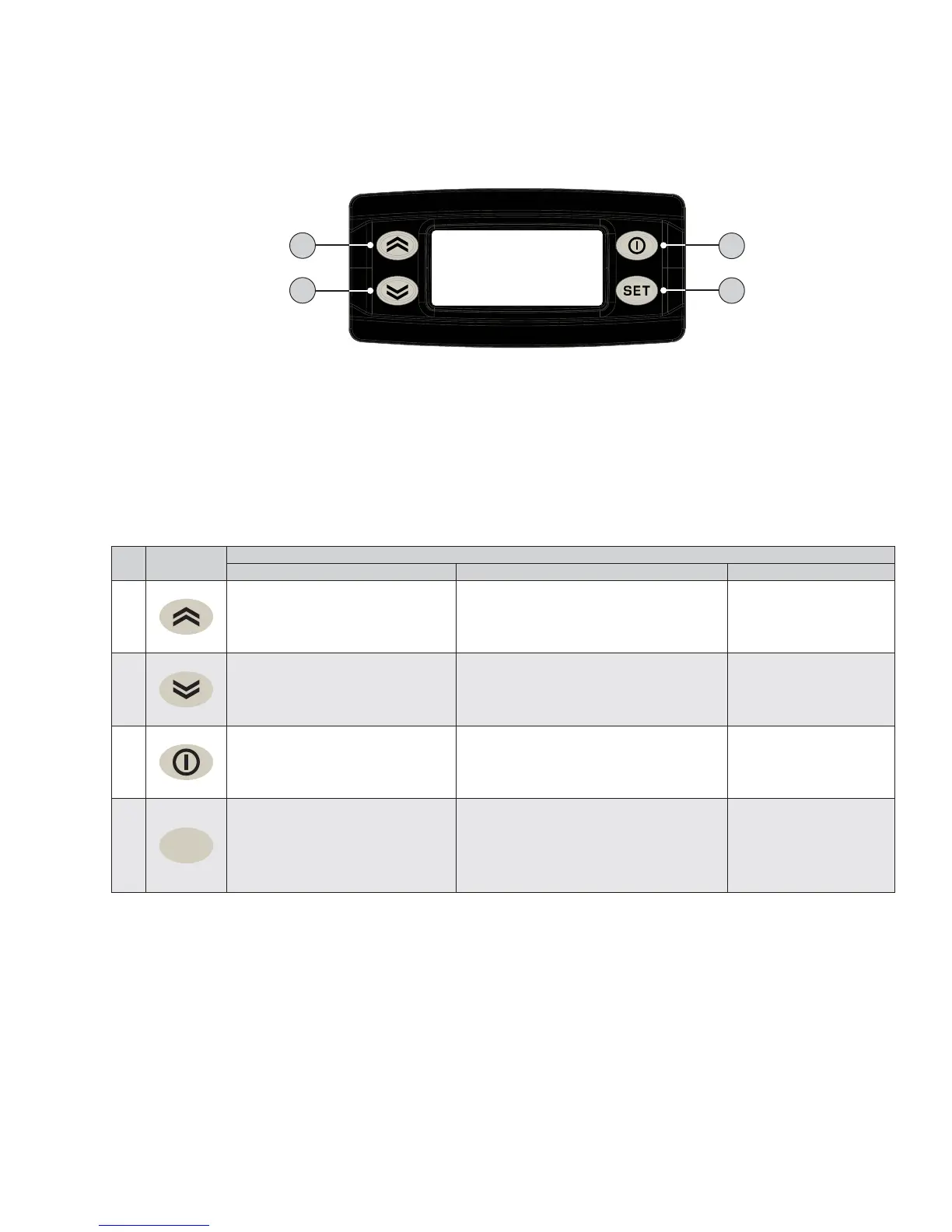
The KDEPlus keyboard has 4 keys, as shown in the illustration:
1
2
3
4
Each key has a different function depending on whether it is:
• Pressed and released
• Pressed for at least 5 seconds
• Pressed and held at start-up
• Pressed in combination with another key.
KEYS
The following table summarizes the function of each key:
No Key
Action
Pressed and released Press for at least 5 secs Start-up
1
• Scrolls through menu items
• Decreases values
Activates the Manual Defrost function
(from outside menus).
---
2
• Scrolls through menu items
• Decreases values
Function can be configured by the user
(from outside menus).
(see parameter H32)
---
3
• Returns to the previous menu
level
• Confirms parameter value
Activates the Stand-by function
(from outside menus).
---
4
set
• Displays any alarms
(if active)
• Opens Machine Status menu
• Confirms commands
Opens the Programming Menu
(User and Installer parameters)
When pressed during
start-up it enables
the user to select the
application to be loaded.
STANDBY or ESC
DOWN SET
UP



 To Next Page