Hypervolt Home 3.0 Quick Start Guide Draft V1.0
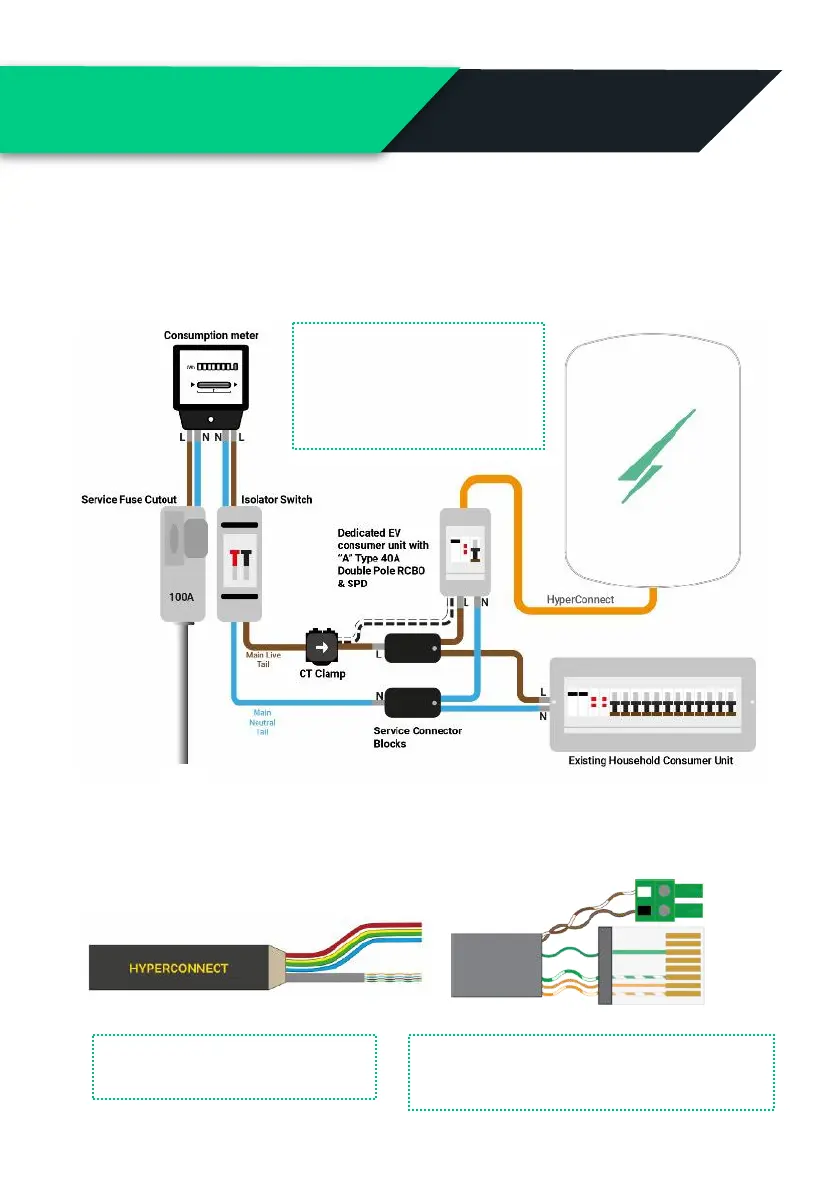
Connection to an Electrical Supply (230v)
Below is the most commonly used & recommended method of
connecting your Hypervolt to an electrical supply.
The CT clamp must be
installed to measure the total
supply load with the arrow
pointing in the direction of
current flow.
4 & 6mm Non & SWA
Live, Neutral, CPC & Cat 5e
HyperConnect
We recommend using HyperConnect cable for installing Hypervolt EV
Chargers, it contains power, data and CT connection wires in one neat easy
to fit cable. Available direct from Hypervolt.
The White Wire from the CT goes in the Left &
Black in the right. Extend as necessary, a Brown
pair of a CAT cable is used in this example.


 To Next Page