Hypervolt Home 3.0 Quick Start Guide Draft V1.0
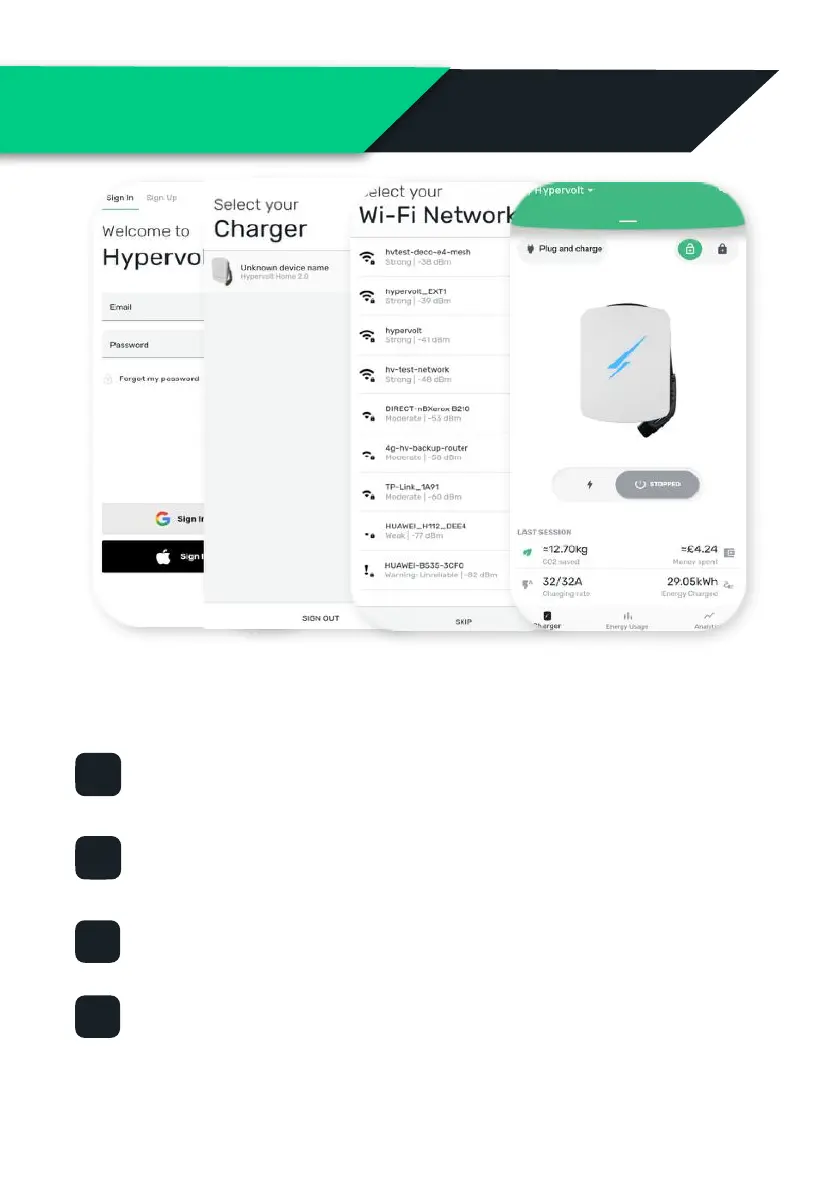
To adopt your Hypervolt charger to an App account and get it online,
first download the Hypervolt App (QR Code on back page) then follow
these 4 steps;
Sign Up / Sign In To start you will need to create a Hypervolt user
account via the ‘Sign Up’ tab and then use the ‘Sign In’ tab to login.
Adopt Next you need to ‘adopt’ your charger by choosing an ‘Available’
Hypervolt on the ‘Select your charger’ page.
Connect to your Wi-Fi Next select your Wi-Fi connection and enter
the the password.
Success ! Once your Hypervolt has connected the pulsing white ring
around the edge of the cover will turn solid blue. You can now use the
App with all its great features.
(Hypervolt Trusted Installers have access to an Installers App for the above process)


 To Next Page