4
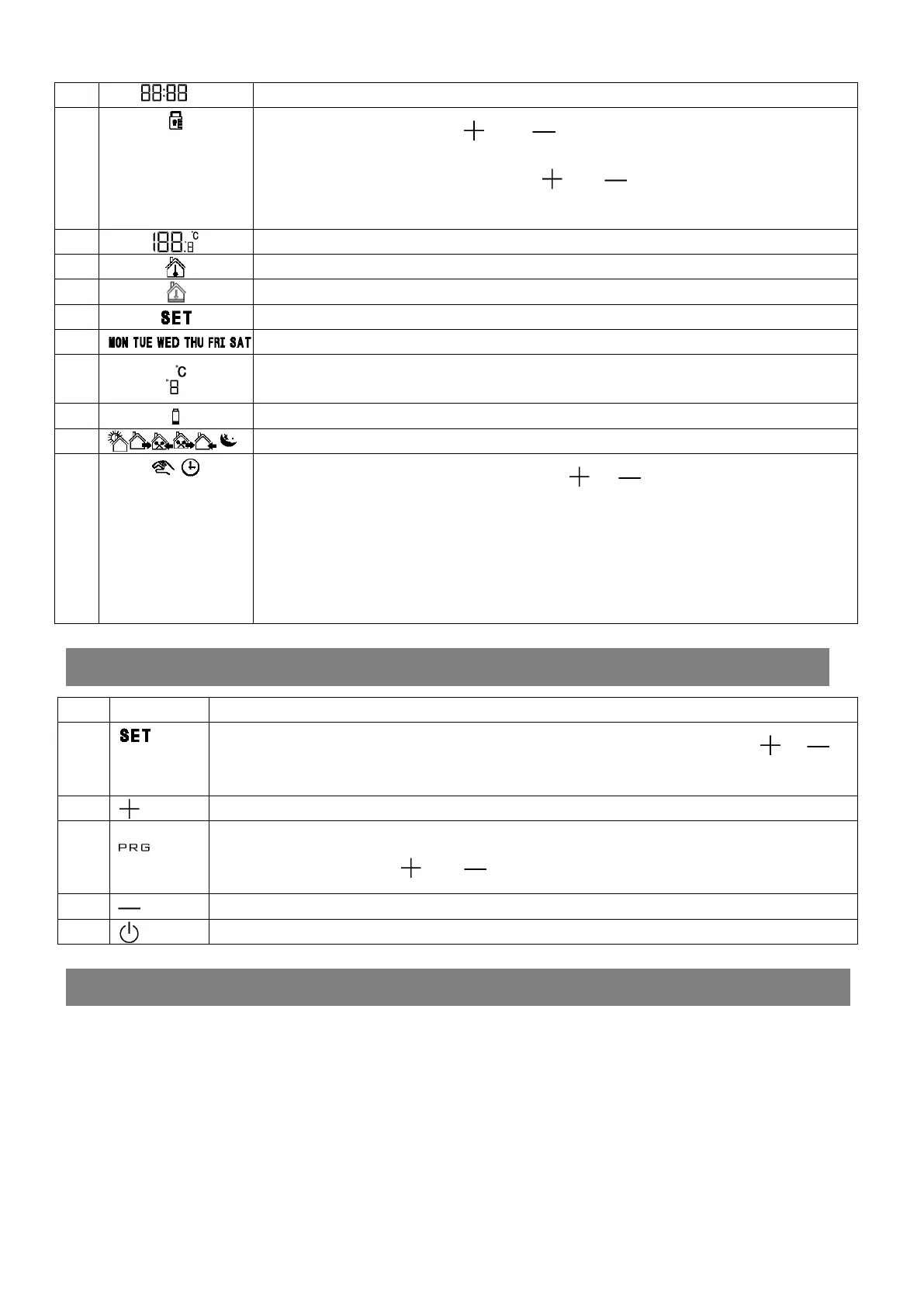
Present time
5
represent keys are locked , press “ ”and“ ”at the same time for over 3 seconds to lock the
operation panel. At the keys locked state, press “ ”and“ ”at the same time for over 5 seconds to
unlock the operation panel
6
Present ambient temperature
7
Indoor temperature
8
Floor temperature
9
Temperature setting mode
10
7 days display in a week,
,
and only the present day is displayed.
11
Celsius degree or Fahrenheit degree
12
Battery conditions
13
1 st ~6th time interval
14
Temporary manual mode, at programme mode,press
“ ”
or
“ ”
to adjust the value, it will automatic
enter into temporary manual mode, the temporary setting value will not be stored into the programme
mode. For example, if the thermostat is working at programme mode,and its comfortable temperature is
20℃ during 17:00 and 22:00, then the user decrease the temperature to 18℃ at 19:00, so the
thermostat’s setting temperature will become 18℃, but it will recover the programme mode after
22:00 ,and the value will be 20℃ too during 17:00~22:00
Operation Key
NO: symbols represent
A
set key:short press it to switch programme mode to manual mode. At programme mode, press “ ”or” ” to
adjust the value, it will automatic enter into temporary manual mode
B
Increasing key
C
clock key:short pressing is setting clock,long pressing is setting programme
Keys locked/unlocked:press “ ”and“ ”at the same time for 3 seconds
D
Decreasing key
E
Power on/off key
Product Specifications
Power: twoAA* 1.5V alkaline batteries
Display accuracy:
:
0.5
℃
or1
℉
Probe sensor:
:
NTC(10k)1%
Contact capacity:
:
5A/250V ;16A/250V;
Working environment temperature:
:
0~50
°
C/32~122
°
F
Range of temperature adjustment:
:
5~35
°
C/41~95
°
F
Range of temperature display:
:
0~40
°
C/32~104
°
F
Insulating condition: Normal environment
Running program: Set per 1 week as a cycle
Frequency
:
433MHZ
(
RF/MRF
)
Wireless transmission distance:
:
Indoor 16/50M
,
outdoor
Installation: Wall mounted or on battery seat


 To Next Page