Display Switch Cluster
REMOVE
NOTE: The Display Switch Cluster is a non-
repairable part. See Parts Manual for replacement
part number.
1.
Disconnect ground wire.
2.
Lift up on the steering wheel slightly and pull
up on the tilt lever. Fully lower the steering
column.
3.
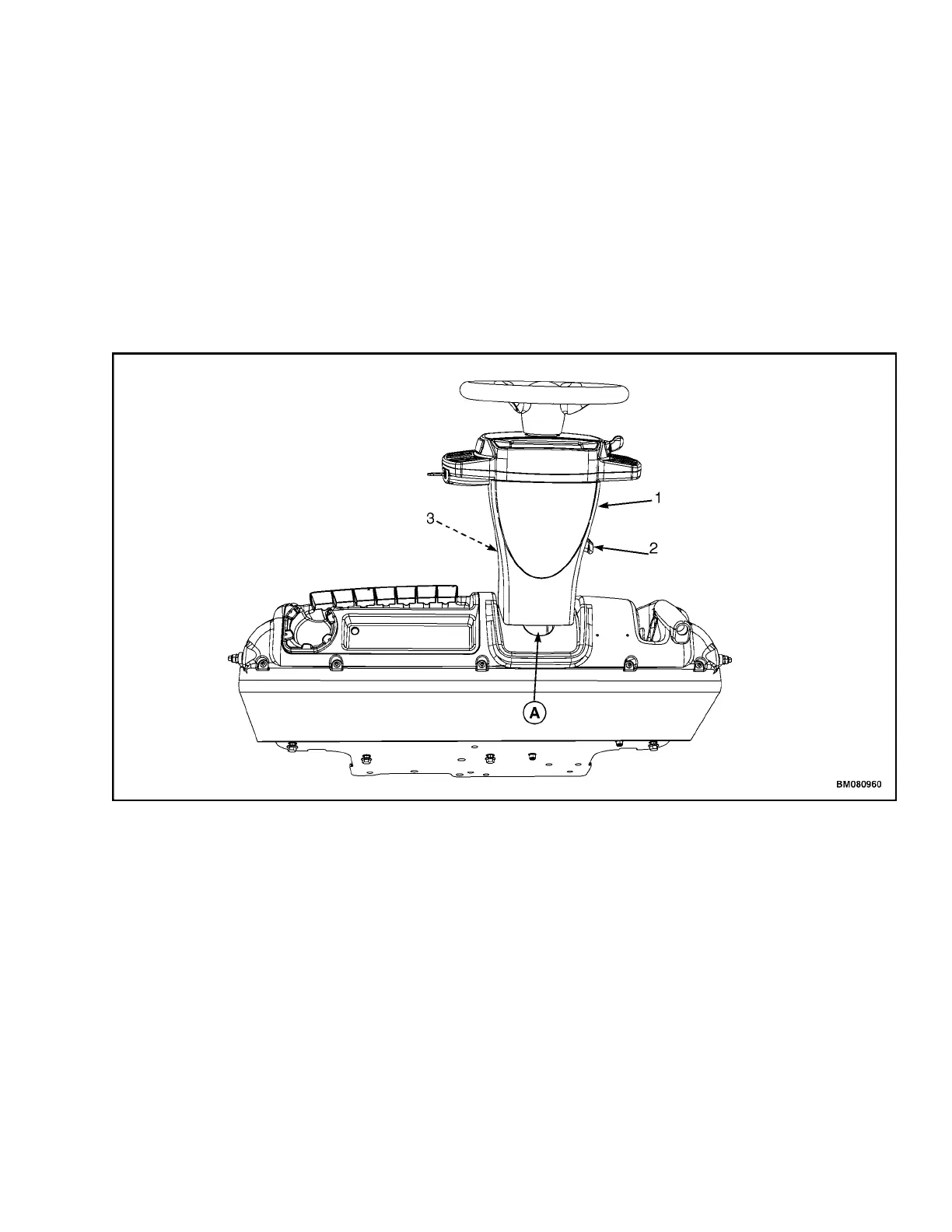
Remove upper steering column cover by pulling
up on upper steering column cover to release
the latches (one on either side), and pulling
cover away from steering column. See
Figure 3.
NOTE: TOP VIEW OF DASH SHOWN.
A. INDICATES TO PULL UP TO UNLATCH
1. UPPER STEERING COLUMN COVER
2. STEERING COLUMN TILT LEVER
3. LOWER STEERING COLUMN COVER
Figure 3. Upper Steering Column Cover Removal
4.
Remove the horn button and disconnect the
horn wires.
NOTE: A puller tool may be required to remove the
steering wheel.
5.
Remove the lock nut securing the steering
wheel and remove steering wheel from steering
column. Take care to not damage the horn
wires. See Figure 4.
2200 SRM 1771 Display Switch Cluster
3


 To Next Page