English
11
1. Instructional Icons
The following icons are available through this guide:
: indicates functions that are available on digital
channel only.
: indicates functions that are available on
analog channel only.
Functions marked with no function icons are available on both
analog and digital channels.
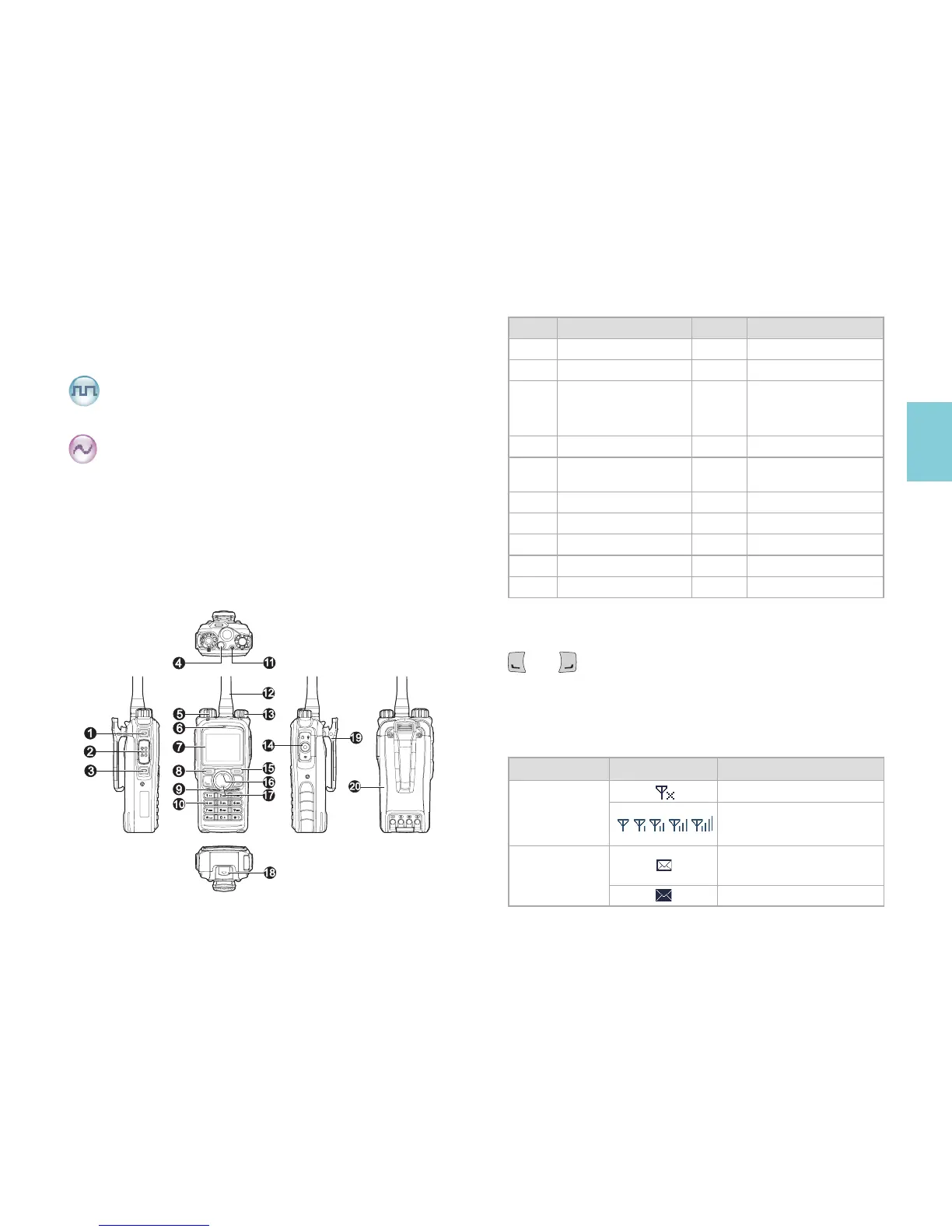
2. Product Overview
■
Product Controls
No. Part Name No. Part Name
1 SK1 (Side Key 1) 11 LED Indicator
2 PTT Key 12 Antenna
3 SK2 (Side Key 2) 13
Radio On-Off/
Volume Control
Knob
4 TK (Top Key) 14 Accessory Jack
5
Channel Selector
Knob
15 Back Key
6 Microphone 16 Up Key
7 LCD Display 17 Down Key
8 OK/Menu Key 18 Battery Latch
9 Speaker 19 Belt Clip
10 Numeric Keypad 20 Battery
■
Programmable Keys
You may request your dealer to program the keys
SK1
,
SK2
,
TK
,
and as shortcuts to radio functions. See the Owner’s
Manual for more details.
3.Status Indication
■
LCD Icon
Icon Name Icon Radio Status
RSSI
No signal
More bars indicate better
signal strength
Message Icon
New message/unread
message
InBox is full



 To Next Page
 Loading...





