1
English
Product Overview
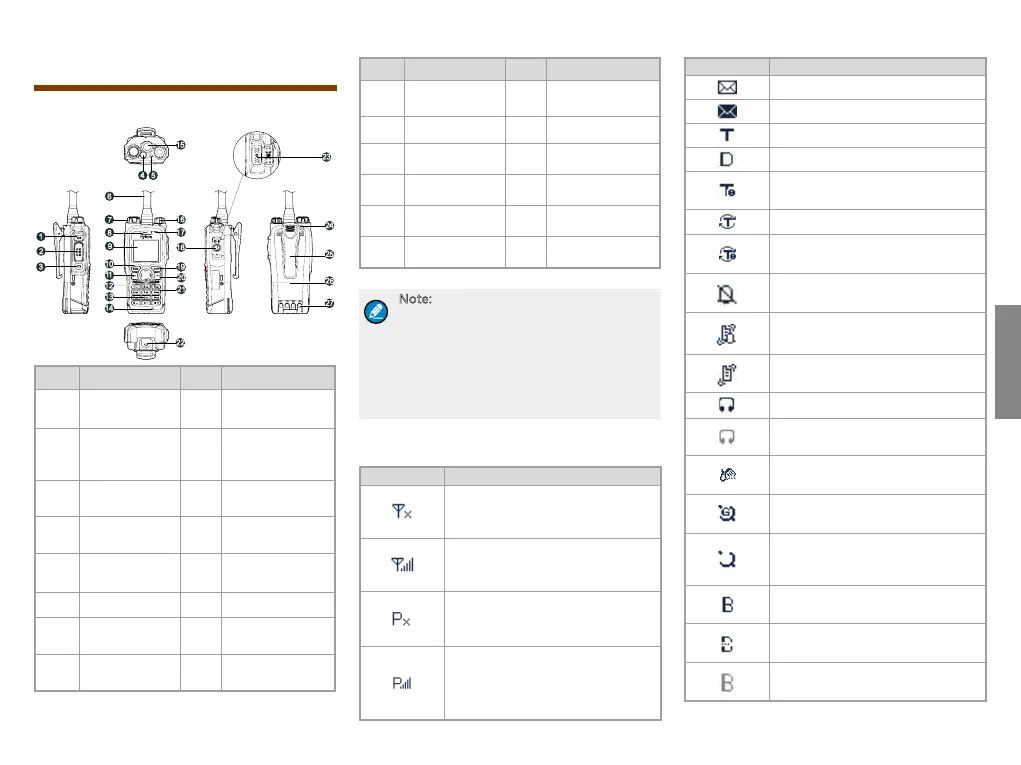
Product Controls
No. Part Name No. Part Name
1
SK1 (Side Key
1)
15
Antenna
Connector
2
PTT (Push-to-
Talk) Key
16
Power On-Off/
Volume Control
Knob
3
SK2 (Side Key
2)
17
Half-duplex
Microphone
4
Emergency
Key
18
Accessory
Connector Cover
5 LED Indicator 19
Options/Back
Key
6 Antenna 20 End Key
7
Group Selector
Knob
21 Navigation Key
8
F u l l - d u p l e x
Receiver
22 Battery Latch
No. Part Name No. Part Name
9 LCD Display 23
Accessory
Connector
10 Func/OK Key 24 Strap Hole
11
Answer/Call
Key
25 Belt Clip
12
Half-duplex
Speaker
26 Battery
13
Numeric
Keypad
27 Charging Piece
14
Full-duplex
Microphone
/ /
Note:
For enhanced convenience, you may
request your dealer to program the numeric
keys 0–9, * key, # key, navigation keys, Call
key, OK key, Back key, SK1 and SK2 key as
shortcuts to certain features. For the detailed
introduction, please refer to the corresponding
TETRA Terminal Series Feature Book.
LCD Icon
Icon Terminal Status
The terminal is not registered with
the sys tem (appl icabl e for TMO
only).
The terminal is registered with the
syst em, and more b ars i ndica te
stronger signal strength.
The terminal is not registered with
the system while the WAP browser
is running.
The terminal is registered with the
system while the WAP browser is
running, and more bars indi cate
stronger signal strength.
Icon Terminal Status
There is(are) unread message(s).
The Inbox is full.
The terminal is operating in TMO.
The terminal is operating in DMO.
The terminal is operating in fallback
mode.
The scan feature is enabled in TMO.
The s c an fe a t u re is e n a bled i n
fallback mode.
The terminal is operating in silent
mode.
The terminal is operating in normal
(ring and vibration) mode.
The terminal is operating in vibration
mode.
An audio accessory is connected.
An audio accessory is connected but
not available for use.
A palm microphone with keypad is
connected.
The GPS feature is active, and valid
GPS or GLONASS data is received.
The GPS feature is active, but no
va lid G PS or GLONA SS data is
received.
A wireless accessory is connected
and available for use.
The BT feature is enabled but no
wireless accessory is connected.
A wireless accessory is connected
but not available for use.



 To Next Page