Blinky | 07
Setting the Alarm
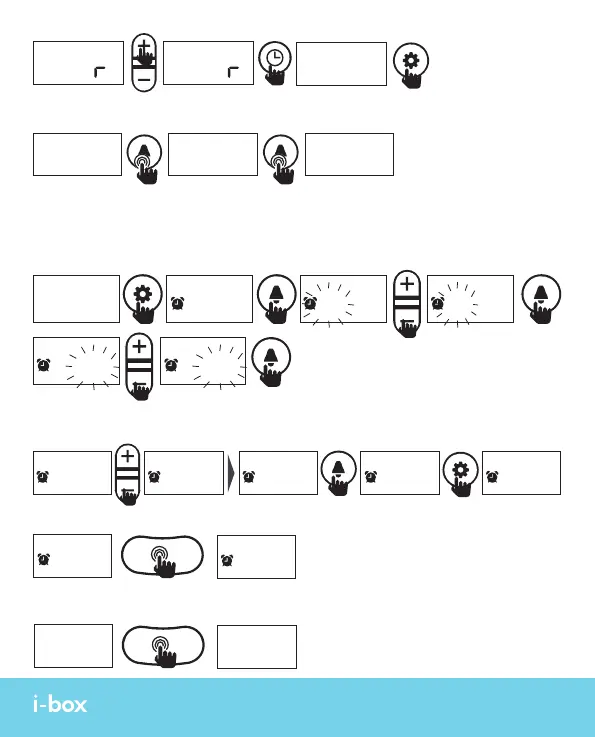
To set an alarm, you need to be in Set Mode, short press the Set key (11) to enter Set Mode.
Short press the Alarm key (8) to enter alarm set mode.
Setting the Alarm Time
Setting the Alarm Sound
Choose from 5 built-in sounds to use for the alarm when it is sounding.
12H 24H
SET SET
PM
15
:
27
15
:
27 3
:
27 15
:
27
15
:
27 15
:
27 8
:
27
8
:
27
1 2 3
8
:
30
8
:
30 15:28
15
:
27
SET
SET SET SET
SET
SET SET SET
SET
SET
When in normal display mode, long press the Alarm key (8) to choose between 12/24hr
time display.
When the Nap function is off. Long press the Snooze key (2) to check an active alarm time.
8
:
30
15:30
8
:
30
15:30
Or if no alarm is showing as active you can long press the Snooze key (2) to see if an alarm
is set but not activated.



 To Next Page