10
EN
Quick Start / C31SMARTDOCKPD/ English
CONNECTION TO THE LAN NETWORK
The GLAN RJ-45 port is used to connect to an Ethernet network to a router / switch / HUB
and to the Internet, supporting speeds of 10 / 100 / 1000 Mbps.
USB DEVICE CONNECTION
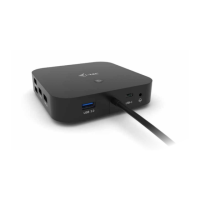
Use the USB-C 3.1 port and USB-A 3.1 ports to connect a keyboard, mouse, external drive,
printer and other peripherals, or use them to connect a HUB for additional free USB ports.
In this case, we recommend using a HUB with an external power supply. In case the con-
nected device is not charging or not working, then plug the original/external USB-C power
adapter into the power connector of the parent laptop/Mac/smartphone/tablet or USB-C
Power Delivery port on the dock for power support.
Notes on using the USB-C port:
Fully compatible devices/systems (Alt Mode & Power Delivery)
USB-C is a new standard with a great variety for use, while compatibility information is
complex. Some USB-C devices/systems support Alt Mode video output while others do
not. Some can be powered and charged via USB-C Power Delivery, while others cannot.
Partially compatible devices (support either Alt Mode or Power Delivery, not both)
Many current USB-C devices that support Alt Mode video output do not support charging
via USB-C Power Delivery. These devices still need their original chargers for charging. Con-
versely, some USB-C phones and tablets can charge via Power Delivery, but most do not
support Alt Mode video output.
Incompatible devices/systems
The dock relies on new features introduced with USB 3.1 and as such, the USB-C Power
Delivery feature is not backwards compatible with USB 3.0/2.0 for charging older devices.
Additionally, USB-A 3.0/2.0 (Male) to USB-C (Female) converters are not compatible for
connecting USB-C devices in the USB-A 3.0 ports of the dock. Most current phones and
tablets with a USB-C port do not support Alt Mode video output, and some do not support
USB-C Power Delivery. Check the device documentation or contact the device manufactur-
er to verify suitability with these technologies.
CHARGING AND POWER SUPPLY
The adapter offers 1x USB-C Power Delivery port, which is designed to power the connect-
ed “parent” device using the original / external AC adapter and to charge devices connected
via USB-C or USB-A 3.0 ports. The dock has the ability to charge the host up to 85W via the
standard USB-C Power Delivery port. As mentioned above, some devices that support video
output via USB-C cannot be charged via USB-C. For these devices/systems, the original
charger must be used.
Most of the problems with the dock and connected peripherals can be solved by
disconnecting the USB-C cable of the dock from the USB-C port of the PC/Mac/smart-
phone/tablet and reconnecting it after about 10s.



 To Next Page
 Loading...