Home
iBasso
MP3 Player
DX200
Page 18 (Firmware Update)
iBasso DX200 - Firmware Update
22 pages
Manual
Save Page as PDF
To Next Page
To Next Page
To Previous Page
To Previous Page
Loading...
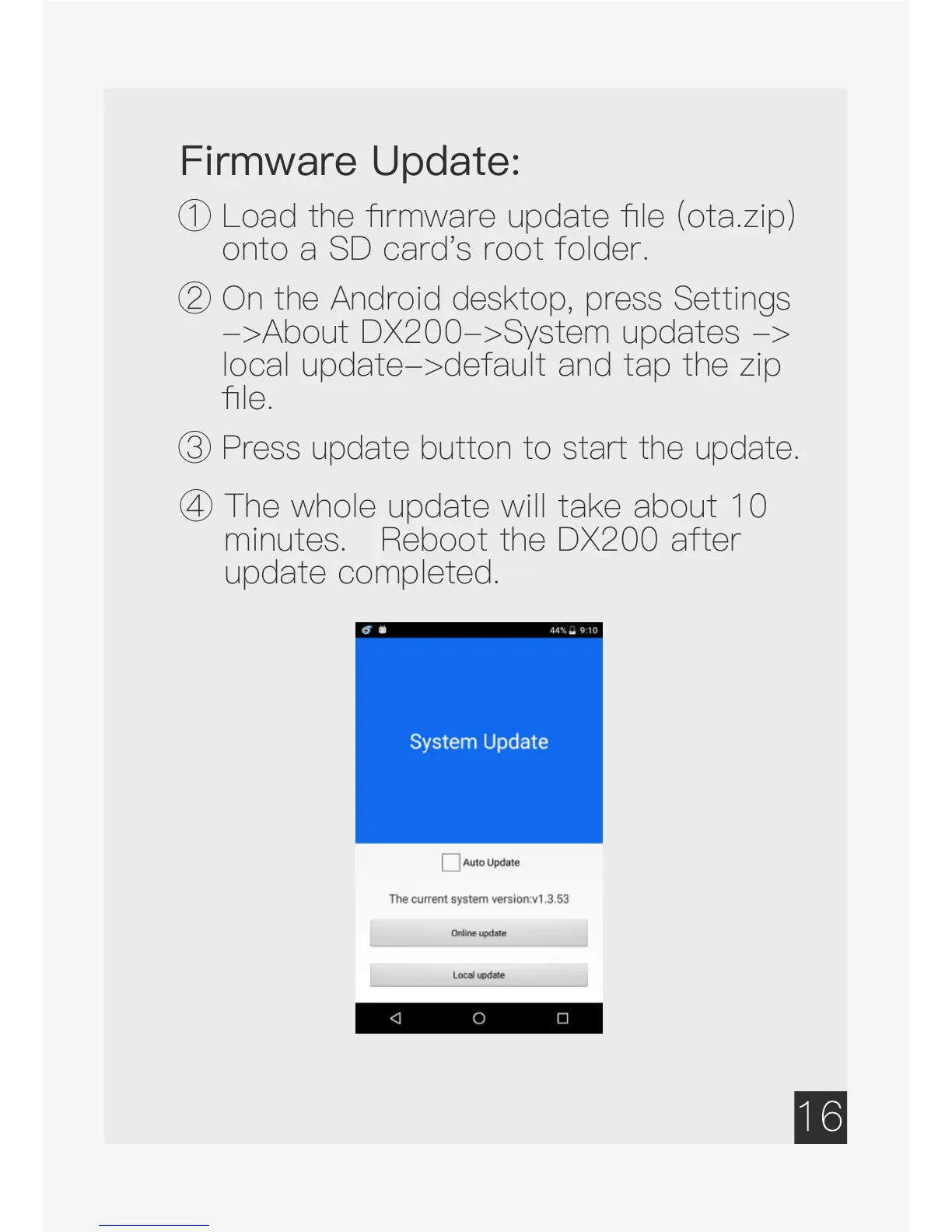
Firmware Update:
①
Load
the
firmware
update
file
(ota.zip)
onto a SD card's root folder.
②
On the Android desktop, press Settings
->About DX200->System updates ->
local update->default and tap the zip
file.
③
Press update button to start the update.
④
The
whole
update
will
take
about
10
minutes. Reboot the DX200 after
update completed.
17
19
Table of Contents
Main Page
Table of Contents
2
Package Components
2
Package Components
3
Leather Case
4
Quick Start Guide
4
Warranty Card
4
Main Features
5
Specifications
7
Names of Parts & Functions
8
Basic Operation
13
Power On/Off; Power On/Off the Screen
13
Android Basic Features Introduction
15
Usb Connections
17
Firmware Update
18
Power Off, Reboot, and System Switching
19
Mango Player Application Introduction
20
Music Playback Screen
21
Related product manuals
iBasso DX50
16 pages
iBasso DX80
32 pages


 To Next Page