button
(RAP) module shown
in Figure 5, typical pro-
grammed
functions for
action buttons are:
END
TRNS (E, 1): The agent
presses the end trans-
action
button to signal
the computer
that the trans-
action
with the customer
is completed and that his
record
may now be
placed in storage.
NEED
(E, 3): The agent
presses this button when
the
customer decides
to reserve space
on the flight
indicated
by the air
information sheet
and flight button,
origin
button,
date, and number
of seats.
Depressing
this
key causes
the computer
to update seats
inventory
(and
reservation
records if
this is a correction
to an
existing
record) and to send
a confirmation message
to
the agent. (The
format of
this confirmation
message
is
determined by
the airline’s
programming.)
CMTR
(E, 9): The
agent uses this
commuter button
to
signal the
computer that
the customer
habitually
makes
the requested
flight. The computer
then main-
tains
this passenger’s
data record
until signaled to
destroy
it. This makes
it unnecessary
for the agent to
repeatedly
re-enter
passenger data such
as address and
telephone
number on
future transactions.
ARNK
(E, 10): This button
means arrival unknown.
The
agent uses it in two situations:
1.
When the passenger is
accomplishing a segment
of
this itinerary independently.
To assure the computer
that
this segment is not being
forgotten, the agent
presses
ARNK and then enters
the following segment.
2.
When the passenger’s
initial boarding point is
elsewhere
than in the city
where the reservation is
made.
In this case, the agent
enters ARNK and then the
first
segment of the itinerary.
FILE
RCRD (E, 11): The agent presses the file-
record
button to cause the
computer to store the pas-
senger
file that the agent is currently
working with and,
at
the same time,
keep the file immediately
available
for
further itinerary adjustment.
SINE
(E, 12): Pushing this
button (after placing his
own
signature card
in the air information
device) en-
ables
the agent to
“sign in” with the
computer at the
beginning
of his work period and thereby reserve a
working
area in which
to carry on
reservation trans-
actions.
To “sign out” at the end of the work period,
the
agent merely pushes the
sine button without plac-
ing
his signature card in the air information device.
AVAIL (J, 5): Pushing this button causes the com-
puter
to indicate what flights shown on the air informa-
tion
sheet have the requested number of seats available
on the designated date.
LIST (J, 6): The agent pushes this button to put
the
customer on a waiting list for the designated
flight.
As soon as the computer receives this signal, it
sells
space if any has just been
released. If it cannot
10
sell,
it
records
the passenger
information
on
the waiting
list file.
FLIFO
(J, 7):
Pushing
this
flight
information
button
enables
the agent
to
receive
a flight
forecast
or
flight
progress
information
on a
designated
flight.
XTRA
SXN
(J,
8): When
the
sixteenth
flight
line
availability
reply
light comes
on,
the computer
is indi-
cating
that
an extra
section
has
been made
up
for the
flight
on the
date indicated.
The agent
now pushes
the
extra
section
button
to ask for
extra section
space
avail-
ability.
The
computer
response may
be the
lighting of
flight
indicators
or the
printing of
a message,
depend-
ing
upon programming.
IGNR
TRNS (J,
9): The agent pushes
this button
to
cause the
computer
to undo
everything
it
has done
since
the
last depression
of
the end transaction
button.
X
ITIN (J,
10): The agent
pushes
this button
to cause
the
computer
to cancel
the
complete
itinerary
of the
passenger
whose record
has
just been
retrieved.
As soon
as
the button
is
pushed,
the computer
erases
the
itiner-
ary
in the
passenger’s
record.
The
inventory
record
is
not updated
correspondingly,
however,
until the
end
transaction
button is
pushed.
RPT
(J,
11): The
agent pushes
the
reset and
then
the
repeat
buttons
under two
conditions:
(1)
after a
halt
in the
print-out
of a message
from
the computer,
accompanied
by
lighting
of the
push
repeat light
on
the
air information
device;
and
(2) when
no response
is
received
from the
data processing
center. When
the
repeat
button
is
pressed,
the computer
repeats
the last
entire
output
message.
LITE
CK
(J, 12):
To test that
all sixteen
availability
reply
lights
on
the air
information
device
are
opera-
tional,
the
agent pushes
the
light check
button.
Before
pushing
the
button,
the agent
must place
an
air infor-
mation
sheet
in the air
information
device.
IBM
1003B
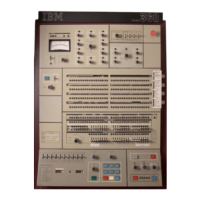
RAP-AID Combination
In
a city or
airport ticket
office—or any
installation
where
it is
more feasible
for the
sales agent
to stand
rather
than
to sit—a
combination
model
of
am and
RAP
is used. Its
features and
operation may
duplicate
those
previously
described
or they
may differ
as dic-
tated
by the needs
of the airline.
For example,
the rap-
aw combination
model
(Figure 6)
has the same
button
functions
as the
separate RAP
and arp except
for the
addition
of
A, B, C, and
our buttons.
These buttons
are
used
in installations
where
three
agents share
the same
agent’s
set.
Each agent
must
initially
sign in
with the
computer,
using
his own
signature
card. The
program
then
assigns
to each of
the agents
a working
assembly
area.
These
areas are
designated
A, B, C.
With this
programming,
the A,
B, C, and
our buttons
function
as
follows.
.
SZ
1003 TERMINAL SET
Figure
6. 18M
1003B rap-ai
Combination
A(D,7):
Agent
A pushes
this button
to identify
him-
self
with the
A working
area.
If agents
A, B, and
C have
initially
signed
in correctly
and
no information
has
been
entered
since the
end-transaction,
ignore
transac-
tion,
or our
button was
pushed,
the computer
sends
agent
A a
proceed-with-transaction
response.
At the
end
of the transaction,
the agent
must push
the appro-
priate
release
key so that
the next
transaction
can be
entered.
B
(D, 8): Agent
B uses
this button
in the
same way
that
agent
A uses the
A button.
C
(D, 9):
Agent C
uses this
button
in the same
way
that
agent
A uses the
A button.
OUT
(D, 10):
If an agent
has not
completed
a trans-
action
but
wishes
to relinquish
the
agent’s
set to
one of
the
other
agents, he
pushes
this button.
In doing
so, he
causes
the
computer
to
save
the information
in his
working
area so
that
it will
be ready
for renewed
activity
when he
again
pushes
his own
identification
button.
This
procedure
is another
example
of
programming
possibilities
and
may
vary
not only
between
airline
systems
but also
within
one system.
IBM
1003
Input-Output
Device
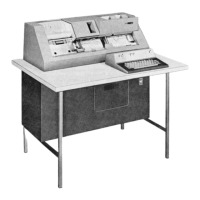
This
part
of the
agent’s
set
consists
of a
page
printer
and
alphameric
keyboard
(Figure
7). All
information
entered
through
the keyboard
(except
the
control
char-
acters)
is simultaneously
displayed
on the
printed
page
for
visual
verification.
No keys
(including
the
space
bar)
are
repetitive.
The
agent
must restrike
a
key or
the
space
bar for
each
repetitive
function
desired.
PHYSICAL
CHARACTERISTICS
The
keyboard
(Figures
7 and 12)
codes
the alphameric
characters
into
the
18m binary
coded
decimal
(scp)
code.
The
special
reservation-code
keys shown
in
Fig-
ure
7 are
typical
airlines
reservation
action
codes,
once
again
determined
by programming.
These
functions
Agents
Sets
11


 To Next Page
 Loading...