8
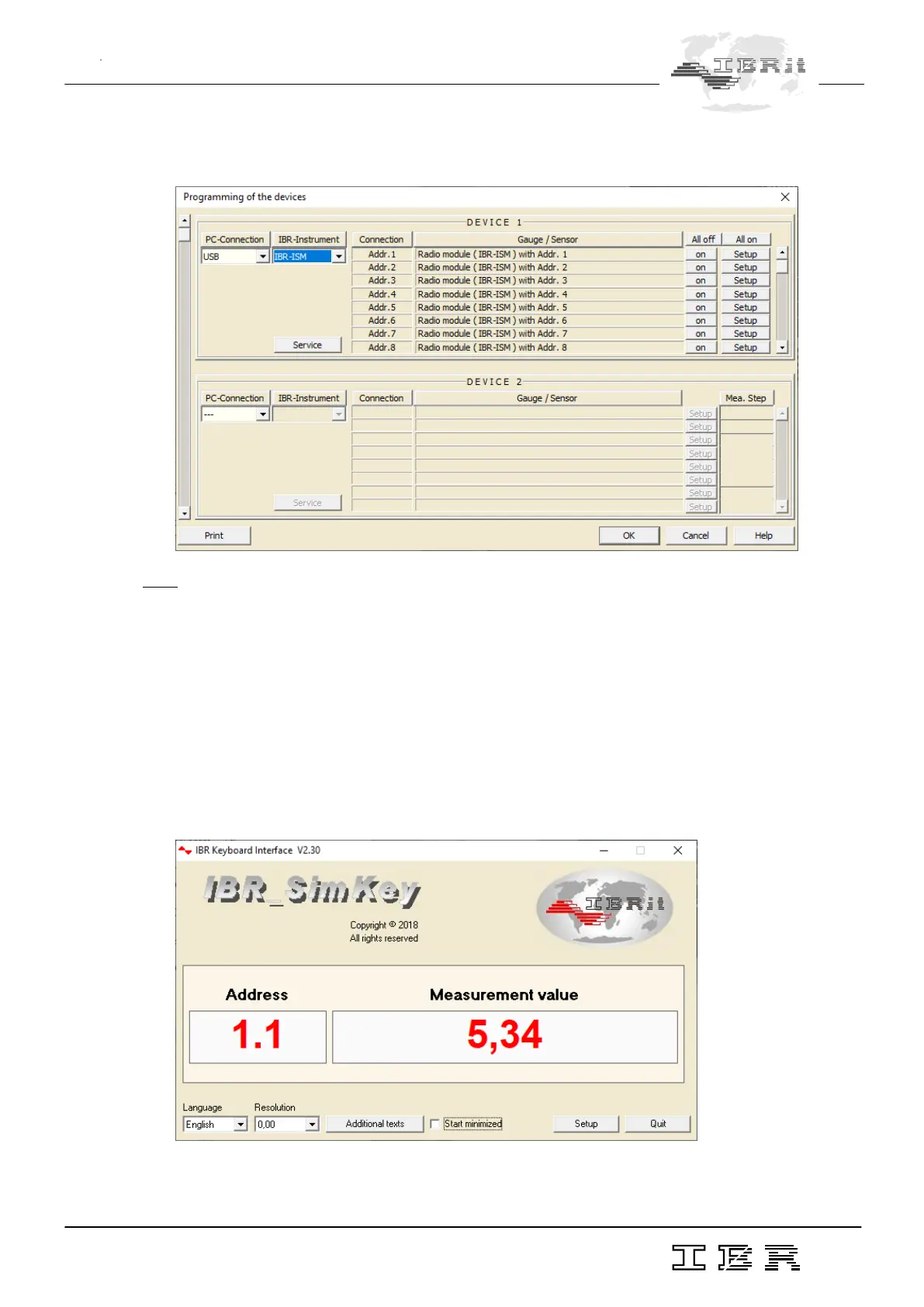
When the selections concerning the PC - connection and the IBR - instrument have been made, the
columns Connection and Gauge / Sensor are filled and displayed as shown below.
Note : If a (*) appears behind the entry IBR-ISM, then the ISM module was not found
( e.g. no driver installed, the IBR-ISM is used by another software, … ).
The gauge radio modules can be individually either activated or deactivated for operation with a
particular PC - Radio station. In order to do so, please click the on ( off ) - button of the radio module
concerned. The button is located directly on the right - hand side of the Gauge / Sensor column.
This programming possibility allows simultaneous operation of several PC - Radio stations with up to
120 radio modules. The addresses 121…499 can be assigned via the Setup buttons of the respective
channels.
By clicking on the OK - Button the settings are confirmed and the window is closed.
As a result, the display window of IBR_SimKey is opened and you can begin with transmission of
measurement data. The display window is shown below.
Now, measurement data can be transmitted to the PC by pressing the data key on the gauge
( if available ), or on the radio module.



 To Next Page