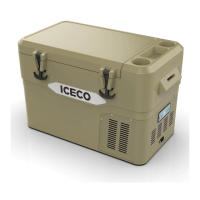
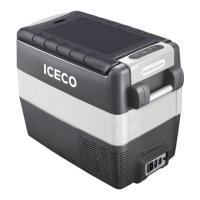
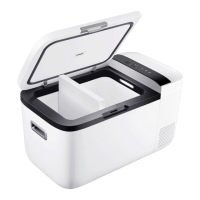
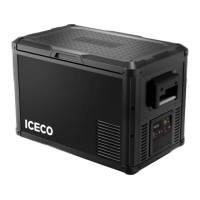
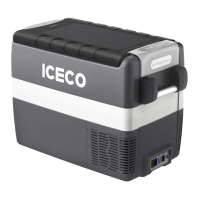
This document is a user manual for ICECO portable freezers, specifically models JP30, JP40, and JP50.
Function Description
The ICECO JP series portable freezers are designed to keep items refrigerated or frozen. They can operate on both AC (110-120V/220-240V) and DC (12V/24V) power, making them suitable for use at home, in vehicles, or during camping. The freezers feature a compressor for cooling and offer different operating modes to optimize performance and battery usage.
Important Technical Specifications
- Models: JP30, JP40, JP50
- Power Input:
- AC: 110-120V / 220-240V (50Hz/60Hz)
- DC: 12V / 24V (15A fuse)
- Compressor Speed Modes: MAX and ECO
- Battery Protection Modes: HIGH, MED, LOW (adjustable)
- Insulation Performance (JP30/JP40/JP50): From an ambient temperature of 25°C (77°F), the refrigerator temperature can be lowered from -18°C (0°F) to 20°C (68°F) in 3-4.5 hours on average (when empty).
- Power Draw (Max/Fast Cooling Mode):
- GO12: 50W
- GO20: 50W
- JP Series: 60W
- JP42: 55W
- VL35 Series: 65W
- VL Series: 85W
- Operating Temperature: Engineered to operate at ambient temperatures up to 55°C (131°F).
- Fuse: The supply line is protected by a 15A fuse located in the refrigerator.
Usage Features
- Power On/Off: Press and hold the 'A' (Power) button.
- Compressor Speed Adjustment: With the unit on, press the 'B' (MAX/ECO) button to toggle between MAX (maximum cooling speed) and ECO (energy-saving mode) compressor speeds.
- Temperature Setting:
- 'C' button: Decrease temperature setting.
- 'D' button: Increase temperature setting.
- Temperature Unit Switch (°C/°F): With the unit on, press and hold both 'C' and 'D' buttons simultaneously to switch between Celsius and Fahrenheit.
- Triple Battery Protection: This feature prevents over-discharge and battery depletion. Users can adjust the protection level to HIGH, MED, or LOW using a dedicated button. When the measured DC voltage falls below the set value for the chosen mode, the compressor automatically shuts off.
- Cut-out/Cut-in Voltages:
- LOW: 12V (Cut-out: 9.6V, Cut-in: 10.6V), 24V (Cut-out: 21.3V, Cut-in: 22.7V)
- MED: 12V (Cut-out: 10.1V, Cut-in: 11.4V), 24V (Cut-out: 22.3V, Cut-in: 23.7V)
- HIGH: 12V (Cut-out: 11.1V, Cut-in: 12.4V), 24V (Cut-out: 24.3V, Cut-in: 25.7V)
- Display: The display shows a solid/non-flashing number for the current interior temperature and a flashing number for the set temperature. The compressor will shut off once the set temperature is reached.
- Included Accessories:
- Refrigerator
- Insulated Protective Cover
- 110V AC Wall Outlet Cable
- Wired Basket
- 12/24V DC Cigarette Lighter Plug Cable
- 12 Feet Cigarette Extension Cable
- Weather Proof: Can operate under light rain conditions. Vents should be kept clear of water, and clearances added to the bottom if the ground is wet. Not recommended for moderate or heavy rain.
- Initial Setup: If the refrigerator is delivered upside down, leave it upright for 24 hours before powering on to allow compressor lubricant to resettle.
- Temperature Difference: Due to the sinking nature of cold air, different temperatures may exist within the refrigerator (bottom being the coldest). The display shows the center temperature.
- Cables: Both AC and DC cables are provided for home and car use.
- Camping Use: This appliance is suitable for camping.
Maintenance Features
- Cleaning:
- Power off and unplug the unit before cleaning.
- Use a wet cloth and warm water mixed with gentle, non-abrasive detergents to clean the interior and exterior.
- Do not scrape the interior to defrost/de-ice.
- Do not pressure-wash/spray with a running water hose.
- Power Cable Replacement: The power cable must only be replaced by qualified technical personnel or an assistant body authorized by the manufacturer.
- Maintenance Operations: Disconnect all power sources from the fridge before carrying out any maintenance.
- Ventilation: Keep the fridge in a well-ventilated area.
- Defrosting: Do not use mechanical devices or other means to accelerate defrosting, other than those recommended by the manufacturer.
Safety Instructions
- Read the user manual and safety instructions carefully.
- Do not leave unattended in uncovered, outdoor areas exposed to elements.
- Do not use near direct heat sources (open flame, radiator).
- Do not place open containers of liquid inside.
- Do not put hot/warm food directly into the fridge without cooling it off first.
- Secure contents when using in a moving vehicle.
- Ensure the lid is closed and secure to maximize energy savings.
- Do not use electrical devices inside food storage compartments unless approved/recommended by the manufacturer.
- Do not store explosive items (e.g., aerosol cans with flammable propellant).
- Risk of fire and electrical shock.
- Do not let hot items touch plastic parts.
- Do not put flammable products or items in, near, or on the appliance.
- Do not touch the compressor or condenser when operating, as they may be very hot.
- Ensure the supply cord is not trapped or damaged during setup.
- This appliance is not intended for use by persons (including children) with reduced physical, sensory, or mental capabilities, or lack of experience and knowledge, unless supervised or instructed by a responsible person.
- Children should be supervised to ensure they do not play with the appliance.
- Intended for household and similar applications (staff kitchen areas, farmhouses, hotels, motels, bed and breakfast environments, catering, non-retail applications).
- Child Entrapment Risk: Before discarding an old refrigerator or freezer, remove doors and leave shelves in place to prevent children from climbing inside.


 To Next Page
 General