EasyManua.ls Logo

Iceco JP30 Series - User Manual

Iceco JP30 Series
12 pages
Print Icon
To Next Page IconTo Next Page
Loading...
JP30/40/50
Question and Answer IconNeed help?

Do you have a question about the Iceco JP30 Series and is the answer not in the manual?

Summary

SAFETY INFORMATION

General Warnings and Precautions

Covers warnings, notices, cautions, and intended use of the appliance.

Disposal and Danger Warnings

Instructions for correct product disposal and warnings about child entrapment risks.

PRODUCT DESCRIPTION AND SPECIFICATIONS

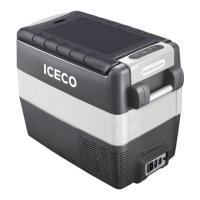
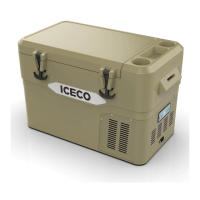
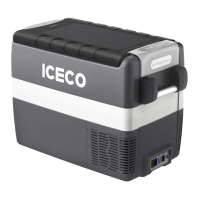
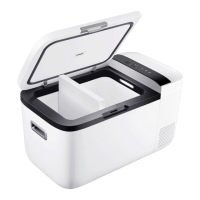
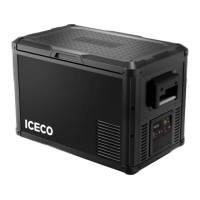
JP30, JP40, JP50 Series Overview

Visuals and basic dimensions of JP30, JP40, and JP50 refrigerator models.

Technical Specifications Table

Detailed specifications including model, dimensions, weight, volume, voltage, and refrigerant.

Naming Method Explanation

Explanation of the naming convention used for ICECO refrigerator models.

GETTING STARTED

INSTALLATION GUIDELINES

Instructions for placing and securing the refrigerator for optimal operation.

OPERATING THE REFRIGERATOR

USING THE REFRIGERATOR IN A VEHICLE

Specific instructions for connecting and operating the refrigerator in a vehicle environment.

USING THE REFRIGERATOR AT HOME

ELECTRONIC CONTROL SYSTEM

FILLING AND DEFROSTING

DEFROSTING PROCEDURE

Steps for defrosting the unit when frost thickness exceeds 4 mm.

MAINTENANCE AND CLEANING

CLEANING GUIDELINES

Instructions for cleaning the inside and outside of the refrigerator.

OPERATIONAL SUGGESTIONS

GENERAL SAFETY MESSAGES

IMPORTANT NOTICES

TROUBLESHOOTING FAULTS

E1: Battery Protection Cut-out

Error indicating voltage outside the cut-out setting for battery protection.

E2: Fan Over-current Cut-out

Error caused by the fan loading the electronic unit with excessive current.

E3: Motor Start Error

Error when the motor rotor is blocked or system pressure is too high.

E4: Minimum Motor Speed Error

Error if the motor cannot maintain minimum speed due to system load.

E5: Thermal Cut-out of Electronic Unit

Error due to the electronic unit overheating from system load or ambient temperature.

PRODUCT GUARANTEE INFORMATION

QUESTIONS AND COMMENTS

Summary

SAFETY INFORMATION

General Warnings and Precautions

Covers warnings, notices, cautions, and intended use of the appliance.

Disposal and Danger Warnings

Instructions for correct product disposal and warnings about child entrapment risks.

PRODUCT DESCRIPTION AND SPECIFICATIONS

JP30, JP40, JP50 Series Overview

Visuals and basic dimensions of JP30, JP40, and JP50 refrigerator models.

Technical Specifications Table

Detailed specifications including model, dimensions, weight, volume, voltage, and refrigerant.

Naming Method Explanation

Explanation of the naming convention used for ICECO refrigerator models.

GETTING STARTED

INSTALLATION GUIDELINES

Instructions for placing and securing the refrigerator for optimal operation.

OPERATING THE REFRIGERATOR

USING THE REFRIGERATOR IN A VEHICLE

Specific instructions for connecting and operating the refrigerator in a vehicle environment.

USING THE REFRIGERATOR AT HOME

ELECTRONIC CONTROL SYSTEM

FILLING AND DEFROSTING

DEFROSTING PROCEDURE

Steps for defrosting the unit when frost thickness exceeds 4 mm.

MAINTENANCE AND CLEANING

CLEANING GUIDELINES

Instructions for cleaning the inside and outside of the refrigerator.

OPERATIONAL SUGGESTIONS

GENERAL SAFETY MESSAGES

IMPORTANT NOTICES

TROUBLESHOOTING FAULTS

E1: Battery Protection Cut-out

Error indicating voltage outside the cut-out setting for battery protection.

E2: Fan Over-current Cut-out

Error caused by the fan loading the electronic unit with excessive current.

E3: Motor Start Error

Error when the motor rotor is blocked or system pressure is too high.

E4: Minimum Motor Speed Error

Error if the motor cannot maintain minimum speed due to system load.

E5: Thermal Cut-out of Electronic Unit

Error due to the electronic unit overheating from system load or ambient temperature.

PRODUCT GUARANTEE INFORMATION

QUESTIONS AND COMMENTS

Overview

This document provides a comprehensive guide for the ICECO JP30/40/50 series of portable refrigerators, designed for both vehicle and home use. It covers safety information, detailed descriptions of the models, getting started instructions, electronic control features, filling and defrosting procedures, maintenance tips, suggestions for troubleshooting, general safety messages, and fault codes.

Function Description:

The ICECO JP30/40/50 series are portable refrigerators intended for cooling and preserving food and beverages. They are designed for versatility, operating on both DC (12V/24V) and AC (110-120V) power sources, making them suitable for use in vehicles, homes, and various other environments such as staff kitchens, farmhouses, hotels, motels, bed and breakfast establishments, and catering services. The refrigerators feature an electronic control system that manages the compressor motor, offering protection for the battery and ensuring efficient cooling. Users can select between "MAX" mode for rapid cooling or high ambient temperatures, and "ECO" mode for energy efficiency, especially in low ambient temperatures or when the vehicle engine is off. The appliance is designed to automatically switch between DC and AC power, prioritizing AC when both are available.

Important Technical Specifications:

Model JP30 Series JP40 Series JP50 Series
Dimensions 15.0 x 23.0 x 13.8 (inch) 17.5 x 23.0 x 13.8 (inch) 20.9 x 23.0 x 13.8 (inch)
(HxWxD) 38.0 x 58.5 x 35.0 (cm) 44.5 x 58.5 x 35.0 (cm) 53.0 x 58.5 x 35.0 (cm)
Net Weight 35.3 lbs (16 kg) 37.5 lbs (17 kg) 40.8 lbs (18.5 kg)
Storage Volume 31.7 quarts (30 liters) 42.3 quarts (40 liters) 52.8 quarts (50 liters)
Voltage DC 12/24V & AC 110-120V 50/60 Hz DC 12/24V & AC 110-120V 50/60 Hz DC 12/24V & AC 110-120V 50/60 Hz
Refrigerant R134a R134a R134a

The appliance contains fluorinated greenhouse gas R134a within a hermetically sealed system.

Battery Protection (Cut-out/Cut-in Voltages):

Switch Position Cut-out 12V Cut-in 12V Cut-out 24V Cut-in 24V
LOW 9.6 10.9 21.3 22.7
MED 10.1 11.4 22.3 23.7
HIGH 11.1 12.4 24.3 25.7

Usage Features:

  • Power Connection: The refrigerator can be powered by DC (12V/24V) or AC (110-120V). It comes with both AC and DC connection cables.
  • Control Panel: Features an ON/OFF button, MAX/ECO mode selection, and temperature adjustment buttons (+ and -). The LED display shows the interior temperature.
  • Temperature Adjustment: Pressing the + or - buttons adjusts the temperature. Pressing both simultaneously switches the display between °C and °F.
  • Operating Modes:
    • MAX Mode: The compressor runs at maximum speed for rapid cooling, ideal for high ambient temperatures or when quick temperature achievement is needed.
    • ECO Mode: The compressor runs at minimum speed to maintain a fresh temperature, suitable for low ambient temperatures or when the vehicle engine is off to conserve battery.
  • Vehicle Use: Connects to a 12V or 24V DC power source. The supply line is protected by a 15A fuse. It is recommended to secure the fridge with metal brackets to prevent damage during transport. Avoid placing liquids or ice not in sealed containers.
  • Home Use: Connects to 110-120V AC mains power. The device automatically switches over from DC to AC, prioritizing AC when both are connected.
  • Battery Protection: An electronic device protects the battery by automatically turning off the compressor when the feeding voltage reaches a minimum threshold. The compressor restarts automatically when voltage returns to normal.
  • Filling: Do not place hot food items directly into the refrigerator. Arrange products to prevent collision and breakage during movement. Ensure the lid is always well closed and opened for the shortest possible time.

Maintenance Features:

  • Cleaning: Regularly clean the inside and outside of the refrigerator with warm water and a neutral detergent. Rinse with clean water and dry thoroughly with a soft cloth. Avoid using abrasive cleaners, alcohol, ammonia, or special glass/mirror cleaning products. If not in use, clean thoroughly and leave the door ajar for ventilation.
  • Defrosting: Defrosting is required when the frost layer exceeds 4 mm. Turn off the refrigerator, allow it to unfreeze completely, and then turn it on again. Do not use sharp or cutting tools to remove frost or ice.
  • Power Disconnection: Always disconnect the power cable from the plug before carrying out any maintenance operations.
  • General Safety:
    • Keep ventilation openings clear of obstruction.
    • Do not use electrical appliances inside food storage compartments unless recommended by the manufacturer.
    • Do not place ice or unsealed liquids inside.
    • Do not place hot products (75°F or higher) inside; allow them to cool to 50°F or less first.
    • Do not expose the cooler to extreme heat or direct sunlight for extended periods.
    • Do not tip or store the cooler at an angle greater than 30° for extended periods to prevent compressor oil contamination.
    • Allow 2-4 inches of space around the cooler for proper ventilation.
    • Secure the cooler with straps or a mounting plate in mobile applications.
    • The power supply cable must only be replaced by qualified technical personnel or an authorized after-sales service.
  • Fault Codes: The device indicates faults through a series of flashes (E1-E5) on the display, corresponding to specific error types such as battery protection cut-out, fan over-current, motor start error, minimum motor speed error, and thermal cut-out of the electronic unit.

Warranty:

ICECO products come with a 3-year warranty on the compressor and a 1-year warranty on all other parts from the date of purchase. The warranty covers repairs or replacements if the product fails when used according to the user guide. It does not cover products not used in accordance with the user guide or outside the warranty terms and conditions.

Iceco JP30 Series Specifications

General IconGeneral
BrandIceco
ModelJP30 Series
CategoryRefrigerator
LanguageEnglish

Related product manuals