EasyManua.ls Logo

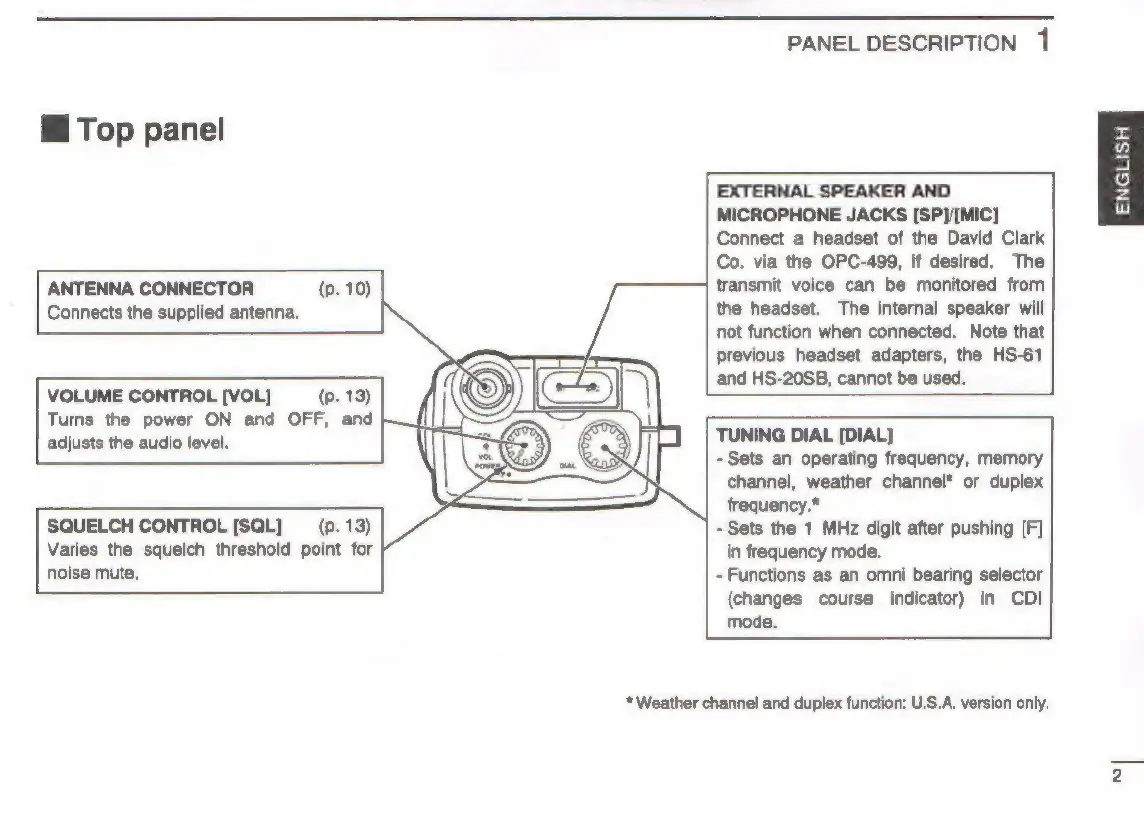
Icom IC-A22E - Top Panel

Icom IC-A22E
63 pages
Print Icon
To Next Page IconTo Next Page
To Previous Page IconTo Previous Page
Loading...
PANEL
DESCRIPTION
1
Hi
Top
panel
EXTERNAL
SPEAKER
AND
MICROPHONE
JACKS
[SP}/[MIC]
Connect
a
headset
of
the
David
Clark
Co.
via
the
OPC-499,
if
desired.
The
transmit
voice
can
be
monitored
from
the
headset.
The
internal
speaker
will
not
function
when
connected.
Note
that
previous
headset
adapters,
the
HS-61
and
HS-20SB,
cannot
be
used.
ANTENNA
CONNECTOR
(p.
10)
Connects
the
supplied
antenna.
VOLUME
CONTROL
[VOL]
(p.
13)
Turns
the
power
ON
and
OFF,
and
adjusts
the
audio
level.
TUNING
DIAL
[DIAL]
-
Sets
an
operating
frequency,
memory
channel,
weather
channel*
or
duplex
frequency.*
=
Sets
the
1
MHz
digit
after
pushing
(F]
in
frequency
mode.
-
Functions
as
an
omni
bearing
selector
(changes
course
indicator)
in
CDI
mode.
SQUELCH
CONTROL
[SQL]
(p.
13)
Varies
the
squelch
threshold
point
for
noise
mute.
*
Weather
channel
and
duplex
function:
U.S.A.
version
only.
ENGLISH
sa
|

Other manuals for Icom IC-A22E

Related product manuals