26
4
CONNECTION AND MAINTENANCE
r
t
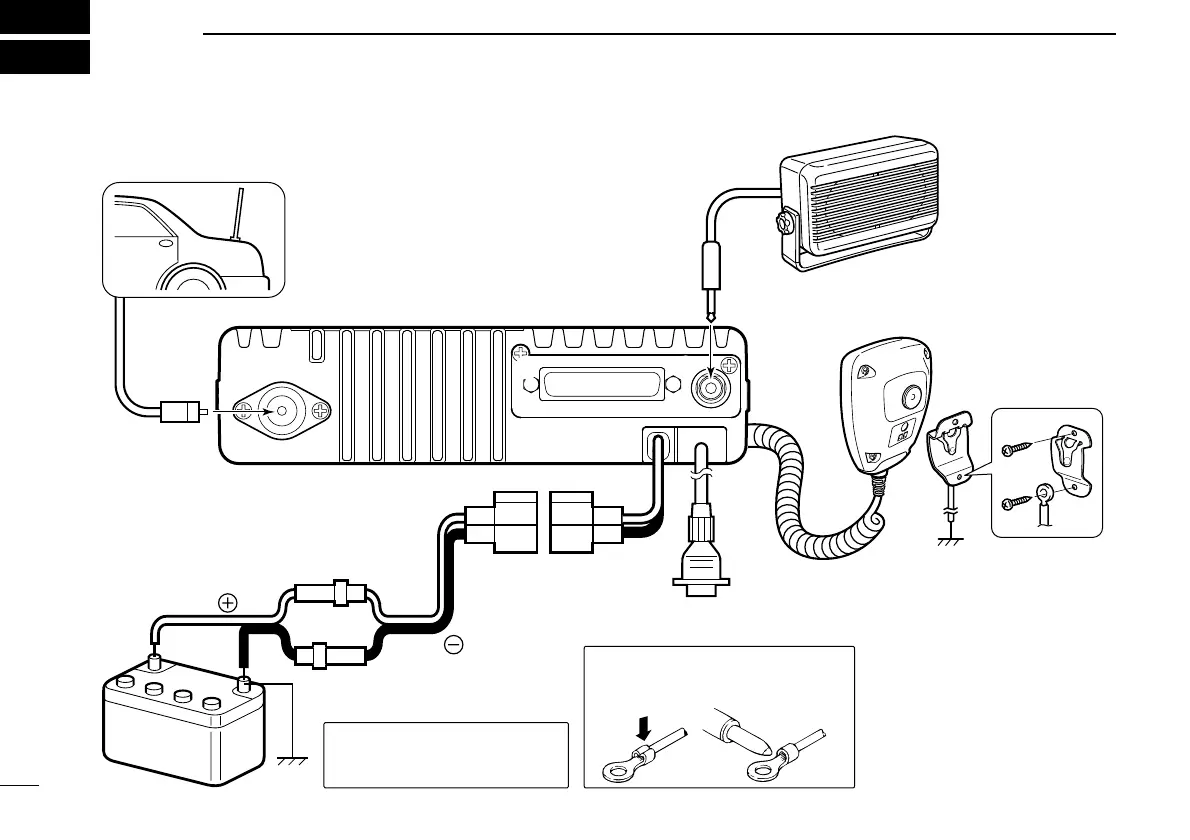
Antenna
Black
Red
12V
Battery
Solder
Crimp
NOTE: Use the terminals as shown
below for the cable connections.
R CAUTION! NEVER remove
the fuse-holder from the DC
power cable.
q ANTENNA CONNECTOR
Connects to an antenna.
Contact your dealer about
antenna selection and
placement.
q
ew
e EXTERNAL
SPEAKER JACK
w Reserved for a
future function.
Connect a 4–8 Ω
external speaker.
r MICROPHONE HANGER
Connect the supplied mi-
crophone hanger to the
vehicle’s ground for mi-
crophone on/off hook
functions. (See p. 2)
t OPTIONAL CABLE
(OPC-617)
Connect an external mo-
dem unit, dimmer control,
etc.
y
y DC POWER RECEPTACLE
Connects to a 12 V DC battery. Pay atten-
tion to polarities. NEVER connect to a 24 V
battery. This could damage the transceiver.
Supplied speaker SP-22
(IC-F1821/D or IC-F2821/D only.
IC-F1721/D and IC-F2721/D has
a built-in speaker.)


 To Next Page
 Loading...