12
3
CONVENTIONAL OPERATION
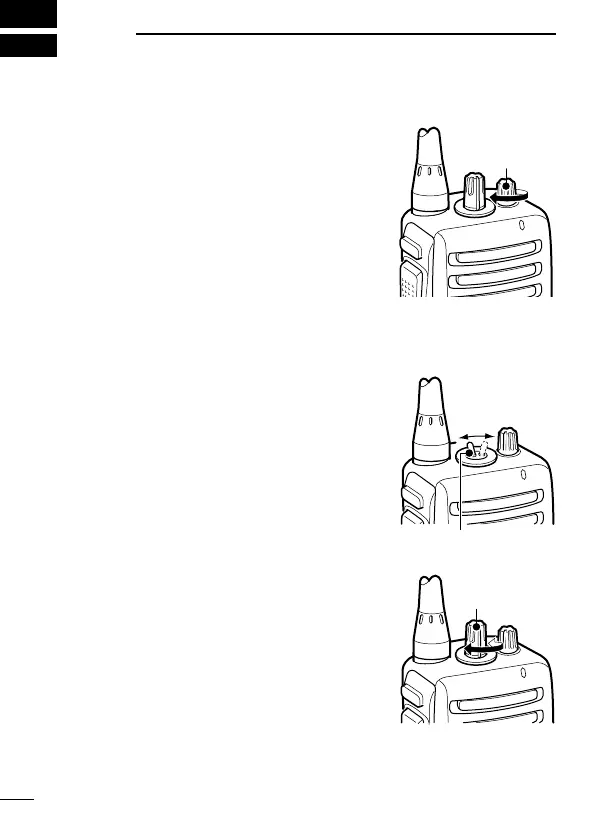
■ Turning power ON
➥ Rotate [VOL] to turn power ON.
■ Channel selection
IC-F15S/F25S:
Toggle [CHANNEL SWITCH] to se-
lect the channel 1 or 2, or, push one of
[MR-CH 1] to [MR-CH 4] key to select a
channel directly.
• The memory channels 3 and 4 are avail-
able when [MR-CH 3] and [MR-CH 4]
keys are assigned.
IC-F15/F25:
Rotate [CHANNEL SELECTOR] to se-
lect the desired operating channel, in
sequence; or, push one of [MR-CH 1] to
[MR-CH 4] key to select a channel di-
rectly.
AUTOMATIC SCAN TYPE:
Channel setting is not necessary for this type. When turning the
power ON, the transceiver automatically starts scanning. Scanning
stops when receiving a call.
[CHANNEL
SELECTOR]
[CHANNEL SWITCH]


 To Next Page
 Loading...