21
5
BATTERY CASE
4
5
■ Optional battery case (BP-240)
When using the optional battery case, install 6 × AAA (LR03)
size alkaline batteries as illustrated at right.
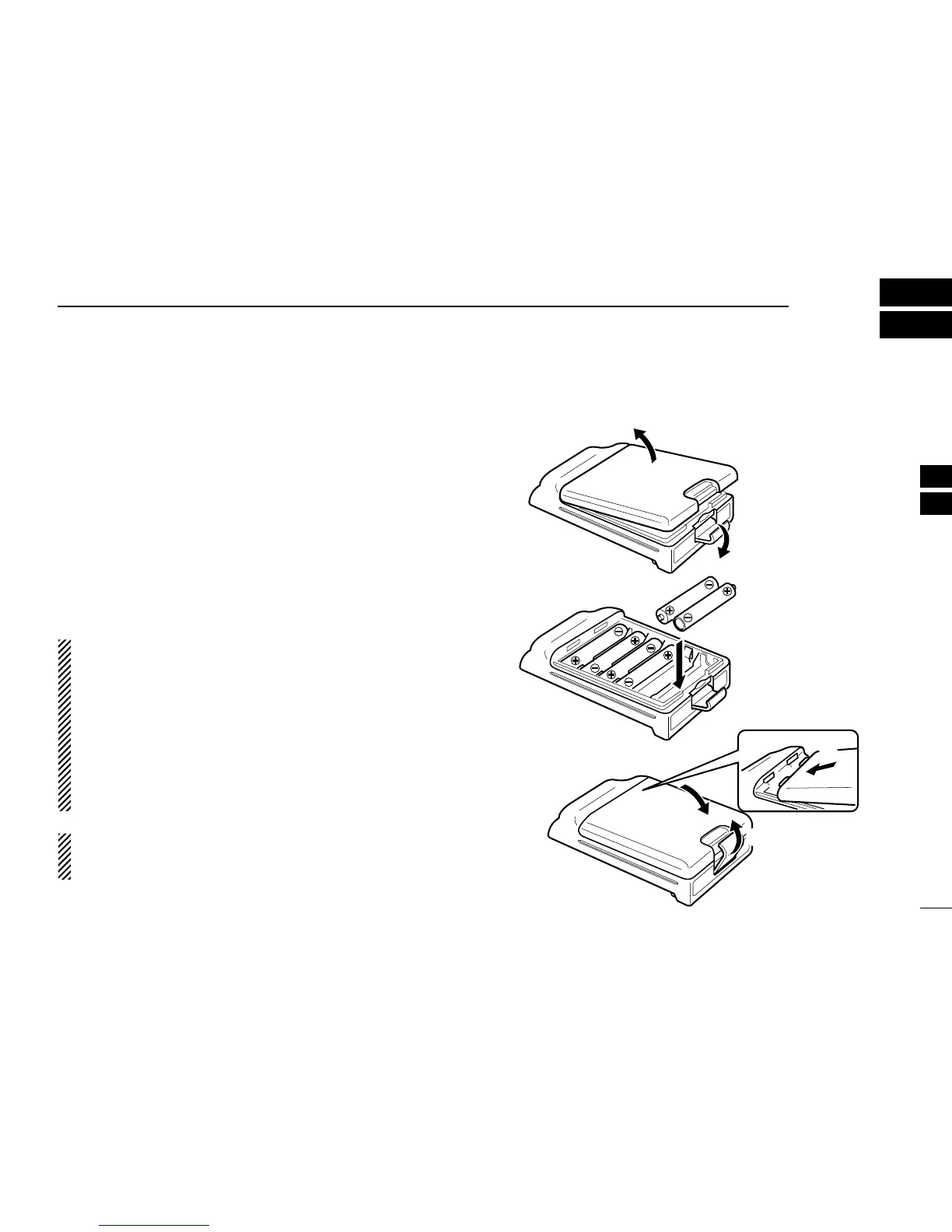
q Unhook the battery cover release hook (q), and open the
cover in the direction of the arrow (w). (Fig.1)
w Then, install 6 × AAA (LR03) size alkaline batteries. (Fig.2)
• Install the alkaline batteries only.
• Be sure to observe the correct polarity.
• Do not pin the ribbon under the batteries.
e Fit the cover in the direction of the arrow (e), then close
(r). And hook the battery cover release hook until it
makes a ‘click’ sound (t). (Fig.3)
CAUTION:
• When installing batteries, make sure they are all the same
brand, type and capacity. Also, do not mix new and old
batteries together.
• Keep battery contacts clean. It’s a good idea to clean bat-
tery terminals once a week.
•Never incinerate used battery cells since internal battery
gas may cause them to rupture.
• Never expose a detached battery case to water. If the bat-
tery case gets wet, be sure to wipe it dry before using it.
NOTE: When the optional battery case is attached, the
battery type must be selected to “DRY BATT” when turn-
ing the transceiver ON. (p. 10)


 To Next Page
 Loading...