8
3
BASIC OPERATION
3
■ Turning power ON
Prior to using the transceiver for the first time, the
battery pack must be fully charged for optimum life and
operation. (p. 17)
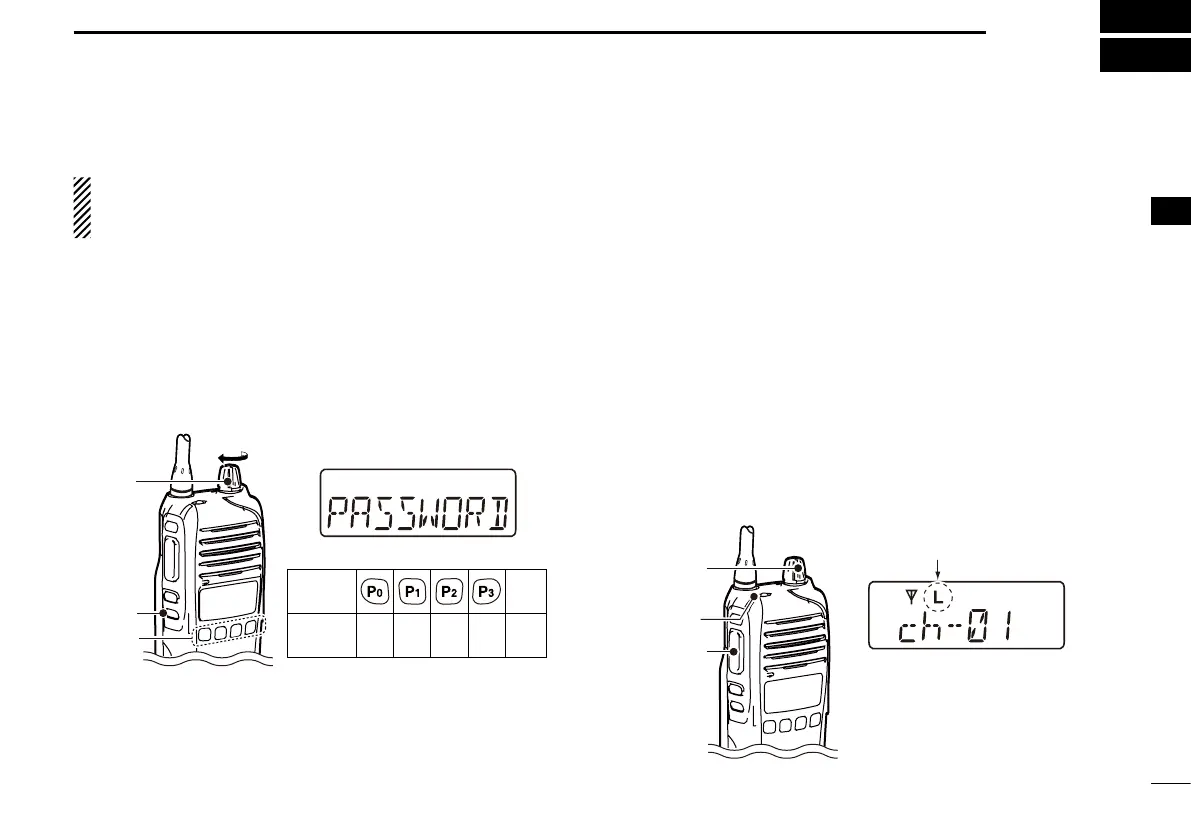
q Rotate [VOL] to turn ON the transceiver.
w If the transceiver is programmed for a start up password,
input the digit codes as directed by your dealer.
• 10-keypad can be used for password input depending on
version:
• The keys in the table below can be used for password input:
• The transceiver detects numbers in the same block as
identical. Therefore “01234” and “56789” are the same.
KEY
NUMBER
0
5
4
9
3
8
2
7
1
6
[Side3]
Side3
[VOL]
e
When the “PASSWORD” indication does not clear after
inputting 4 digits, the input code number may be incorrect.
Turn OFF the transceiver and start over in this case.
D Battery type selection
The battery type must be selected according to the type of
battery you are using when turning ON the transceiver.
Ask your dealer for details.
q Turn OFF the transceiver.
w
Hold down [Emer] and [PTT], then rotate [VOL] to turn
ON the transceiver, and toggle the type of battery you are
using.
• After the battery type is displayed, release [Emer] and [PTT].
• “DRY BATT” is displayed for about 3 seconds then “L” is
displayed when the battery case operation is selected. In this
case, the transmit output power is low.
• “LI-ION” is displayed for about 3 seconds when the Lithium-
ion battery operation is selected.
[VOL]
[PTT]
[Emer]
Dry battery mode
Displayed


 To Next Page
 Loading...