22
6
SPEAKER MICROPHONE
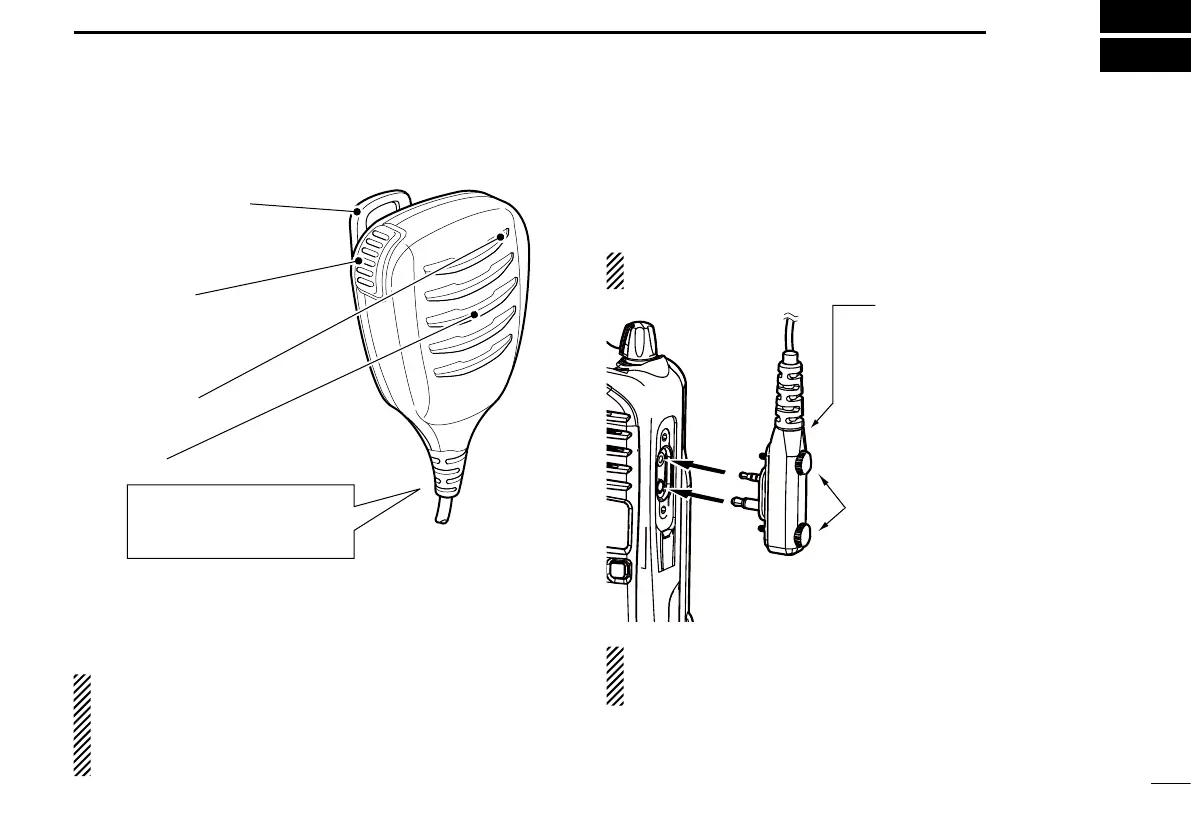
■ Optional HM-168LWP description
Alligator type clip
To attach the speaker-mic.
to your shirt or collar, etc.
PTT switch
Transmits while pushed
Receives while released
Microphone
Speaker
Turn the transceiver power
OFF when connecting the
HM-168LWP.
NEVER immerse the connector in water. If the connector
becomes wet, be sure to dry it BEFORE attaching it to the
transceiver.
NOTE: The microphone is located as shown in the dia-
gram above. To maximize the readability of your transmit-
ted signal (voice), hold the microphone approximately 5
to 10 cm (2 to 4 inches) from your mouth, and speak in a
normal voice level.
■ Attachment
Attach the connector of the speaker-microphone into the [SP
MIC] jack on the transceiver and tighten the screws with fin-
gers.
NOTE: Use only your fingers instead of tools to tighten
the screws.
IMPORTANT: Keep the [SP MIC] jack cover attached to
the transceiver when the speaker-microphone is not in
use.
Hand tighten
CAUTION: Attach the con-
nector snugly.
A loose connection will al-
low water intrusion into the
connector.


 To Next Page
 Loading...