2
1
ACCESSORIES
1
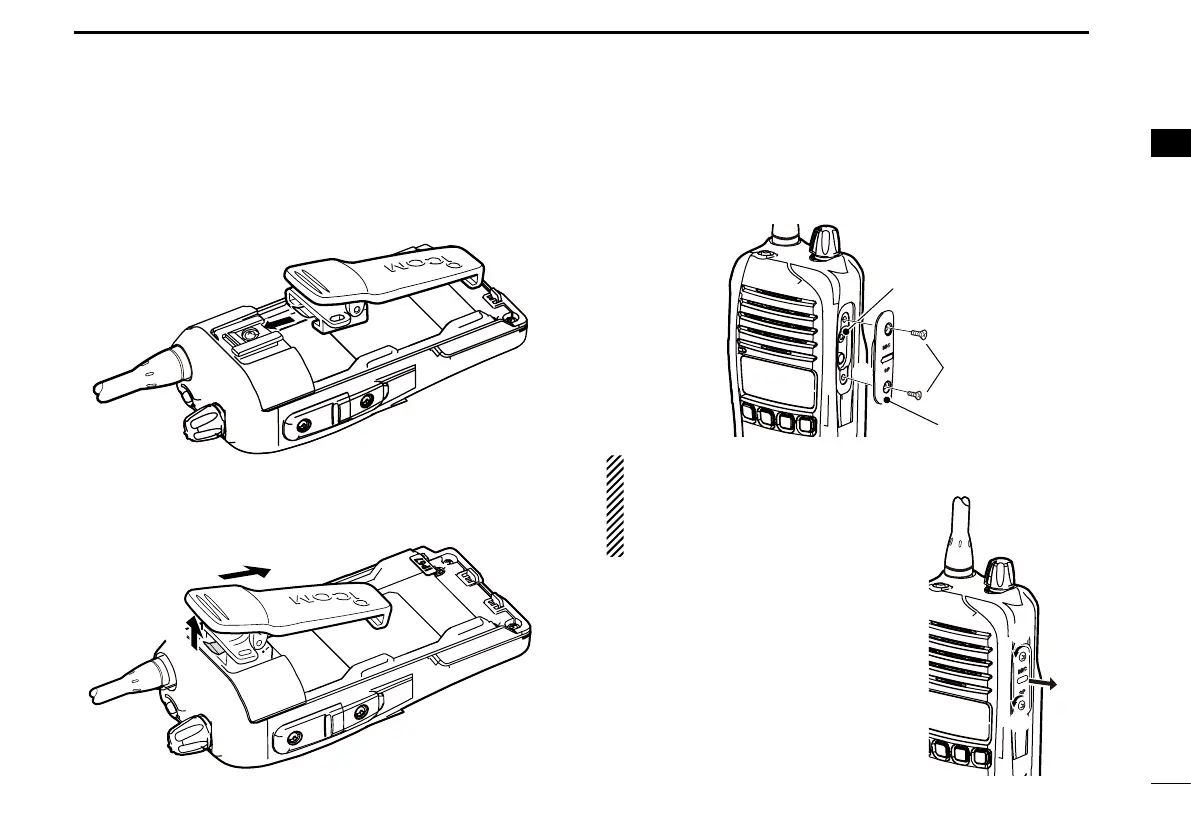
D Belt clip
To attach the belt clip:
q Release the battery pack if it is attached.
w Slide the belt clip in the direction of the arrow until the belt
clip is locked and makes a ‘click’ sound.
To detach the belt clip:
q Release the battery pack if it is attached.
w Pinch the clip (q), and slide the belt clip in the direction of
the arrow (w).
q
w
D Jack cover
To attach the jack cover:
q Attach the jack cover to the [MIC/SP] jack.
w Tighten the screws.
w
[MIC/SP] jack
q
q
q
w
CAUTION:
• Attach the jack cover when the op-
tional speaker-microphone is not
used.
• Use the supplied screws only.
To detach the jack cover:
q Unscrew the screws using a phillips
screwdriver.
w Detach the jack cover for the speak-
er-microphone or headset connec-
tion.


 To Next Page
 Loading...