23
7
DIGITAL SELECTIVE CALLING (DSC)
■ Sending DSC calls (other)
NOTE: To ensure proper DSC operation, be sure to correctly adjust the “CH 70 SQL
Level” item on the Menu screen. (p. 45)
D Sending an Individual call
NOTE: You can also compose an Individual call to an AIS target on the Plotter screen or
the AIS list. (pp. 53, 56)
1. Push
.
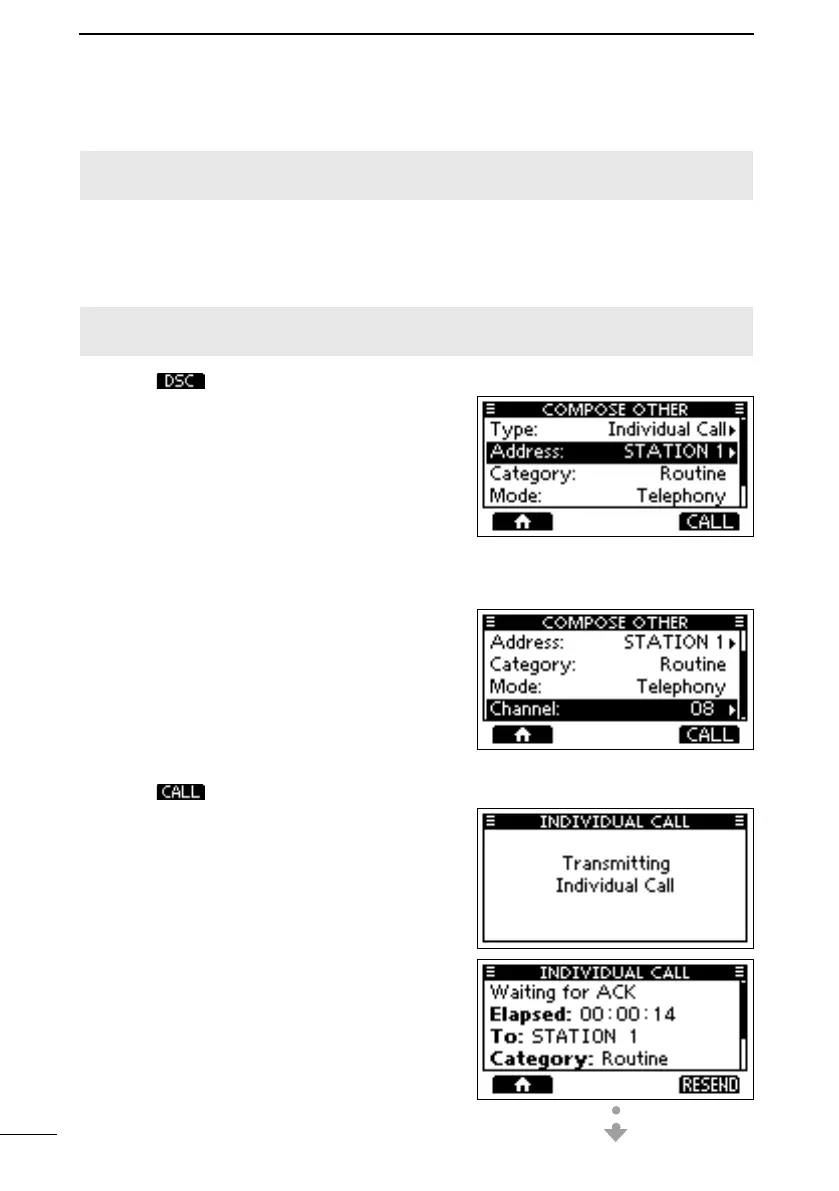
• The “COMPOSE OTHER” screen is displayed.
L You can also display the screen by selecting
the “Compose Other” item on the Menu screen.
2. Select “Type,” and then push [ENT] or [DIAL].
3. Select “Individual Call,” and then push [ENT]
or [DIAL].
• Returns to the previous screen.
4. Select “Address,” and then push [ENT] or [DIAL].
5. Select the station to send an Individual call to,
and then push [ENT] or [DIAL].
• Returns to the previous screen.
L You can also select “Manual Input” to manually
enter the target station ID.
6. Select “Channel,” and then push [ENT] or
[DIAL].
7. Select a channel to assign, and then push
[ENT] or [DIAL].
L The assigned channels are preset by default.
8. Push to send the Individual call.
• “Transmitting Individual Call” is displayed, and
then “Waiting for ACK” is displayed.
L If Channel 70 is busy, the transceiver stands
by until the channel becomes clear.
FELLECS-TECH | inbox@fellecs-tech.com | www.fellecs-tech.com



 To Next Page