54
1
7
4
10
15
18
2
8
13
5
11
16
3
9
14
6
12
17
AIS FUNCTION
8
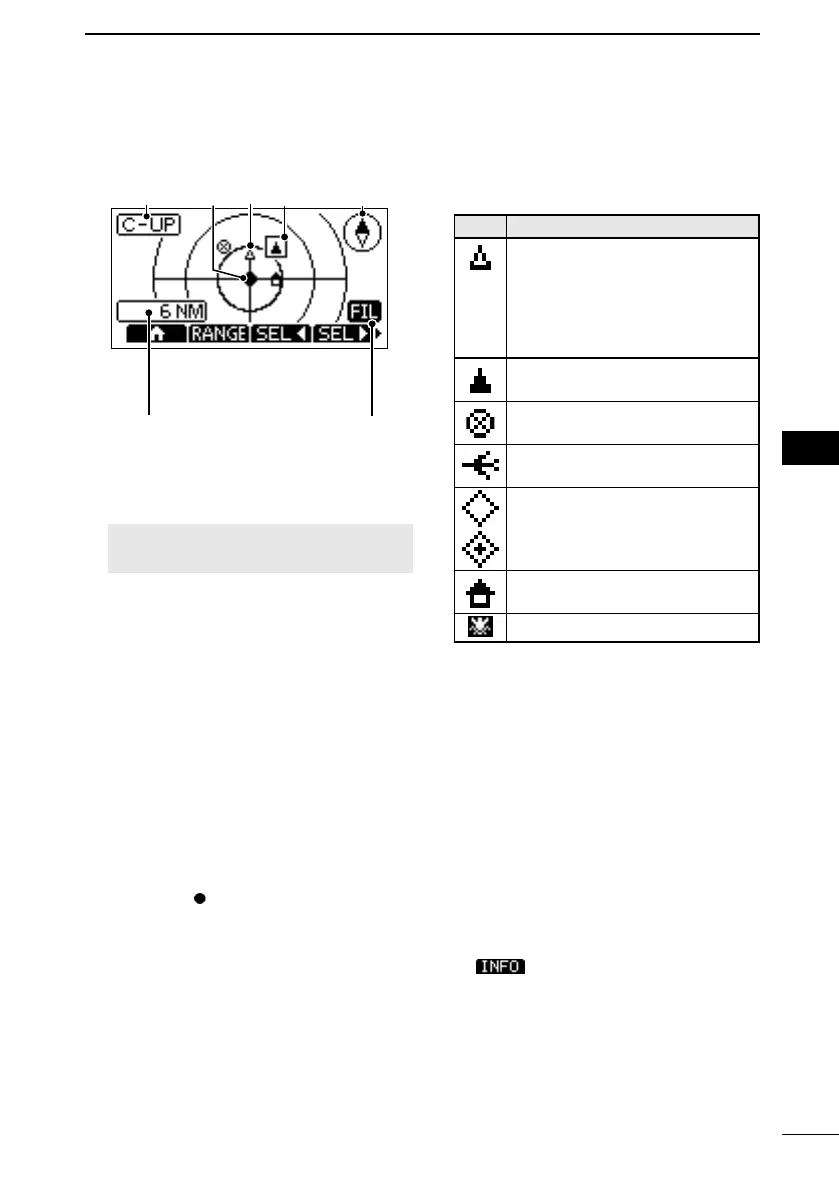
D Plotter screen
Displays the plotter display and selected
target’s information.
1 3
4
5
6
2
7
1DISPLAY TYPE
Displays the selected display type. You
can select the display type in “North up/
Course up” on the Menu screen. (p. 61)
[MENU] > Settings > AIS >
North/Course up
L When “N-UP” is displayed, the top of
the plotter screen represents North.
L When “C-UP” is displayed, the top
of the plotter screen represents the
direction your vessel’s course over
ground.
2YOUR VESSEL ICON
Displayed in the center of the screen.
L When “N-UP” is displayed, the vessel
icon automatically points in the direction
your vessel is heading, in 45 degree
steps.
L When “C-UP” is displayed, the vessel
icon constantly points to the top of the
plotter screen.
L When your vessel moves less than
2 knots,
is displayed.
3TARGET ICONS
Targets whose AIS signal are received
are displayed with icons. The icon may
dier, depending on the target type or
its status.
Icon Description
AIS target: Vessel
AIS target: Search and Rescue
(SAR) vessel
L The tip of the target triangle
automatically points in the
direction it’s heading.
AIS target: Vessel (Friend)
(Black triangle)
AIS target:
AIS-SART, AIS-MOB,
and EPIRB-AIS
AIS target: Search and Rescue
(SAR) aircraft
AIS target: Aids to Navigation
(AtoN)
AIS target: Aids to Navigation
(AtoN) virtual
AIS target: Base station
MOB
L Icons for other than the SAR aircraft,
Base station and MOB start blinking
when the AIS target is closer than your
CPA and TCPA settings (Danger target).
L A vessel is regarded as a “Lost target,”
and a cross mark displays on the target
icon after a specied period of time has
passed since the vessel last transmitted
data (p. 66). The Lost target icon
disappears from the plotter display
6 minutes and 40 seconds after the
vessel was regarded as a “Lost target.”
Ask your dealer for details.
4TARGET BOX
Displays the selected target.
L When a target box is displayed, push
to display the detail screen of
the selected target.
5COMPASS
Displays the bearing information.
6DISPLAY FILTER INDICATOR
FELLECS-TECH | inbox@fellecs-tech.com | www.fellecs-tech.com



 To Next Page