65
9
OTHER FUNCTIONS
■ Anchor Watch (For only the IC-M510BB)
Anchor Watch is the function to sound an alarm when your vessel is at anchor and has
drifted.
D Starting Anchor Watch
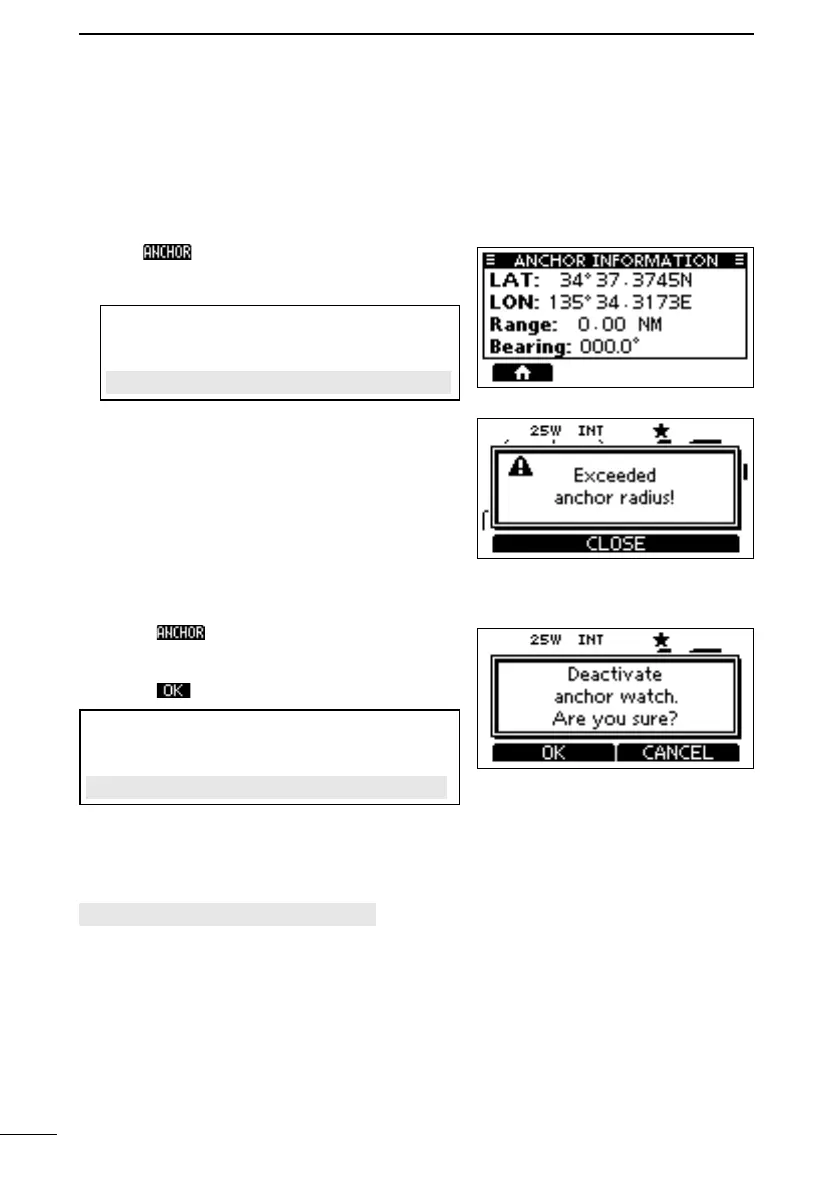
z Push to start the Anchor Watch mode.
• The “ANCHOR INFORMATION” screen is
displayed.
TIP: You can also start the Anchor Watch
mode by selecting the “Start Anchor Watch”
item on the Menu screen.
[MENU] > Anchor Watch > Start Anchor Watch
L When your vessel exceeds the range of the
anchor watch, “Exceeded anchor radius!” is
displayed.
D Stopping Anchor Watch
1. Push to stop the Anchor Watch mode.
• “Deactivate anchor watch. Are you sure?” is
displayed.
2. Push .
TIP: You can also stop the Anchor Watch mode
by selecting the “Stop Anchor Watch” item on the
Menu screen.
[MENU] > Anchor Watch > Stop Anchor Watch
D Anchor Watch Settings
[MENU] > Settings > Anchor Watch
z Audible Alarm
position.
ON: The alarm sounds.
OFF: The alarm does not sound.
z Range
Set the alarm function range from 0.01 to 6.00 NM (0.01 NM steps).
FELLECS-TECH | inbox@fellecs-tech.com | www.fellecs-tech.com



 To Next Page