EasyManua.ls Logo

Icom IC-W2E - Basic Operation Guide; Initial Preparation and Battery Charging

Icom IC-W2E
52 pages
Print Icon
To Next Page IconTo Next Page
To Previous Page IconTo Previous Page
Loading...
ms
|
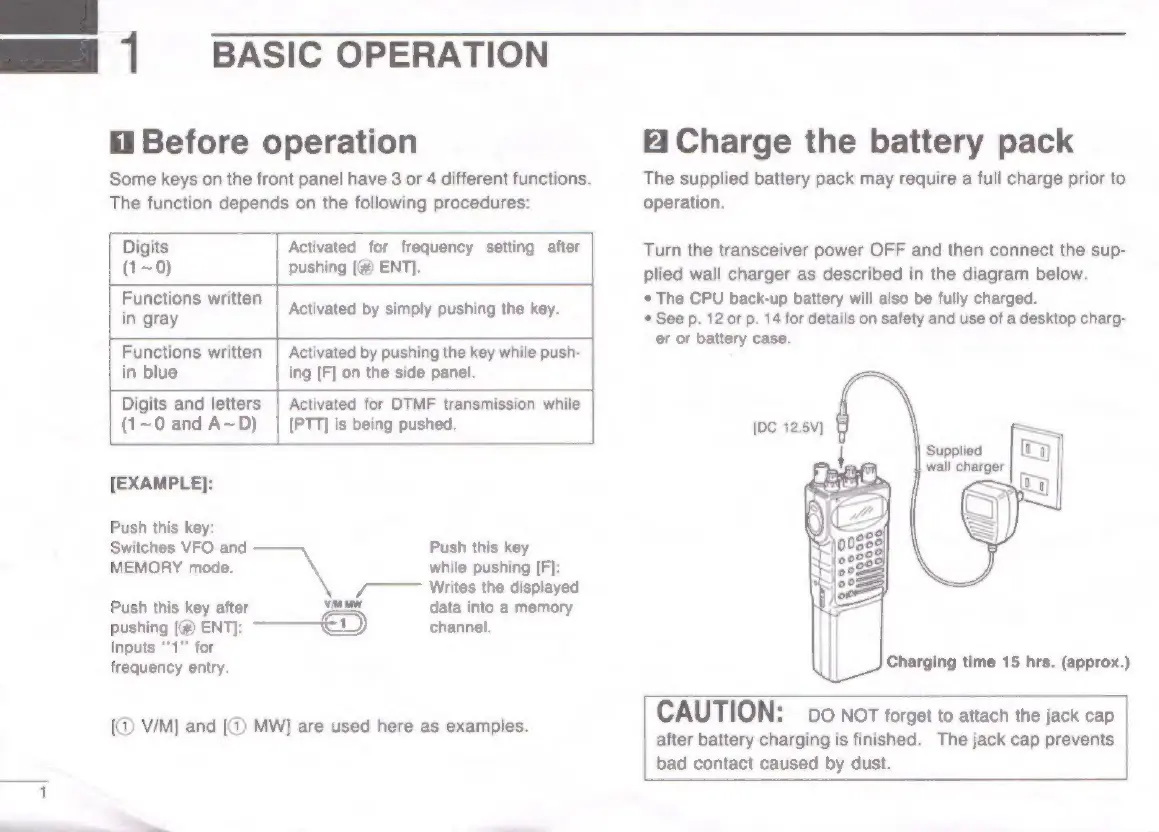
Before
operation
Some
keys
on
the
front
panel
have
3
or
4
different
functions.
The
function
depends
on
the
following
procedures:
Activated
for
frequency
setting
after
(1~0)
pushing
[#@
ENT].
Functions
written
:
:
;
Activated
by
simply
pushing
the
key.
Functions
written
|
Activated
by
pushing
the
key
while
push-
in
blue
ing
[F]
on
the
side
panel.
Digits
and
letters
|
Activated
for
DTMF
transmission
while
(1~0
and
A~D)
|
[PTT]
is
being
pushed.
[EXAMPLE]:
Push
this
key:
Switches
VFO
and
Push
this
key
MEMORY
mode.
while
pushing
[F]:
/
Writes
the
displayed
Push
this
key
after
=
data
into
a
memory
pushing
[(@
ENT):
1
channel.
Inputs
‘'1"'
for
frequency
entry.
[@
V/M]
and
[@)
MW]
are
used
here
as
examples.
BASIC
OPERATION
&
Charge
the
battery
pack
The
supplied
battery
pack
may
require
a
full
charge
prior
to
operation.
Turn
the
transceiver
power
OFF
and
then
connect
the
sup-
plied
wall
charger
as
described
in
the
diagram
below.
*
The
CPU
back-up
battery
will
also
be
fully
charged.
*
See
p.
12
or
p.
14
for
details
on
safety
and
use
of
a
desktop
charg-
er or
battery
case.
Charging
time
15
hrs.
(approx.)
CAUTION:
DO
NOT
forget
to
attach
the
jack
cap
after
battery
charging
is
finished.
The
jack
cap
prevents
bad
contact
caused
by
dust.

Other manuals for Icom IC-W2E

Related product manuals