EasyManua.ls Logo

Icom SM-30 - User Manual

Icom SM-30
2 pages
Print Icon
To Next Page IconTo Next Page
Loading...
INSTRUCTIONS
DESKTOP MICROPHONE
SM-30
Thank you for purchasing the SM-30
d e s k t o p m i c r o p h o n e .
This is a unidirec-
tional, electret microphone designed
for base station operation with an Icom
transceiver.
Please read these instructions thorough-
ly before using the microphone.
PRECAUTIONS
CAUTION: NEVER expose the microphone
to rain, snow or any liquids.
CAUTION: NEVER let metal, wire, etc.
touch any internal part of the microphone.
CAUTION: NEVER touch or operate the
desktop microphone with wet hands.
DO NOT place the microphone in exces-
sively dusty environments or in direct sun-
light.
DO NOT use harsh solvents such as ben-
zine or alcohol to clean the microphone,
as they can damage the microphone’s sur-
faces.
Place the microphone in a secure place to
avoid inadvertent use by children.
This microphone is for the specified Icom
transceivers only! The microphone can-
not be used with a non-Icom transceiver
since the power is supplied from the con-
nected transceiver.
About CE
The SM-30 complies with the
essential requirements of the
2004/108/EC directive for
Electromagnetic Compatibility.
Microphone type : Unidirectional electret condenser microphone (preamp built-in)
Output impedance : 600 ±30% (at MIC GAIN: Max)
Sensitivity : –28 dB ±4 dB (0 dB=1 V/Pa, at 1 kHz)
Power requirements : 8 V DC (supplied from the transceiver)
Cable length (approx.) : 1 m; 3 ft 3
3
8 in
Weight (approx.) : 350 g; 12.3 oz
All stated specifications are subject to change without notice or obligation.
1-1-32 Kamiminami, Hirano-ku, Osaka 547-0003, Japan
A-6829X-1G-q Printed in Japan
© 2010 Icom Inc.
PART NAMES AND FUNCTIONS
Icom, Icom Inc. and the Icom logo are registered trademarks of Icom Incorporated (Japan) in Japan,
the United States, the United Kingdom, Germany, France, Spain, Russia and/or other countries.
SPECIFICATIONS
D PLUG PIN ASSIGNMENTS
The pins are described from the direction of the arrow in the illustration.
y GND (PTT ground)
t PTT
r No connection
q Microphone output
w 8 V DC input
e No connection
u GND (Microphone ground)
i No connection
D TOP VIEW
w
q
e
q PTT SWITCH
Push to transmit, then release to re-
ceive.
w PTT LOCK SWITCH
Push to continuously transmit. The
transmission continues until pushing this
switch again.
e PTT LOCK INDICATOR [LOCK]
Lights red when the PTT lock switch
(w) is ON.
D BOTTOM VIEW
MIC GAIN
ONOFF
LOW CUT
rt
r MIC GAIN VOLUME [MIC GAIN]
Rotate to adjust the microphone out-
put level.
Use this control as an adjunct to the
microphone gain setting of the con-
nected transceiver.
Rotating the control too far clockwise
may result in an output level that is
too high and transmit signal distor-
tion.
t LOW CUT SWITCH [LOW CUT]
Cuts out the low frequency components
of input voice signals.
Question and Answer IconNeed help?

Do you have a question about the Icom SM-30 and is the answer not in the manual?

Summary

Part Names and Functions

Top View Controls

Details the PTT switch, PTT lock switch, and lock indicator on the microphone's top surface.

Bottom View Controls

Details the microphone gain and low cut switches on the microphone's bottom surface.

Precautions and Safety

Handling and Environmental Warnings

Covers critical safety advice on avoiding liquids, metal contact, wet hands, dust, sunlight, and harsh solvents.

Technical Specifications

Plug Pin Assignments

SM-30 Schematic Diagram

Overview

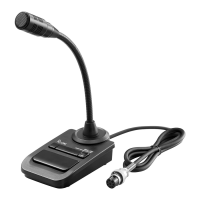
The Icom SM-30 Desktop Microphone is a unidirectional electret microphone designed for base station operation with compatible Icom transceivers. This manual provides essential information for its proper use and maintenance.

Function Description

The SM-30 serves as an input device for voice communication through an Icom transceiver. It converts spoken words into electrical signals that can be transmitted. The microphone features a built-in preamp to optimize audio quality. Power for the microphone is supplied directly from the connected transceiver, meaning it cannot be used with non-Icom transceivers.

Usage Features

The microphone is equipped with several controls to enhance its functionality and user experience:

  • PTT Switch: This is the primary control for transmitting. Pressing the switch initiates transmission, and releasing it returns the transceiver to receive mode.
  • PTT Lock Switch: For continuous transmission, this switch can be engaged. Once pressed, transmission will continue until the switch is pressed again to disengage it.
  • PTT Lock Indicator: A red light illuminates when the PTT lock switch is active, providing a visual cue of continuous transmission.
  • MIC GAIN Volume: This rotary control allows the user to adjust the microphone's output level. It acts as an auxiliary control to the microphone gain setting on the connected transceiver. Users should exercise caution when adjusting this control, as rotating it too far clockwise may lead to an excessively high output level and potential distortion of the transmitted signal.
  • LOW CUT Switch: This feature is designed to improve voice clarity by cutting out low-frequency components from the input voice signals. This can be particularly useful in environments where background noise might interfere with speech intelligibility.
  • Plug Pin Assignments: The microphone connects to the transceiver via a multi-pin plug. The pin assignments are clearly defined to ensure proper connection and functionality. These include pins for microphone output, 8V DC input (power from the transceiver), PTT (Push-To-Talk) signal, and ground connections for both the microphone and PTT. There are also pins designated as "No connection."

Maintenance Features

Proper care and handling are crucial for the longevity and optimal performance of the SM-30 microphone. The manual outlines several precautions:

  • Environmental Protection: The microphone should never be exposed to rain, snow, or any other liquids. Similarly, it should not be placed in excessively dusty environments or subjected to direct sunlight. These conditions can damage the internal components and affect performance.
  • Electrical Safety: Users must never allow metal, wire, or any other foreign objects to touch the internal parts of the microphone. This prevents potential short circuits or damage to the electronics.
  • Handling with Care: It is important to avoid touching or operating the desktop microphone with wet hands, as this could pose an electrical hazard or damage the device.
  • Cleaning: When cleaning the microphone, harsh solvents such as benzene or alcohol should not be used. These substances can damage the microphone's surfaces and potentially affect its functionality. A gentle, dry cloth is recommended for cleaning.
  • Storage: To prevent inadvertent use, especially by children, the microphone should be stored in a secure place when not in use.

The SM-30 is designed for ease of use and reliability within the Icom ecosystem. Adhering to these guidelines will help ensure its continued performance and extend its operational life.

Icom SM-30 Specifications

Microphone Specifications IconMicrophone Specifications
microphone typeUnidirectional electret condenser microphone (preamp built-in)
output impedance600 Ω ±30% (at MIC GAIN: Max)
sensitivity–28 dB ±4 dB (0 dB=1 V/Pa, at 1 kHz)
Power IconPower
power requirements8 V DC (supplied from the transceiver)
Physical Characteristics IconPhysical Characteristics
cable length1 m; 3 ft 3[3]⁄8 in
weight350 g; 12.3 oz

Related product manuals