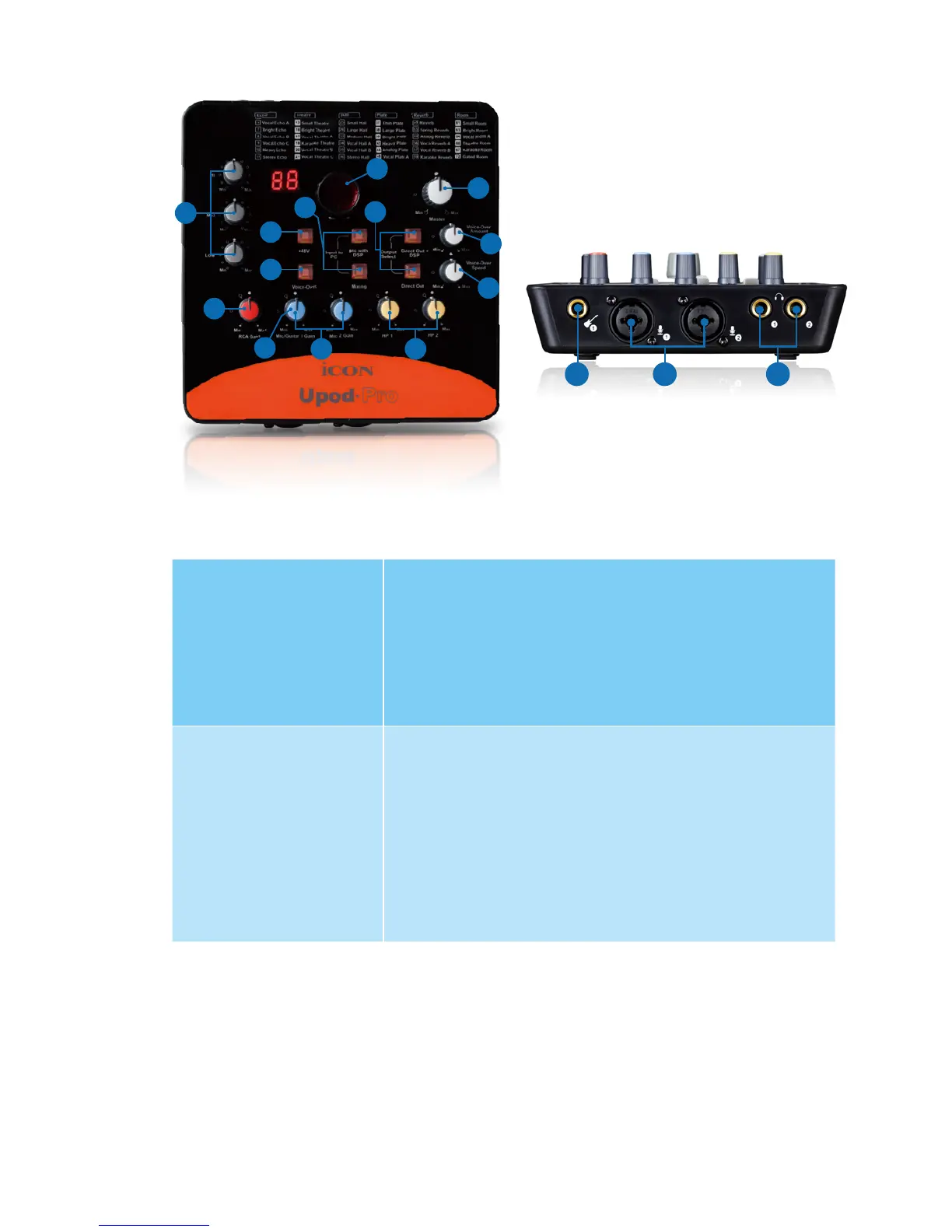
6
10
9
5
12.2
6
4
2
8
14
13
11
3
12.1
Front/Top Panel
1. “Mic” inputs 1/2
These hybrid connectors will accept a standard 3-pin XLR plug or a 1/4” TS
connector.
3-pin XLR (Balanced)
For condenser microphone with +48V phantom
power or dynamic microphone.
Note: For dynamic microphone user, please make
sure +48V phantom power switch is “OFF” before
you plug in your microphone, otherwise it may cause
damage to your microphone.
1/4” TS (Unbalanced)
For condenser microphone with +5V phantom power
or dynamic microphone.
Note: For condenser microphone user, TRS cable
must be used in order to have the +5V phantom
power.
For dynamic microphone user, TS cable must be
used, otherwise the +5V phantom power may cause
damage to your microphone.
Please refer to P.11 for the connection method of different type of microphone.
2. HI-Z input & gain control
This is high impedance input for guitar/bass with individual gain control knob.
3. 48V phantom power switch
Press to supply +48V phantom power to both XLR input. This phantom power
circuit is suitable for most condenser microphones.
2 1 7


 To Next Page