7
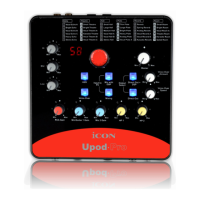
4. Input gain level controls 1/2
These potentiometers control the input level of the associated analog
microphone (& instrument) inputs.
5. Master level control
This potentiometer controls the master output level of the analog outputs.
Note: Master level control will only adjust the output level of both the Line output
1/2 and the 3.5mm stereo output.
6. Headphone level control
These potentiometers control the output level of the associated headphone
output.
7. Headphone output
These output jacks accept a standard 1/4″ stereo TRS headphone connector.
8. RCA gain level control
This potentiometer controls the input level of the RCA inputs.
9. 72-DSP selector knob
Rotate to select the DSP effect from 1-72.
10. Hi, Mid & Low EQ adjust knobs
Adjust the Hi, Mid & Low EQ parameters for inputs 1 & 2.
11. Attenuator (Voice-Over) button
Activating the attenuator (Voice-Over) function will allow the music signal from
PC & RCA inputs to be ramped down when there is input signal from input 1 or 2.
Signal will gradually ramp up again if there is no input signal.
12. Voice-Over function control knobs
12.1 BGM ramping speed
Turn clockwise to increase the ramping speed
of the BGM
12.2 BGM ducking amount
Turn clockwise to increase
the ducking amount of the BGM
13. Input to PC
Mic with DSP button
Controlling the input signal to PC. Wet signal
(activated)-DSP processed. Dry signal (inactivated)
-no DSP effect.
Mixing button
Controlling the input signal to PC. Activated to allow
all signals including RCA, PC and input 1 & 2 to be
recorded by PC. Inactivating it will only record the
input signals 1 & 2.


 To Next Page