9
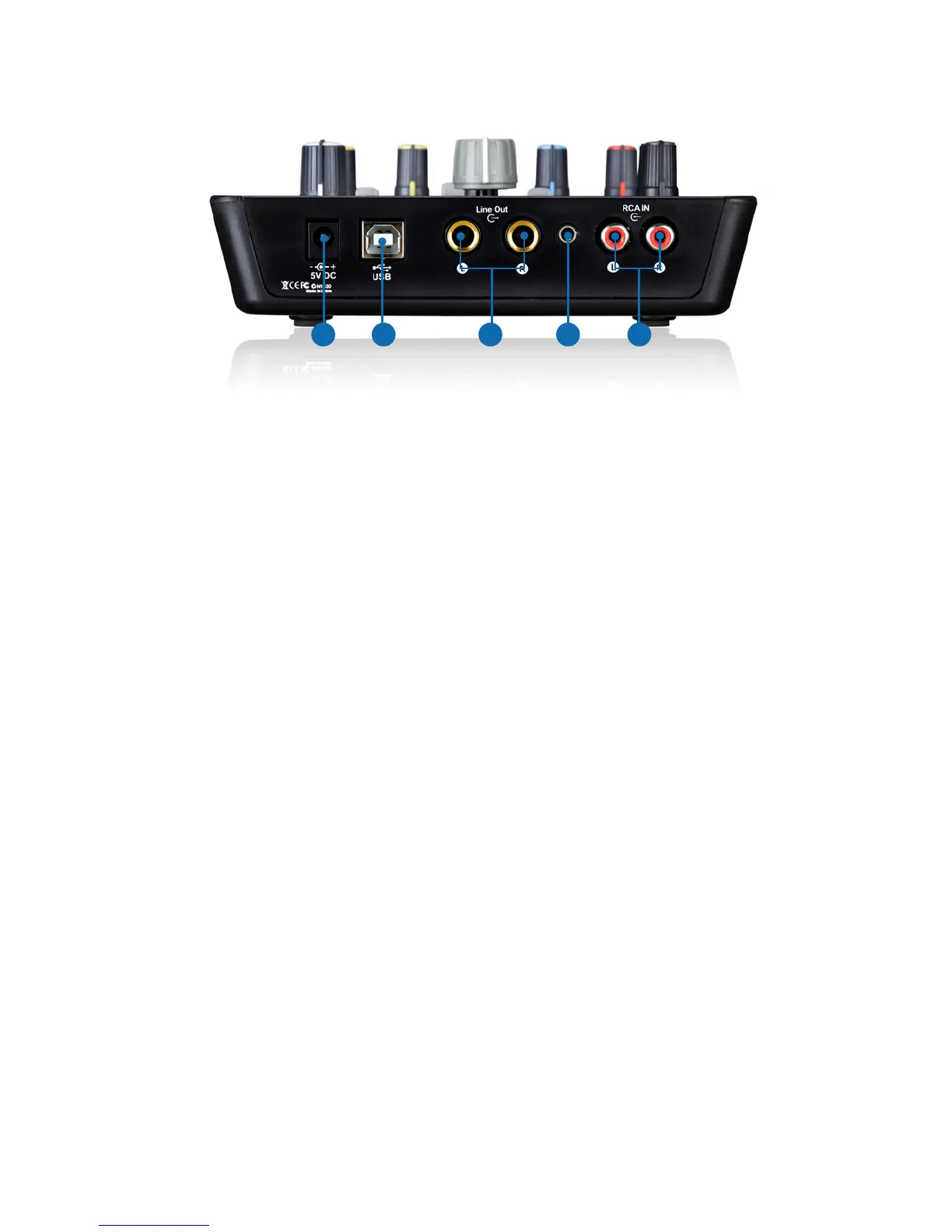
Rear Panel
1. RCA input connectors
These are unbalanced analog inputs on RCA connectors at –10dB line level.
2. Line outputs 1/2
These are unbalanced analog outputs on standard 1/4″ TS connectors at +6dBU
line level.
3. 3.5mm stereo output
This is an unbalanced analog stereo output on a standard 3.5mm stereo
connector at +6dBU line level.
4. USB 2.0 compatible Connector
Connect it with the provided USB cable to your Mac/PC’s USB connector.
5. 5V/1A power adaptor
Connect the provided power adaptor here.
Note: Upod Pro is not able to work without the provided power adaptor
connected. The USB bus power is not able to provide sufcient power supply for
Upod Pro.
Note: External power adapter is needed if the Upod Pro is using as a standalone
unit.
5 34 2 1


 To Next Page