13
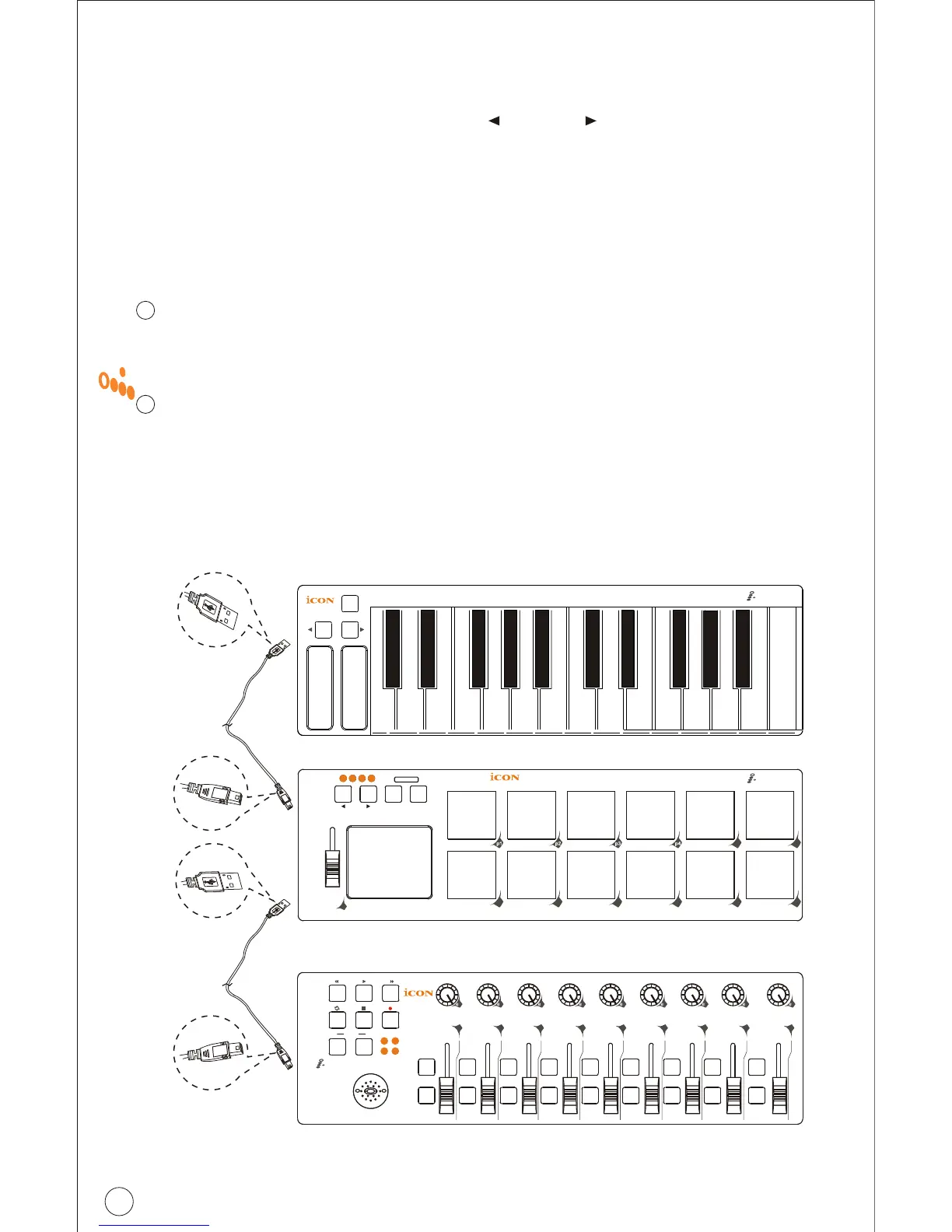
Daisy Chain with iPad or any i-series controllers
You may daisy chain up to 3 units of iPad or any i-series controllers.
Connect the first unit of iPad to your Mac/PC via the USB port.
Choose a USB port on your Mac/PC and insert the wide (flat) end of
the USB cable and the other small end (B-type USB pack) to iPad.
Connect the next units of iPad (or iKey/iControls)
Insert the wide (flat) end of the USB cable to the first unit of iPad's
second USB port and the other small end (B-type USB jack) to the
second unit iPad's USB port. By following the same procedure,
you may daisy chain with the 3rd unit of iPad (or iKey/iControls).
1
2
Restore the factory default settings
By holding down the buttons "Artist ", "Artist " and "Hold" together,
the settings of the iPad will return to its factory default condition.
Pa d
ke y
Octave
Sustain
Mod Pitch
C o n tro ls
e1
Layer
e2 e3 e4 e5 e6 e7 e8 e9
1 2
3 4
f1 f2 f3 f4 f5 f6 f7 f8 f9
- +
Pa d
p5 p6
p7 p8 p9
p
10
p
11
p
12
Artist Hold
Flam
Roll
f1
1 2 3 4
USB2.0 Cable
USB2.0 Cable



 To Next Page