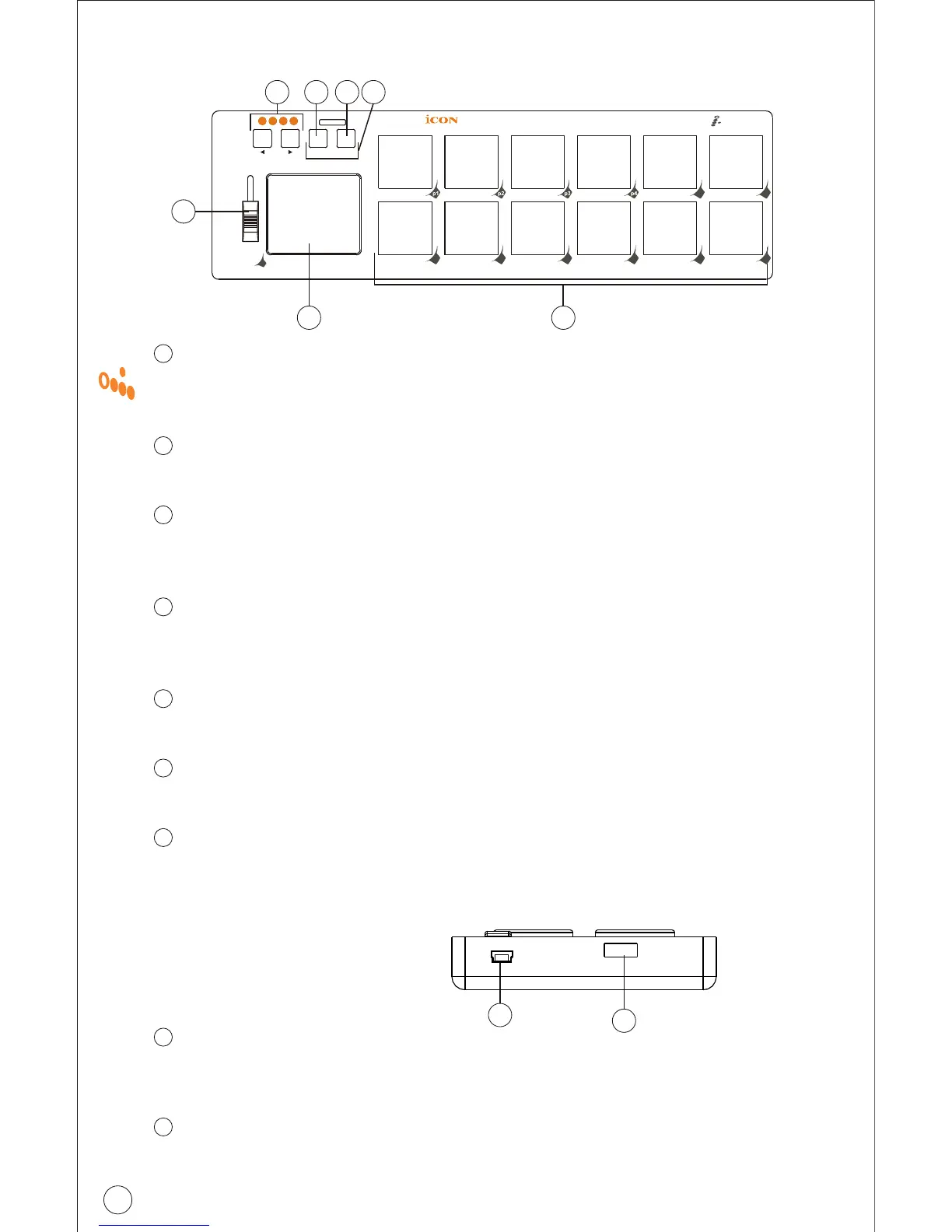
Side Panel Layout
USB port (B-Type)
Functions as a MIDI port to your notebook (or computer) and
compatible software. Also provides power to your iPad.
USB port
Use to daisy chain with the second unit of iPad or any i-series
controllers such as iKey or iControls.
1
2
Front Panel Layout
12 integrated velocity-sensitive trigger pads
12 integrated velocity-sensitive trigger pads send MIDI notes or
control data
X/Y TouchPad
Assignable X/Y touchpad allows you to make various controls.
Assignable Fader
This programmable fader slides up and down to adjust linear MIDI
parameters such as volume.
Artist buttons
Switching between the4 scenes for instant control of multiple
applications.
Hold button
Press this button to "Hold" the last play note or effect.
Roll button
Activate this button to make a Roll drum effect.
Flam button
Activate this function (press both buttons Hold+Roll), it will provide
a flam stroke effect.
1
2
3
4
5
3
1
2
6
7
12
Pa d
p5 p6
p7 p8 p9
p
10
p
11
p
12
Artist Hold
Flam
Roll
f1
1 2 3 4
4 5 6 7
3
Pa d



 To Next Page