Control Panel (Continues)
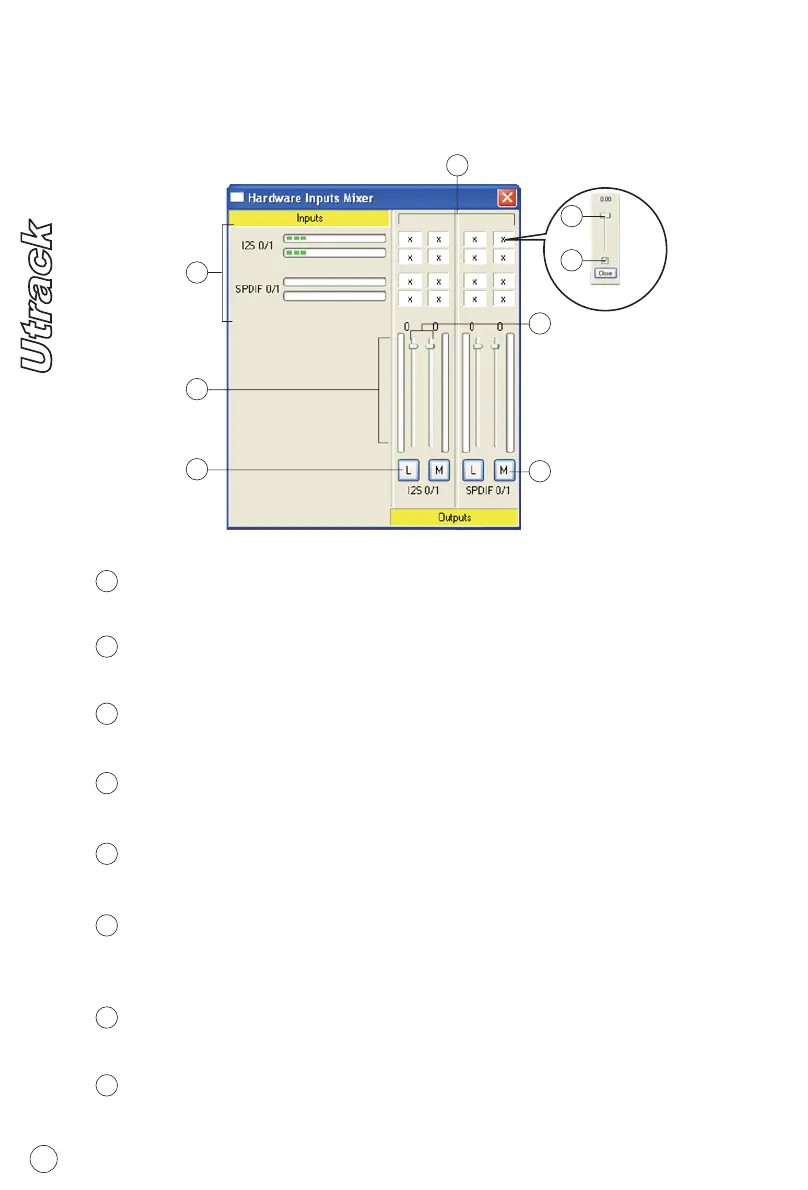
Matrix Fader
1
2
6
3
5
8
7
4
Hardware Inputs Mixer
Hardware Inputs Ch1,2 & S/PDIF Level Metering
Showing the input level for the hardware input channel.
1
Hardware Onputs Ch1,2 & S/PDIF Level Metering
Showing the output level for the hardware output channel.
2
Link Switch
Switch to adjust both Channels simutaneously
3
Mute Switch
Switch to Mute the corresponding channel
4
Gain Control
Adjust the gain for the corresponding channel
5
Inputs & Outputs Matrix switches
Switch to turn On/Off of the corresponding hardware input channel
route to the corresponding hardware output channel
6
Inputs & Outputs Matrix Mixer
"Tick" the box to activate the mixer
7
Inputs & Outputs Matrix Mixer Gain Control
Adjust the gain for the corresponding hardware channel. After finish
the adjustment, click "Close" to close the window
8
9


 To Next Page