EasyManua.ls Logo

ICON Utrack - User Manual

ICON Utrack
19 pages
Print Icon
To Next Page IconTo Next Page
Loading...
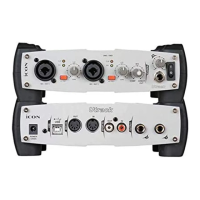
2-In / 2-Out Recording USB Interface
withMIDI&S/PDIFI/O
N16549
MIDI I/O
USB
INOUT
21
SPDIF I/O
INOUT
OUTPUT
USB
COMP DIRECT
OUT
MIX
MONITOR
HP
Question and Answer IconNeed help?

Do you have a question about the ICON Utrack and is the answer not in the manual?

Summary

Important Safety Instructions

General Operation Safety Precautions

General safety advice including avoiding water, proper cleaning, ventilation, cord protection, and unplugging during storms.

Electrical Plug and Grounding Safety

Ensures proper use of polarized and grounding plugs for user safety.

Front Panel Layout and Controls

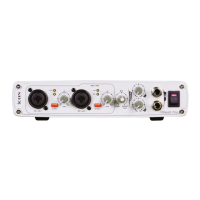
Front Panel Inputs and Gain Controls

Details the hybrid inputs, phantom power, and gain adjustment controls on the front panel.

Monitoring and Headphone Controls

Explains latency adjustment, headphone output jack, and level control.

Driver Installation Guide

Driver Installation (Continued)

Driver Installation and Device Setup

Steps for installing the ASIO driver and connecting the Utrack to the computer.

Driver Installation (Final Steps)

Control Panel Settings

Sample Rate and Buffer Size Configuration

Settings for adjusting sample rate and buffer size for audio streaming and ASIO/WDM.

Hardware Inputs Mixer Details

Software Inputs Mixer Details

Hardware Connections Guide

Audio Output and Input Connections

Connecting monitors, headphones, microphones, instruments, and line sources to the Utrack.

MIDI Connections and System Requirements

Minimum System Requirements

Specifies the operating system, processor, and RAM needed for Windows and Mac.

Technical Specifications

Mic;Inst Input Specifications

Details frequency response, dynamic range, THD+N, and impedance for inputs.

Servicing and Support Information

Summary

Important Safety Instructions

General Operation Safety Precautions

General safety advice including avoiding water, proper cleaning, ventilation, cord protection, and unplugging during storms.

Electrical Plug and Grounding Safety

Ensures proper use of polarized and grounding plugs for user safety.

Front Panel Layout and Controls

Front Panel Inputs and Gain Controls

Details the hybrid inputs, phantom power, and gain adjustment controls on the front panel.

Monitoring and Headphone Controls

Explains latency adjustment, headphone output jack, and level control.

Driver Installation Guide

Driver Installation (Continued)

Driver Installation and Device Setup

Steps for installing the ASIO driver and connecting the Utrack to the computer.

Driver Installation (Final Steps)

Control Panel Settings

Sample Rate and Buffer Size Configuration

Settings for adjusting sample rate and buffer size for audio streaming and ASIO/WDM.

Hardware Inputs Mixer Details

Software Inputs Mixer Details

Hardware Connections Guide

Audio Output and Input Connections

Connecting monitors, headphones, microphones, instruments, and line sources to the Utrack.

MIDI Connections and System Requirements

Minimum System Requirements

Specifies the operating system, processor, and RAM needed for Windows and Mac.

Technical Specifications

Mic;Inst Input Specifications

Details frequency response, dynamic range, THD+N, and impedance for inputs.

Servicing and Support Information

ICON Utrack Specifications

General IconGeneral
Channels2
ConnectivityUSB
TypeAudio Interface
Sample Rate48 kHz
Inputs2 XLR/TRS combo
Outputs2 x TRS
Headphone Output1
CompatibilityMac