41
Video & Audio Screen
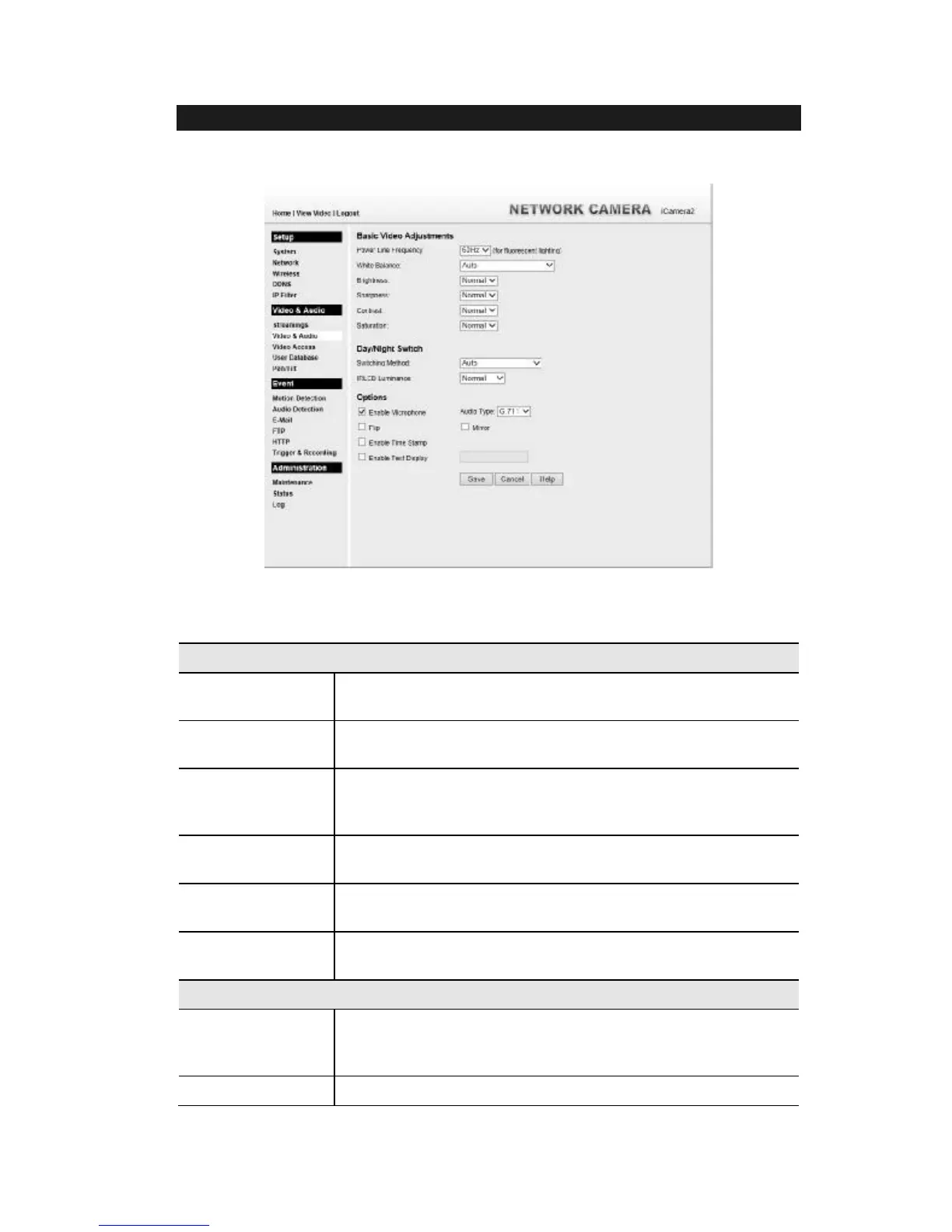
This screen is displayed when the Video & Audio menu option is clicked.
Figure 20: Video & Audio Screen
Data - Video & Audio Screen
Basic Video Adjustment
Power Line
Frequency
Select the power line frequency (50Hz or 60Hz) used in your region,
to improve the picture quality under florescent lighting.
White Balance Select the desired option to match the current environment and
lighting.
Brightness If necessary, you can adjust the brightness to obtain a better image.
For example, if the camera is facing a bright light, the image may be
too dark. In this case, you can increase the brightness.
Sharpness Select the desired option for the sharpness. You can select a
Sharpness value between -3 and 3.
Contrast Select the desired option for the Contrast. You can select a value
between -3 and 3.
Saturation Select the desired option for the Saturation. You can select a value
between -3 and 3.
Day/Night Switch
Switching Method The iCamera2 supports Day/Night mode switch for getting better
quality of the low light condition. Select the desired method to use
this function.
IRLED Luminance


 To Next Page